How to Secure DevOps Pipeline: Top 10 Security Controls to Implement

A single leaked credential in a CI/CD pipeline can undo years of engineering work. In 2025, GitGuardian scanned public GitHub activity and found 23.8 million new hardcoded secrets, a 25 percent jump from the year before, and its 2026 follow-up report found the number climbed again to 29 million, a 34 percent increase. Most of those secrets were never meant to be public. They ended up there because someone’s pipeline was not built with security in mind from the start.
That is the real story behind “secure DevOps pipeline” as a search topic. It is not a theoretical concern for security teams. It is a practical, sequential engineering problem that every CTO, engineering manager, and platform lead eventually has to solve, usually right after an audit, a funding round due diligence request, or a close call.
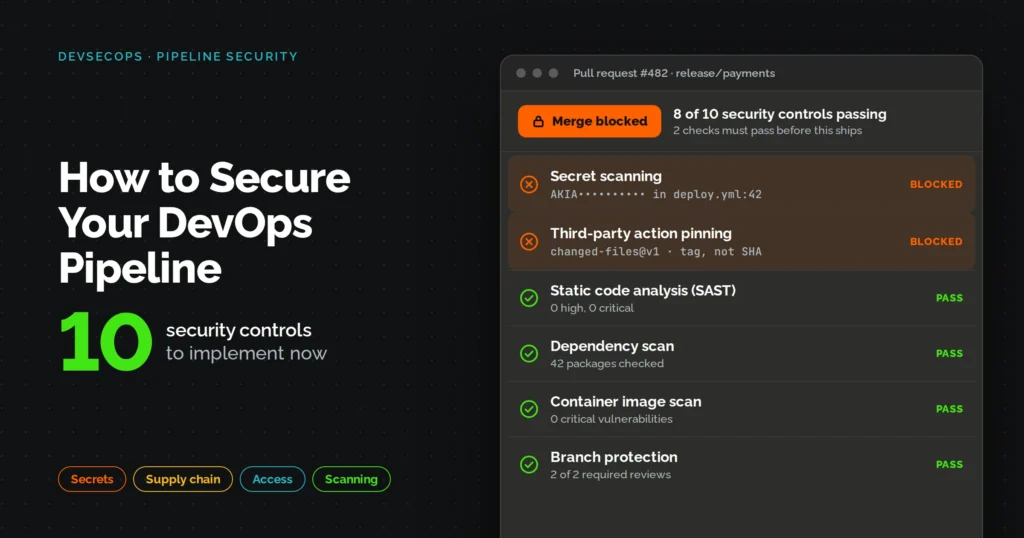
This guide walks through 10 security controls, in the order they should be implemented, from your source code repository to your production monitoring stack. Each one builds on the last. Skip a step and the ones after it become harder to trust.
Quick Steps: Secure Your DevOps Pipeline in 10 Moves
- Lock down source control with branch protection and mandatory reviews.
- Enforce least-privilege identity and access controls across every tool in the pipeline.
- Centralize secrets management and remove hardcoded credentials from code.
- Scan dependencies and open-source components with SCA tools and generate SBOMs.
- Run static application security testing (SAST) on every build.
- Scan container images and Infrastructure as Code before anything ships.
- Run dynamic and runtime security testing (DAST) before release.
- Sign and verify build artifacts to guarantee integrity.
- Enforce automated security gates and approvals before deployment.
- Set up continuous monitoring, logging, and incident response.
What You Need Before You Start
Before touching a single pipeline setting, get these three things in place. Skipping this step is the most common reason security rollouts stall halfway through.
Access and permissions:
- Admin access to your source control platform (GitHub, GitLab, or Bitbucket)
- Admin rights on your CI/CD platform (Jenkins, GitHub Actions, GitLab CI, CircleCI, and so on)
- Cloud IAM console access for the environments your pipeline deploys to
- Provisioning rights on a secrets manager, or budget approval to stand one up
Tools to have ready:
- One secrets manager (HashiCorp Vault or a cloud-native equivalent like AWS Secrets Manager)
- One SAST tool (Semgrep, SonarQube, or CodeQL)
- One SCA tool (Snyk, OWASP Dependency-Check, or Dependabot)
- One container and IaC scanner (Trivy plus Checkov or tfsec)
- A centralized log destination (a SIEM, or even a well-configured log aggregator to start)
Time and team:
- The first four controls are usually achievable in one to two sprints for a small platform team
- A full rollout across all 10 controls typically takes four to eight weeks depending on pipeline complexity and how many services you run. This is a directional estimate based on typical engagement scope, not a fixed benchmark.
- You need at least one DevOps or platform engineer, a security champion (does not have to be a dedicated security hire), and buy-in from one developer team to pilot with
If your team does not have the bandwidth to run this rollout alongside regular delivery work, this is exactly the kind of project that DevOps Automation Services are built to absorb. A managed partner can implement the controls below without pulling your engineers off product work for two months.
The 10 DevOps Pipeline Security Controls at a Glance
| # | Control | Pipeline Stage | Primary Risk It Stops |
|---|---|---|---|
| 1 | Source control and branch protection | Source | Unreviewed or unauthorized code changes |
| 2 | Least-privilege identity and access | Source and CI | A compromised account gaining full pipeline access |
| 3 | Centralized secrets management | Build | Leaked and hardcoded credentials |
| 4 | Dependency and SCA scanning | Build | Vulnerable or malicious open-source packages |
| 5 | SAST in every CI build | Build | Insecure code patterns before merge |
| 6 | Container and IaC scanning | Build and package | Misconfigured infrastructure and vulnerable images |
| 7 | DAST and runtime testing | Test | Runtime and authorization flaws static tools miss |
| 8 | Artifact signing and provenance | Package | Tampered or unverified build artifacts |
| 9 | Security gates and approvals | Deploy | Unauthorized or non-compliant releases |
| 10 | Continuous monitoring and logging | Post-deploy | Undetected breaches and slow incident response |
Control 1: Secure Source Code Repositories and Enforce Branch Protection
Your source control system is where every pipeline security problem either starts or gets stopped early. If anyone can push directly to your main branch, nothing downstream matters much.
What to do:
- Turn on branch protection for main and release branches. No direct pushes, no exceptions for admins.
- Require at least one, ideally two, code reviewers before a pull request can merge.
- Use CODEOWNERS to force review on sensitive paths, especially pipeline configuration files, Infrastructure as Code, and Kubernetes manifests.
- Require signed commits or tags for release branches where feasible.
- Require a passing status check (build, lint, and security scan) before merge is allowed.
Common Failure Point
Teams enable branch protection and then quietly add an “admin bypass” exception the week of a deadline. That exception rarely gets removed. Audit your bypass list quarterly.
A Second Failure Point Practitioners Keep Running Into
Protecting your dev, uat, and prod branches is not the same as protecting the pipeline definition itself. In a practitioner discussion on r/azuredevops, one engineer described a setup where protected branches could not be pushed to directly, but contributors working in feature branches could still edit the pipeline’s YAML file itself, including its triggers and tasks, before that pull request was ever merged or reviewed. That means someone could alter what a pipeline runs from a branch that was never meant to trigger anything.
The fix is to treat your pipeline definition files the same way you treat production code: put them under CODEOWNERS, require review on any change to trigger or task definitions specifically, and where your platform supports it, lock which branches are allowed to define or trigger a pipeline at all.
Control 2: Enforce Least-Privilege Identity and Access Controls
CI/CD systems hold more power than almost any other part of your stack. They can push code, pull secrets, and trigger deployments to production. Treat access to them the same way you would treat access to your production database.
What to do:
- Require SSO and MFA for both source control and CI/CD platform logins.
- Apply role-based access control (RBAC) so developers, pipeline admins, and release managers each have exactly the permissions their job needs, nothing more.
- Separate who can approve a change from who can deploy it. One person should never hold both keys for high-risk environments.
- Replace long-lived credentials with short-lived, automatically rotated tokens wherever your tooling supports it.
Why This Matters More Than It Looks
According to Datadog’s research on cloud security posture, a meaningful share of organizations still rely on long-lived IAM credentials inside CI/CD workflows, which is exactly the kind of standing access that turns a single phishing email into a full pipeline compromise.
What Least Privilege Looks Like in Practice
It is easy to say “apply least privilege” and much harder to define what that means for a specific pipeline identity. A detailed thread on r/Azure captured this well: one engineer described moving away from granting broad contributor or owner roles to pipeline service principals, and instead building narrow custom roles per environment. In their setup, no landing zone service principal had standard contributor or owner access to the central networking subscription. Instead, each principal received only the specific rights its pipeline actually needed, for example the ability to create but not delete network peerings, or to pull certificates from a central secrets vault without any administrative rights inside that vault.
That level of granularity is the real bar for least privilege. A pipeline identity should be able to do exactly the handful of actions its job requires and nothing else, even if that means writing more custom roles than a single “contributor” grant would take.
Control 3: Centralize Secrets Management and Eliminate Hardcoded Credentials
This is the control most teams know they need and still put off. It is also the one with the clearest data behind it.
What to do:
- Store every credential, API key, and token in a dedicated secrets manager, never in code, config files, or CI variables typed directly into the platform UI.
- Inject secrets at runtime only. They should never appear in logs or build output.
- Rotate secrets on a schedule, and immediately after any personnel change with access.
- Run automated secret scanning (GitLeaks or TruffleHog) on every commit and block merges that introduce a hardcoded credential.
The Data Behind This Control
GitGuardian’s 2025 State of Secrets Sprawl report found that 70 percent of secrets leaked in 2022 were still active in 2025, meaning most organizations never rotate a credential once it leaks, they just hope no one finds it. The same report found that 35 percent of private repositories contained plaintext secrets, which quietly dismantles the assumption that “private” repos are automatically safe.
FST tip: Teams working with us on Secure DevOps services almost always start here, because centralizing secrets is the single highest-leverage fix relative to the effort it takes.
Control 4: Scan Dependencies and Open-Source Components with SCA and SBOMs
Most modern applications are more open-source code than original code. Every dependency you pull in is a piece of someone else’s codebase running with your permissions.
What to do:
- Run Software Composition Analysis (SCA) on every build to flag known-vulnerable packages.
- Generate a Software Bill of Materials (SBOM) for each release so you know exactly what shipped.
- Pin dependency versions rather than pulling “latest” automatically.
- Set a policy for how quickly critical vulnerabilities in dependencies must be patched, and track it.
Application Security in DevOps Starts with What You Import
This is where the secondary keyword “application security in DevOps” applies most directly. A SAST scan of your own code means little if a third-party library with a known critical CVE is sitting untouched in your dependency tree.
Control 5: Run Static Application Security Testing (SAST) in Every CI Build
SAST looks at your source code without running it, catching insecure patterns before they ever reach a test environment.
What to do:
- Run a fast SAST scan on every pull request so developers get feedback in minutes, not days.
- Run a deeper, more thorough scan on scheduled builds against your main branch.
- Define which severity levels block a merge versus which ones get logged for later triage.
- Give developers a clear, documented process for handling false positives so trust in the tool does not erode.
Control 6: Scan Container Images and Infrastructure as Code Before Deployment
If your infrastructure is defined in code, and for most modern teams it is, a misconfigured Terraform file can expose a database to the public internet just as easily as a vulnerable application can.
What to do:
- Scan container images for known vulnerabilities before they are pushed to a registry.
- Scan Terraform, CloudFormation, or Kubernetes manifests for insecure defaults such as open security groups or missing encryption.
- Enforce minimal base images and non-root execution in containers.
- Fail the build automatically on critical findings. A scan that only reports and never blocks is a dashboard, not a control.
Comparison: Container Scanning vs. IaC Scanning
| Aspect | Container Image Scanning | Infrastructure as Code Scanning |
|---|---|---|
| What it checks | Vulnerabilities in OS packages and application layers inside an image | Misconfigurations in Terraform, CloudFormation, or Kubernetes YAML |
| Common tools | Trivy, Grype, Anchore | Checkov, tfsec, Terrascan |
| Best run at | Image build and before registry push | Pull request time, before infrastructure changes apply |
| Typical finding | Outdated base image with a known CVE | An S3 bucket or storage account left publicly readable |
Control 7: Run Dynamic and Runtime Security Testing (DAST) Before Release
Some vulnerabilities only show up when the application is actually running. Authorization flaws, session handling issues, and API misuse fall into this category.
What to do:
- Run DAST against a staging environment that mirrors production as closely as possible.
- Include API-specific security testing if your application exposes APIs, which most SaaS products do.
- Test authenticated flows, not just the public-facing surface. Most real vulnerabilities live behind a login.
- Keep DAST separate from SAST in your reporting. They catch different classes of issues and mixing the data makes triage harder.
Control 8: Sign and Verify Build Artifacts for Integrity and Provenance
Once code passes every check, you need proof that what gets deployed is exactly what was tested. This is the control that stops supply chain tampering between build and deploy.
What to do:
- Produce immutable build artifacts. Once built, an artifact should never be modified.
- Sign images and binaries, and verify that signature before deployment.
- Separate build permissions from deploy permissions so a compromised deploy credential cannot also forge a new build.
- Promote the same artifact across staging and production instead of rebuilding for each environment.
Control 9: Enforce Automated Security Gates and Approvals Before Deployment
By this point, you have a lot of scan results. Control 9 is where those results actually decide whether a release ships.
What to do:
- Define clear pass and fail thresholds for vulnerability severity, license risk, and policy violations.
- Automate gate enforcement using a policy-as-code tool like Open Policy Agent (OPA) or Conftest, rather than relying on someone remembering to check a dashboard.
- Reserve manual approval for genuinely high-risk changes, such as production database schema changes or new external integrations.
- Log every gate decision, including overrides, with who approved it and why.
Manual Review vs. Automated Gates
| Aspect | Manual Review | Automated Gates |
|---|---|---|
| Speed | Slower, depends on reviewer availability | Consistent, runs in seconds |
| Consistency | Varies by reviewer and time pressure | Same threshold applied every time |
| Best for | High-risk, low-frequency changes | High-frequency, routine deployments |
| Common failure mode | Gets skipped under deadline pressure | Poorly tuned thresholds create alert fatigue |
Control 10: Set Up Continuous Monitoring, Logging, and Incident Response
Every control above reduces risk before deployment. This one is about what happens after, because no set of controls catches everything.
What to do:
- Centralize logs for pipeline executions, permission changes, secret access, and deployments in one place.
- Alert on high-signal events specifically: new runner registrations, disabled security gates, or unusual access patterns, rather than flooding your team with low-value noise.
- Write a short incident response playbook covering token revocation, secret rotation, and rollback steps before you need it, not during an incident.
- Run a tabletop exercise at least once a year simulating a pipeline compromise.
Why This Control Has the Highest Financial Stakes
IBM’s 2025 Cost of a Data Breach report puts the global average cost of a breach at 4.44 million dollars, with breaches in the United States averaging 10.22 million dollars, a record for the fifteenth consecutive year. The same report found it takes an average of 241 days to identify and contain a breach. Healthcare organizations specifically saw the highest average breach cost of any sector, at 7.42 million dollars, for the fifteenth year running, which matters directly if your pipeline supports a healthtech or clinical product. Strong monitoring is what shrinks that 241-day window into something a team can actually respond to.
Secure DevOps Pipeline Checklist
Use this as a working checklist alongside the table above. Check off each item as you implement it, not as you plan it.
- Branch protection enabled on all production branches, no admin exceptions
- MFA and SSO enforced on source control and CI/CD platforms
- All secrets moved to a centralized secrets manager
- Automated secret scanning blocking merges on detection
- SCA and SBOM generation running on every build
- SAST running on every pull request
- Container images scanned before registry push
- IaC scanned before infrastructure changes apply
- DAST running against staging before release
- Build artifacts signed and verified before deployment
- Automated security gates enforcing pass and fail thresholds
- Centralized logging covering pipeline executions and access changes
- A written, tested incident response playbook for pipeline compromise
Bottom Line
Securing a DevOps pipeline is not one tool or one afternoon of configuration. It is 10 controls layered from source code to production monitoring, each one closing a gap the next control depends on. Start with source control and secrets management since those two stop the most common real-world incidents, then work through dependency, code, and infrastructure scanning before finishing with deployment gates and monitoring.
If your team is evaluating how much of this to build in-house versus hand off, Fullstacktechies’ DevOps Automation Services works alongside engineering teams to implement and maintain these controls without slowing down delivery. Whether that means standing up secrets management in week one or building out full monitoring and incident response, the goal is the same 10-control framework above, just executed faster with a team that has done it before.
As AI-assisted development continues to speed up how quickly code moves through pipelines, these controls matter more, not less. Faster commits mean faster paths to production, and a pipeline without these guardrails simply lets risk move at the same speed as your releases.
Frequently Asked Questions
Q1. What is a secure DevOps pipeline?
A secure DevOps pipeline embeds identity, access, secrets, and vulnerability controls into every stage of build and deployment. It treats security as a continuous check, not a final review before release.
Q2. How do you integrate security into DevOps without slowing releases?
Automate checks so they run inside the pipeline itself, with clear pass and fail thresholds instead of manual reviews for every change. This keeps security consistent while low-risk changes still ship quickly.
Q3. What tools are used for application security in DevOps?
Common categories include SAST for source code, SCA for dependencies, DAST for runtime behavior, and container or IaC scanners for infrastructure. Most teams combine two or three of these rather than one tool alone.
Q4. What is the difference between SAST and DAST in a DevOps pipeline?
SAST examines source code without running it, catching insecure patterns early. DAST tests a running application, catching authorization and runtime issues that static analysis cannot see.
Q5. How long does it take to secure an existing DevOps pipeline?
Most teams can implement the first three or four controls within a sprint or two. A full rollout across all 10 controls typically takes four to eight weeks depending on pipeline complexity.
Q6. Do small teams need all 10 security controls?
Even small teams benefit from starting with source control hardening, access controls, and secrets management, since those three stop the most common and costly incidents. The remaining controls can be added as the pipeline and team grow.