AWS DevOps Checklist: 15 Things to Review Before Scaling Your Delivery Pipeline
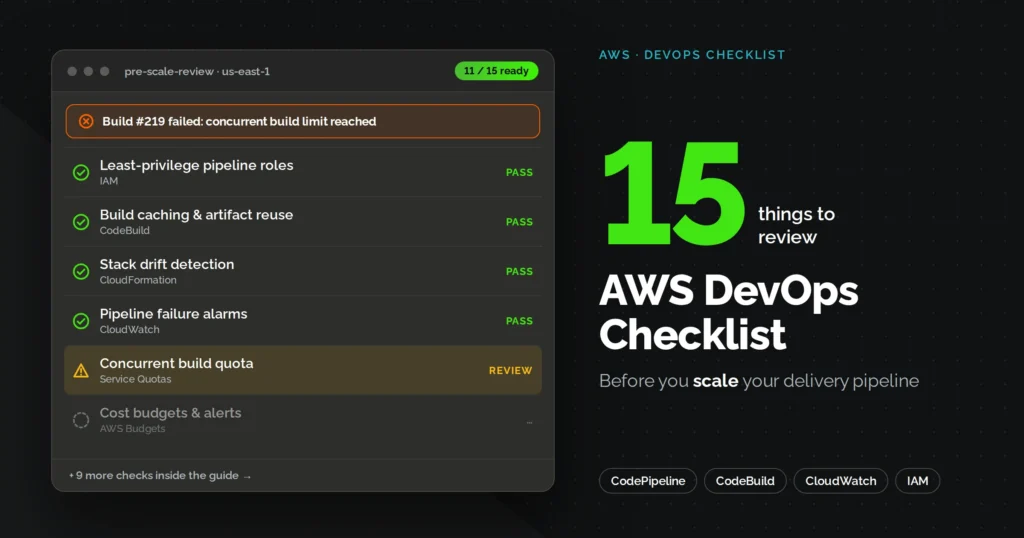

An AWS DevOps checklist is a structured review of four things: pipeline integrity, infrastructure and access controls, security posture, and observability. Teams run this review before scaling because the mistakes that go unnoticed at ten deployments a week tend to surface loudly at a hundred. This guide walks through 15 specific items worth auditing before you push your delivery pipeline to handle more traffic, more services, or more engineers.
Quick Recap: The Full Checklist
| Item | Why it matters |
|---|---|
| 1. CI catching bad code early | Prevents defects from reaching staging |
| 2. Environment isolation | Limits blast radius when something breaks |
| 3. Infrastructure as code | Makes environments reproducible and reviewable |
| 4. Automated rollback | Cuts recovery time from hours to minutes |
| 5. Secrets management | Removes plaintext credentials from the codebase |
| 6. IAM least privilege | Reduces the impact of a compromised role |
| 7. Security scanning in build | Catches vulnerabilities before deployment |
| 8. Unified logs, metrics, traces | Speeds up root cause analysis |
| 9. SLO-based alerting | Reduces noise, focuses on user impact |
| 10. Auto-scaling infrastructure | Handles traffic spikes without manual intervention |
| 11. Staging mirrors production | Prevents “it worked in staging” failures |
| 12. Production readiness, tested not assumed | Catches gaps a clean demo won’t reveal |
| 13. Culture and feedback loops | Keeps technical wins from stalling out organizationally |
| 14. Cost visibility | Prevents scaling from becoming a deferred billing problem |
| 15. AI-review readiness | Prepares the pipeline for emerging tooling |
1. Is your CI pipeline actually catching bad code before it reaches staging?
A lot of teams assume their CI/CD pipeline is doing its job just because it runs on every commit. That’s not the same as catching problems early.
Here’s what a pipeline that’s actually working looks like:
- Every pull request gets reviewed, plus a scheduled peer review cycle for anything that touches shared services
- Trunk-based workflows (like GitHub flow) instead of long-lived feature branches, which reduce merge conflicts as team size grows
- Linters and code coverage reports run automatically, not manually before a release
- Dependencies are pinned to exact versions, ideally inside a container, so “works on my machine” stops being an excuse
According to DORA’s research on elite-performing teams, the difference isn’t the tools. It’s how consistently these checks are enforced, not how sophisticated they sound in a slide deck.
2. Are your dev, staging, and production environments fully isolated?
Environment isolation is one of those things that seems fine until it isn’t. A shared VPC across dev and prod work okay for a five-person team, then quietly becomes a liability once three teams are deploying into the same space.
| Team size | Recommended isolation |
|---|---|
| Small teams (1-15 engineers) | Separate VPCs per environment, single AWS account |
| Mid-to-large teams or compliance-sensitive workloads | Separate AWS accounts per environment, managed under AWS Organizations |
The code and dependencies should stay the same across environments. Only the configuration should change from one environment to the next. If your team is manually editing config files per environment, that’s a sign this checklist item needs attention.
3. Is your AWS infrastructure defined as code, or still clicked together manually?
Manual console changes, sometimes called “click-ops,” are still one of the most common reasons infrastructure becomes unreproducible. If someone leaves the team and they were the only one who remembered how a resource got configured, that’s a warning sign.
- AWS CloudFormation: native, mature, works well for teams fully committed to AWS
- AWS CDK: code-native approach, growing adoption for teams that prefer writing infrastructure in a real programming language
- Terraform: the standard choice for multi-cloud or hybrid environments
Drift detection tools are worth running periodically too. If your actual infrastructure state and your Infrastructure as Code (IaC) templates don’t match, that gap grows less noticeable, but more expensive, the longer it goes unchecked.
4. Can your pipeline roll back automatically when a deployment fails?
Automated deployment is only half the job. The other half is what happens when a deployment fails at 2 a.m. and nobody’s watching.
- Blue-green deployments: two identical environments, traffic switches instantly if the new version fails health checks
- Canary deployments: new version gets a small percentage of traffic first, then scales up only if metrics look healthy
If your rollback process still requires someone to SSH into a server and manually revert a change, the pipeline isn’t production-grade yet. It’s a fast way to fail, not a resilient way to deploy.
5. Are secrets and credentials kept out of your source code and pipeline logs?
This one is short because it should be simple, though it’s surprising how often it’s still missed.
- Use AWS Secrets Manager or Systems Manager Parameter Store for anything sensitive
- Never commit .env files or API keys to a source repo, even a private one
- Rotate secrets automatically rather than relying on someone remembering to do it quarterly
6. Does your IAM setup follow least privilege across every AWS account?
IAM misconfiguration remains one of the most common security gaps in AWS environments, and it rarely gets fixed until an audit or an incident forces the issue.
Common problems worth checking for:
- *:* permissions attached to production roles “for convenience”
- Shared IAM users instead of scoped IAM roles
- Long-lived access keys that never expire or rotate
- No permission boundaries set on who can create or modify roles
Least privilege isn’t a nice-to-have anymore. It’s the baseline expectation for any team running production workloads on AWS.
7. Is security scanning built into your build stage instead of a final gate?
Security used to happen right before a big release. That model doesn’t hold up when releases happen daily and infrastructure changes constantly.
- SAST (Static Application Security Testing): scans source code for vulnerabilities before it’s even built
- DAST (Dynamic Application Scanning): tests the running application for exposed weaknesses
- Container image scanning integrated directly into your ECR workflow, not run as a separate afterthought
The stakes here are real. IBM’s 2025 Cost of a Data Breach Report found the global average cost of a breach dropped to $4.44 million, down 9% from the year before, largely because organizations are detecting and containing breaches faster through AI-assisted security tooling. Teams that treat security as embedded, not bolted on, are the ones benefiting from that trend.
This is exactly the kind of gap that FullStacktechies’ DevSecOps services are built to close for teams that don’t have the bandwidth to build this discipline in-house from scratch.
8. Do your logs, metrics, and traces actually connect to the same incident?
When something breaks, the question isn’t just “what broke.” It’s “why,” and that answer usually lives across three different tools that don’t talk to each other.
- Metrics tell you performance and resource health
- Logs give you event-level detail
- Traces show you how a request moved across services
Amazon CloudWatch, AWS X-Ray, and Amazon Managed Grafana cover most of this stack on AWS. The goal isn’t collecting more data, it’s making sure an engineer can pull all three together during an incident without switching between five browser tabs.
9. Are your alerts tuned to business impact, or just noisy thresholds?
Alert fatigue is real, and it quietly undermines the whole point of monitoring. If your team has stopped reading half their alerts, the alerting system has already failed.
- Set Service Level Objectives (SLOs) tied to actual user experience, not arbitrary CPU percentages
- Define error budgets so teams know how much risk they can take before it becomes a problem
- Alert on business-impact thresholds first, infrastructure noise second
This approach, popularized by Google’s SRE practices, shifts the question from “did something spike” to “did our users actually feel it.”
10. Can your infrastructure scale automatically when traffic spikes?
Manual capacity planning doesn’t survive contact with a real traffic spike. Whether that’s a product launch, a viral moment, or just normal business growth.
- Auto Scaling Groups tied to real usage metrics, not fixed schedules
- Containerized workloads on ECS, EKS, or Fargate so scaling doesn’t depend on provisioning new EC2 instances by hand
- Load testing done before scaling is actually needed, not after the first outage proves it wasn’t ready
11. Does your staging environment actually mirror production?
“It worked in staging” is one of the more frustrating sentences in software delivery, and it’s almost always a symptom of environment drift.
- Staging should match production’s instance types, network configuration, and dependency versions, not just its code
- Clone-environment approaches, where a full production snapshot gets replicated for testing, catch issues that a stripped-down staging setup misses
- Configuration values can differ. Infrastructure and dependencies should not.
Teams that skip this step often find out the hard way that their staging tests were only ever testing a simplified version of reality.
12. Have you actually asked yourself if you’re ready for production, or just assumed you are?
This is a question that comes up on r/aws more than you’d expect. One engineer, running a stack built on ECS, PostgreSQL on RDS, and SQS, posted a simple thread asking the community for a production readiness checklist before going live, and it pulled in nearly 30 replies combined across two versions of the same question.
The thread itself is short (“Checklist: are we ready for production?”), but the pattern behind it isn’t. Teams with a genuinely solid architecture still hesitate before flipping the switch, because “ready” usually means more than the app just running without errors.
The honest answer, based on what experienced engineers tend to raise in threads like this, comes down to three things: has the failover path actually been tested, not just documented, is there a real rollback plan, and does someone other than the original builder understand how the system holds together. If the answer to any of those is no, you’re not ready yet, regardless of how clean the demo looked.
13. Does your checklist cover more than just tools, like culture and feedback loops too?
A ten-year-old thread on r/devops, titled “The 15-point DevOps Checklist,” still gets referenced because it got something right that a lot of technical checklists miss.
The list (posted by u/eon01) mixes technical items like Infrastructure as Code, Continuous Integration, and Automated Release Management with softer ones: cross-functional teams, communication culture, and what the author calls the DevOps feedback loop.
That mix matters more as pipelines scale. A team can nail every technical box on this article’s checklist and still stall out if nobody owns the feedback loop between what production tells you and what the next sprint prioritizes. Worth checking: does your team actually review production incidents in planning meetings, or does that information stay stuck in a Slack channel nobody revisits.
14. Are you tracking cost alongside performance before you scale further?
Cost tends to get ignored until it’s already a problem, mostly because teams are watching uptime and latency dashboards, not billing dashboards.
- AWS Cost Explorer insights reviewed on a regular cadence, not just when a bill spikes
- Budget alerts set at the account or service level, before costs become a surprise
- Cost allocation tags applied consistently, so spend can actually be traced to a team or a feature
Scaling without cost visibility isn’t really scaling. It’s just deferring a bill you haven’t looked at yet, and it tends to land at the worst possible time.
15. Will your pipeline hold up to an AI code review agent before a human ever sees it?
This one’s less of a hard requirement and more of a readiness signal worth watching, since the tooling is still maturing.
AWS has been expanding agent-based capabilities for root cause analysis and investigation, aimed at reducing mean time to resolution during incidents. For a pipeline to actually benefit from this kind of tooling, it generally needs:
- Clear commit-to-deploy traceability, so an agent (or a human) can trace any production issue back to a specific change
- Consistent IaC across environments, since agents reasoning about infrastructure need it to actually match what’s documented
- Telemetry that’s already unified, per item 8 above
Teams don’t need to adopt AI-driven Devops optimization today. But pipelines that are messy and undocumented now will be the ones left behind once this tooling becomes standard practice, which most industry analysts, including Gartner, expect to accelerate through 2026 and beyond.
The Bottom Line
None of these 15 items are individually complicated. What makes them hard is that most teams are only ever looking at two or three at once, usually whichever one just caused an incident.
Scaling a delivery pipeline safely means treating this as a standing review, not a one-time audit before a big launch. The teams that keep coming back to threads like the ones referenced above, years after they were first posted, are proof that these questions don’t really go away. They just resurface at a bigger scale, with higher stakes attached.
If you’ve made it through this checklist and found more open items than closed ones, that’s a normal starting point. FullStacktechies works with engineering teams to close exactly these kinds of gaps through DevOps Automation Services built around your existing AWS setup, not a rip-and-replace approach.
FAQs
Q1. How often should we review this checklist?
Most teams benefit from a full review every quarter, or immediately before any major scaling event like a new market launch or a significant traffic increase.
Q2. What's the difference between this checklist and an AWS Well-Architected review?
The Well-Architected Framework is broader and covers cost, sustainability, and operational excellence across six pillars. This checklist focuses specifically on the delivery pipeline itself, the part most teams touch daily.
Q3. Do we need DevOps as a Service to fix these gaps, or can an in-house team handle it?
Smaller in-house teams can absolutely close these gaps with time and focus. Many growing companies instead turn to devops service providers when they need the gaps closed faster than their existing team's bandwidth allows.
Q4. What should we fix first if we're failing most of this checklist?
Start with infrastructure as code and IAM least privilege. Both items reduce risk immediately and make every other item on this list easier to implement afterward.
Q5. Should we run this checklist before or after migrating to a multi-account AWS setup?
Before, if possible. Multi-account structures are easier to design correctly from the start than to retrofit once services and IAM roles are already tangled together in a single account.