How to Integrate DevOps and Service Management Without Slowing Delivery
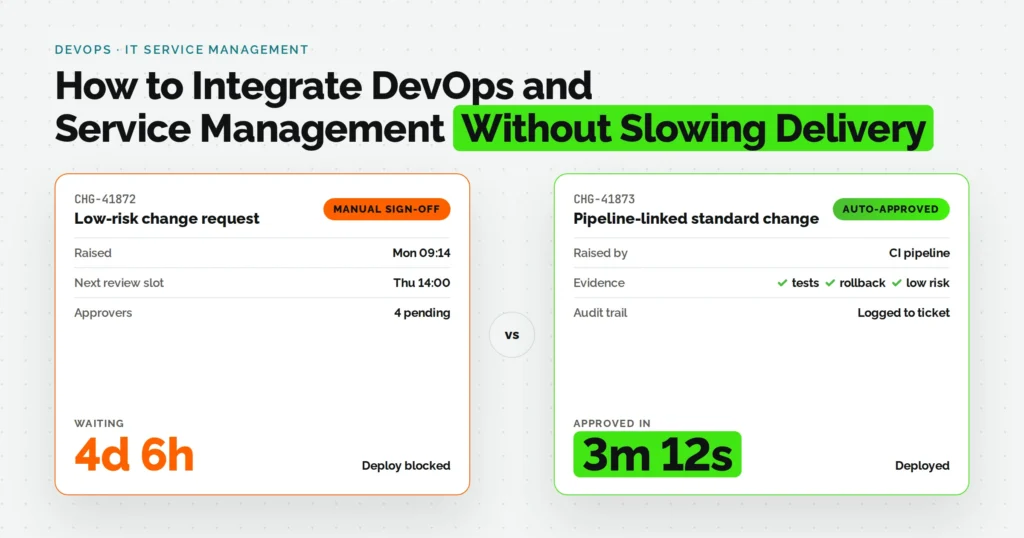

DevOps teams want to ship. Service management teams want every change tracked, approved, and reversible. Most organizations treat these as opposing forces, and the result is either a release process buried in approval tickets or a fast pipeline that IT operations does not trust.
Quick answer: You integrate DevOps and service management by auditing your current release path for manual handoffs, aligning both teams on one shared set of metrics, pre-approving low-risk changes so they skip manual sign-off, and connecting your CI/CD tool to your ITSM platform so change and incident records are created automatically instead of typed in by hand. Done in that order, service management adds accountability without adding wait time.
That is the short version. Below is the full sequence, with the tools, roles, and failure points that make it actually work in production, not just in a slide deck.
Quick Steps
- Audit current DevOps and ITSM workflows to find where releases wait on manual steps.
- Align development, operations, and the service desk on one shared set of delivery metrics.
- Build a lightweight change model that pre-approves low-risk, well-tested deployments.
- Connect CI/CD tools to the ITSM platform so change records are created automatically.
- Set DevOps SLAs for incident response and rollback that match your actual release speed.
- Shift service management left so developers see relevant tickets inside their own workflow.
- Automate self-service for the routine requests that make up most ticket volume.
- Close the cultural gap with joint on-call rotations and shared incident reviews.
- Track DORA and ITSM metrics together on one recurring review, not two separate ones.
What You Need Before You Start
Before mapping any workflow changes, get these four things in place. This is also the checklist most teams skip, which is why integrations stall in week two.
Access and permissions
- Admin or configuration access to your ITSM platform (Jira Service Management, ServiceNow, or similar)
- Equivalent access to your CI/CD tool (Jenkins, GitHub Actions, GitLab CI, or Azure DevOps)
People in the room
- One representative each from engineering, operations, and the service desk, before any process is redesigned
- A decision-maker who can approve changes to the change management policy itself
Documentation on hand
- Your current change management policy, even if it is informal
- Existing incident severity definitions and any SLA commitments already made to customers
Time to budget
- Two to four weeks for a mid-sized organization to complete the audit, alignment, and initial tool connection (steps 1 through 4)
- Ongoing practice, not a one-time project, for steps 5 through 9
DevOps and Service Management Integration Steps at a Glance
| Step | Action | Primary Owner | Example Tool or Practice |
|---|---|---|---|
| 1 | Audit workflows for friction points | Engineering lead + service desk lead | Value stream mapping session |
| 2 | Align on shared metrics | Engineering manager + ITSM owner | Shared dashboard (deployment frequency, MTTR, ticket age) |
| 3 | Build a lightweight change model | Change manager + DevOps lead | Standard/normal/emergency change classification |
| 4 | Connect CI/CD to ITSM | DevOps engineer | Webhook from Jenkins or GitHub Actions into Jira Service Management |
| 5 | Set DevOps SLAs | Engineering manager | Internal SLA for alert acknowledgment and rollback time |
| 6 | Shift service management left | DevOps engineer | Ticket links surfaced inside pull requests |
| 7 | Automate self-service requests | Service desk lead | Self-service portal for access and environment requests |
| 8 | Close the cultural gap | Engineering manager + service desk manager | Joint on-call rotation and shared retros |
| 9 | Track metrics together | Engineering leadership | Monthly review pairing DORA and ITSM metrics |
Step 1: Audit Your Current DevOps and ITSM Workflows to Find the Friction Points
Start by shadowing one release from commit to production. Log every handoff, every approval wait, and the exact time a deployment sat idle because it needed a signature rather than a technical fix.
Two things are worth flagging specifically:
- Manual handoffs that repeat information already sitting in a pull request or ticket
- Approval steps that exist out of habit rather than an actual compliance or risk requirement
This matters more than most teams assume. Gartner research is frequently cited across the ITSM industry for the finding that roughly 85 percent of IT performance incidents trace back to a recent change or deployment, which means the change process is not bureaucratic overhead. It is the thing most directly connected to whether production stays stable.
Done properly, this audit produces one page: a map of the current release path with wait times marked next to each step. That page becomes the baseline every later step improves against.
Step 2: Align Dev, Ops, and the Service Desk on Shared Goals and Metrics
Before touching any tool, agree on a small metric set that both sides can see on the same dashboard. This is where most integration attempts quietly fail, because automating a handoff nobody agrees on the goals for just automates the disagreement faster.
A workable starting set:
- Deployment frequency and change failure rate, tracked by engineering
- Mean time to resolve and ticket backlog age, tracked by the service desk
According to the 2024 DORA State of DevOps Report, elite-performing teams deploy on demand with a change failure rate near 5 percent, while low performers can take one to six months to ship a single change. That gap is not just a speed difference. It reflects whether an organization’s change and incident processes support the pace of delivery or fight against it.
A startup shipping a SaaS product weekly and an enterprise healthtech team shipping monthly both need this same alignment step. The metrics differ by scale, but the principle (agree on what “good” means before you automate anything) does not change.
Step 3: Build a Lightweight Change Management Model That Fits CI/CD
Classic ITIL change management assumes every change gets a human review. That model breaks down the moment a team deploys more than a few times a week. The fix is not removing change management. It is classifying changes so only the risky ones need a human.
A practical three-tier model:
- Standard changes: pre-approved in advance because they are low-risk, well-tested, and repeatable (for example, a deployment that passed automated tests, has a rollback plan, and touches a non-critical service)
- Normal changes: still require review, typically anything touching customer data, payment flows, or infrastructure shared across services
- Emergency changes: expedited approval for active incidents, logged after the fact rather than before
The specific rule matters more than the category names. One workable example: any deployment that passes the full automated test suite, includes an automated rollback path, and does not touch a service on the “high blast radius” list qualifies as standard and skips manual sign-off entirely.
This exact disagreement plays out often among practitioners. In a change management discussion on r/devops, an engineer described narrowly avoiding a major outage after a peer pushed an untracked change, and when they raised the idea of formal change requests, the pushback was that doing so would undermine DevOps and agility altogether. That reaction is common but reflects an all-or-nothing view of change management. A classification model is the actual fix: most changes stay fast and untouched by a human reviewer, while only the genuinely risky ones get the review that would have caught the near-miss in the first place.
Step 4: Connect Your CI/CD Tools to Your ITSM Platform for Automated Records
Once Step 3 defines what a standard change looks like, automation needs somewhere to record it. This step wires a deployment event in your CI/CD tool to automatically generate a change record in your ITSM platform, populated with the commit, the test results, and the person who deployed it.
Nobody should be typing this in manually after the fact. That is where change records drift out of sync with what actually happened in production, which is one of the most common audit findings in regulated industries like fintech and healthtech.
Teams we have worked with at Fullstacktechies typically wire this through a webhook from the pipeline directly into the service desk’s change API, rather than exporting logs into a ticket by hand at the end of a sprint.
Common CI/CD to ITSM Tool Pairings
- Jenkins or GitHub Actions into Jira Service Management, using webhook-triggered change tickets
- Azure DevOps into Jira Service Management, syncing work item status changes bidirectionally
- GitLab CI into ServiceNow, using the ServiceNow DevOps integration app
The workflow worth aiming for shows up in an integration discussion on r/AZURE among practitioners weighing exactly this setup: a customer-reported issue in the ticketing tool automatically creates a matching work item in the dev tracker, and once the work item is completed, the original ticket updates on its own. That two-way sync, ticket to work item and back again, is what separates a working integration from a one-way webhook that only pushes data in a single direction.
Step 5: Set DevOps SLAs That Match Your Real Release Cadence
A DevOps SLA is different from the customer-facing SLA your sales team quotes. It is an internal commitment covering how fast the team responds to a failed deployment, acknowledges a pipeline alert, or completes a rollback.
Set these using the audit data from Step 1, not aspiration. A team deploying twice a week does not need the same SLA as a team deploying fifty times a day, and setting one anyway just produces an SLA nobody hits.
One workable example:
- Acknowledge a failed production deployment alert within 15 minutes
- Begin rollback or mitigation within 30 minutes of acknowledgment
- Close the incident review within 24 hours of resolution
IBM’s 2025 Cost of a Data Breach Report found that organizations took an average of 241 days to identify and contain a breach, the fastest response time in nine years but still a reminder of how much detection speed affects total cost. The same logic applies at a smaller scale to deployment incidents: the SLA that matters most is the one measuring how fast you notice something broke, not just how fast you eventually fix it.
Step 6: Shift Service Management Left into the Development Workflow
Shifting left here means something concrete, not a slogan. It means the developer sees relevant service management context (an open incident, a known error record, a linked ticket) inside the tool they are already using, instead of needing to check a separate ITSM portal before shipping.
In practice, this looks like:
- Linking the related ticket directly in the pull request description, enforced by a pipeline check
- Surfacing known error records as a warning when a change touches an affected service
- Failing a build automatically if it targets a service currently under an active major incident
This prevents a specific and common failure: a developer ships a fix that unknowingly reopens an incident because nothing in their normal workflow surfaced the existing ticket.
Step 7: Automate Self-Service for Routine Requests and Approvals
Look at your service desk’s ticket categories for anything DevOps-related and find the three to five types that make up most of the volume. Access requests, environment provisioning, and routine configuration changes are the usual suspects.
Build a self-service form or automated workflow for each instead of routing it through a queue with a human reviewer. This step gets skipped constantly, mostly because it requires someone to actually look at ticket data rather than assume what counts as routine.
A startup with a five-person platform team and an enterprise with a 200-person IT organization both benefit here, though the volume that justifies automation looks different at each scale.
Step 8: Close the Cultural Gap With Joint Training and Shared Ownership
Every source on this topic agrees the biggest integration obstacle is cultural, not technical. The fix is specific mechanisms, not a training kickoff that happens once and is never repeated.
Three practices that hold up over time:
- A rotating on-call schedule that includes both a DevOps engineer and a service desk representative
- A joint incident retro after any major outage, with both teams in the room, not two separate postmortems
- Short, recurring cross-training: engineers learning to read the ITSM queue, service desk staff learning to read a pipeline dashboard
This directly reinforces the shared metrics from Step 2. Training without shared metrics tends to fade after the first quarter.
Step 9: Track Integration Health with DORA and ITSM Metrics Together
Review DevOps delivery metrics and ITSM metrics in the same meeting, on the same cadence, ideally monthly. Separate reviews are how a team ends up celebrating faster deployments in one room while the service desk reports rising SLA breaches in another.
A healthy pattern: deployment frequency rising while change failure rate stays flat or drops.
A warning sign: deployment frequency rising while SLA adherence from Step 5 drops, which usually means speed is being bought by quietly ignoring the incident response commitments made earlier.
This step closes the loop back to Step 1. The audit is not a one-time exercise; rerunning it annually, using the same shared dashboard from Step 2, is how an organization catches process drift before it becomes a major incident.
DevOps Mindset vs. ITSM Mindset: Where the Friction Actually Comes From
| Dimension | DevOps Default | ITSM Default | What Integration Requires |
|---|---|---|---|
| Speed vs. control | Optimizes for release frequency | Optimizes for change stability | Pre-approved standard changes (Step 3) |
| Documentation | Lives in code and pull requests | Lives in tickets and change records | Automated sync, not manual duplication (Step 4) |
| Ownership of incidents | Whoever wrote the code | Whoever is on the service desk queue | Joint on-call rotation (Step 8) |
| Success metric | Deployment frequency, lead time | Ticket resolution time, SLA adherence | One shared dashboard (Step 2 and Step 9) |
Common Mistakes That Slow Down DevOps and ITSM Integration
- Automating before aligning. Connecting tools (Step 4) before agreeing on shared metrics (Step 2) just automates a disagreement faster.
- Setting SLAs from aspiration, not data. SLAs built without the audit from Step 1 either get missed constantly or are too loose to mean anything.
- Treating culture as a kickoff event. Training (Step 8) run once and never repeated fades within a quarter.
- Automating records without classifying changes first. Skipping Step 3 means the automation in Step 4 has nothing to check standard changes against.
- Reviewing metrics in separate meetings. DevOps and ITSM metrics reviewed apart (skipping Step 9) hide the exact tradeoffs leadership needs to see.
Implementation Checklist
Use this as a working checklist before calling the integration complete:
- Current release path mapped with wait times documented
- Shared metric dashboard live and visible to both teams
- Standard, normal, and emergency change categories defined in writing
- CI/CD tool connected to ITSM platform with automated change record creation
- Internal DevOps SLAs documented and communicated to both teams
- Relevant tickets and known errors visible inside the development workflow
- Self-service enabled for the top three to five recurring request types
- Joint on-call rotation and shared incident retro process in place
- Monthly review scheduled pairing DORA and ITSM metrics
When It Makes Sense to Bring in Managed DevOps Support
Internal teams often get through the audit and alignment steps, then stall at the tooling and ongoing maintenance stage because the engineers who would build the integration are also on the hook for feature delivery. Something has to give, and it is usually the integration work.
This is the point where managed devops services and devops support services become a realistic option, not because internal teams lack the skill, but because the integration needs a dedicated owner rather than a side project. Devops maintenance services cover the part that gets neglected most: keeping webhooks, SLA dashboards, and change automation working as tools, teams, and vendors change over time.
Full-Stack Techies works with engineering teams on exactly this kind of ongoing integration and maintenance, so internal engineers stay focused on product work instead of babysitting a webhook that broke after a tool upgrade. If your integration keeps stalling at Step 4 or Step 9, that is usually the signal worth acting on.
The Bottom Line
Integrating DevOps and service management is not about choosing speed or control. It is a sequence: audit first, align on metrics second, classify changes third, then automate. Skip a step and the automation you build in Step 4 has nothing solid to run on.
If your team has the audit and alignment steps mapped out but keeps losing momentum at the tooling or ongoing maintenance stage, that is a common and solvable point to bring in outside support. Fullstacktechies’ managed DevOps services are built around exactly this kind of integration and long-term upkeep, so speed and service accountability do not have to trade off against each other.
FAQs
Q1. What is the difference between DevOps and ITSM?
DevOps focuses on fast, automated software delivery, while ITSM focuses on structured processes for change, incident, and service management. Integrated well, DevOps provides the speed and ITSM provides the accountability.
Q2. Does integrating service management slow down DevOps releases?
Not if changes are classified correctly first. Pre-approved standard changes skip manual sign-off, so most releases move at the same speed while only risky changes get extra review.
Q3. What is a DevOps SLA?
A DevOps SLA is an internal commitment covering response and recovery times for pipeline and deployment issues, distinct from the customer-facing SLA. It typically covers alert acknowledgment, rollback time, and incident review closure.
Q4. Which ITSM tools integrate best with CI/CD pipelines?
Jira Service Management pairs commonly with Jenkins, GitHub Actions, and Azure DevOps. ServiceNow pairs commonly with GitLab CI through its dedicated DevOps integration app.
Q5. Do small teams need formal service management at all?
Yes, in a lighter form. Even a five-person team benefits from a written change classification and a shared metrics view, since the cost of an untracked change scales with how many customers depend on the service.