How to Automate Your DevOps Workflow: Top 10 Processes You Should Automate First

Software teams that automate well are pulling ahead of teams that do not, and the gap is not small. Google Cloud’s DORA research found that elite performing teams deploy 973 times more frequently and recover from incidents 6,570 times faster than low performing teams. That gap is not about hiring more engineers. It comes down to which processes get automated, and in what order.
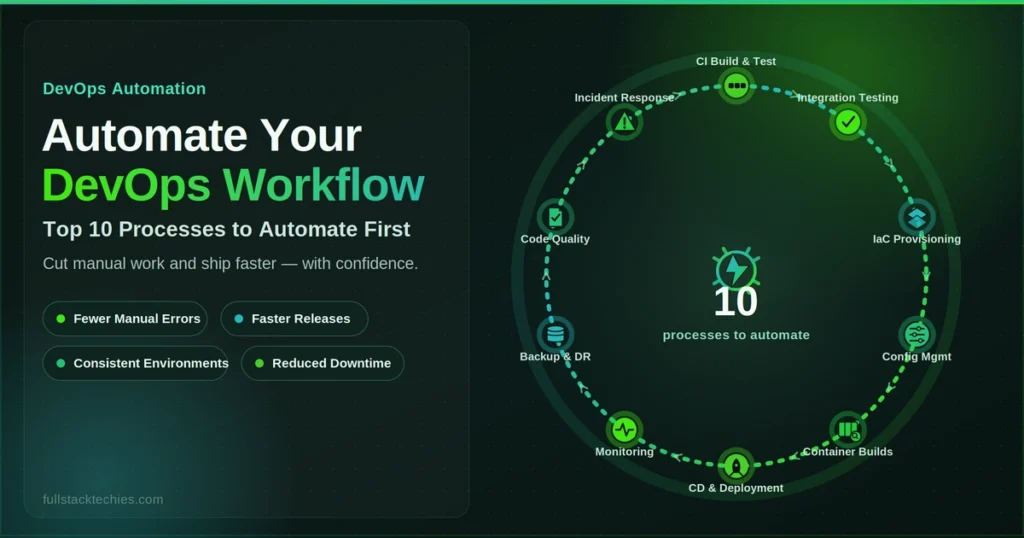
This guide breaks down the top 10 DevOps processes to automate first, in the sequence that actually works, whether you run a five-person startup or a regulated enterprise platform in healthcare or fintech.
Quick Steps
- Add automated code quality checks and pre-commit hooks before touching your pipeline.
- Set up a CI server to automatically build and unit test every commit.
- Automate integration, regression, and functional testing so releases do not depend on manual QA.
- Automate container image builds and vulnerability scanning as part of the build step.
- Provision infrastructure with code (IaC) instead of manual server setup.
- Automate configuration management so every environment stays consistent.
- Build an automated CD pipeline that deploys tested builds without manual sign-off for routine releases.
- Automate monitoring, logging, and alerting so issues surface before users report them.
- Automate incident response and rollback so failed deployments revert without a war room.
- Automate backups and disaster recovery so your safety net does not depend on someone remembering to run a script.
What You Need Before You Start
Automation works best when you have the basics in place first. Here is the checklist to run through before you start.
Tools and access:
- Version control (GitHub, GitLab, or Bitbucket) with admin rights
- A CI/CD platform (GitHub Actions, GitLab CI, Jenkins, or Azure DevOps Pipelines)
- An IaC tool (Terraform, Pulumi, or OpenTofu) and cloud provider access (AWS, Azure, or GCP)
- A container registry if you ship containers (Docker Hub, Amazon ECR, or Google Container Registry)
- A monitoring stack (Datadog, Prometheus with Grafana, or New Relic)
- One person with authority to approve pipeline and rollback policy changes
Time required:
A small team can get the first three steps running in one to two weeks. The full 10-step sequence usually spans one to two quarters, depending on how much legacy infrastructure you are working around.
Skill level:
You should be comfortable with YAML, basic scripting, and your cloud console. Teams without an in-house DevOps engineer often bring in a managed service specifically for the infrastructure-as-code and CI/CD setup stages, since that is where most first attempts stall.
Manual Workflow vs. Automated Workflow
Before diving into the steps, it helps to see what changes when automation actually takes hold.
| Factor | Manual Workflow | Automated Workflow |
| Release frequency | Weekly or monthly, dependent on staff availability | Multiple times per day, on demand |
| Error source | Human error during repetitive steps | Configuration errors caught earlier, before deployment |
| Recovery time | Hours, often requiring a war room | Minutes, often triggered automatically |
| Compliance evidence | Manually collected before audits | Generated continuously as pipeline output |
| Scaling cost | Grows linearly with headcount | Grows sublinearly as pipelines reuse the same automation |
According to Gartner’s continuous compliance research, organizations that integrate compliance automation into DevOps workflows can improve lead time by at least 25 percent, which is one reason regulated teams in healthcare and fintech are moving in this direction rather than staying manual.
Top 10 DevOps Processes to Automate
Each process below pairs with a specific category of tooling, and the right tool choice often determines whether automation actually sticks or gets abandoned after a few weeks. If you want a deeper breakdown of what to use at each stage, our 10 Best DevOps Automation Tools to Streamline Your Workflow guide covers the leading options for build, test, deployment, and monitoring in more detail than we can fit into this table.
| # | Process | Why Automate It First | Recommended Tools | Stage |
| 1 | Code quality checks and pre-commit hooks | Catches issues before they enter the pipeline | Husky, pre-commit, ESLint, SonarQube | Foundation |
| 2 | CI build and unit testing | Confirms every commit builds and passes tests automatically | Jenkins, GitHub Actions, GitLab CI, CircleCI | Foundation |
| 3 | Integration, regression, and functional testing | Removes manual QA as a release bottleneck | Selenium, Cypress, Playwright, JUnit | Foundation |
| 4 | Container image builds and vulnerability scanning | Standardizes environments and catches security issues at build time | Docker, Trivy, Snyk, Grype | Packaging |
| 5 | Infrastructure provisioning (IaC) | Makes environments repeatable and version controlled | Terraform, Pulumi, OpenTofu | Infrastructure |
| 6 | Configuration management | Keeps dev, staging, and production environments consistent | Ansible, Chef, Puppet | Infrastructure |
| 7 | CD and deployment pipeline | Removes manual deployment steps and human error | ArgoCD, Spinnaker, GitLab CD, Azure Pipelines | Delivery |
| 8 | Monitoring, logging, and alerting | Surfaces problems before customers do | Prometheus, Grafana, Datadog, New Relic | Operations |
| 9 | Incident response and rollback | Cuts mean time to recovery when something breaks | PagerDuty, Opsgenie, automated rollback scripts | Operations |
| 10 | Backup and disaster recovery | Protects against data loss from human error or outages | Velero, GitProtect, cloud-native snapshot tools | Safety net |
Step 1: Automate Source Code Quality Checks and Pre-Commit Hooks
This is the cheapest, lowest-risk place to start. It needs no infrastructure and no budget approval, just a hook manager and a set of rules.
How to set it up
- Install a hook manager (Husky for JavaScript projects, or pre-commit for Python and polyglot repos)
- Define your rules: linting, formatting, and basic static analysis
- Enforce the same rules in CI, not just locally, so they cannot be skipped
A quick example
A seed-stage SaaS startup with three engineers added pre-commit linting and static analysis before writing a single CI job. Within a month, code review comments about formatting and style dropped close to zero, freeing reviewers to focus on logic instead.
Common pitfall: Teams add hooks but never enforce them in CI, so a developer can bypass a local hook with a flag and the rule quietly stops mattering.
Step 2: Automate Your CI Build and Unit Testing
A CI server builds and tests your code on every push, not on a schedule someone remembers to run manually.
How to set it up
- Connect your repository to a CI platform
- Define a build script that runs on every commit
- Add unit test execution as part of that same build
- Set required status checks on your main branch so failing builds cannot merge
A quick example
A mid-size enterprise software division moved from nightly manual builds to CI on every pull request. Build failures that used to surface the next morning, after other developers had already built on top of the broken code, now surface within minutes.
Common pitfall: Flaky tests get skipped instead of fixed. Once a team starts ignoring red builds, the whole pipeline stops being trusted.
Step 3: Automate Integration, Regression, and Functional Testing
Unit tests check code in isolation. This step checks whether components actually work together, which is a different and often more revealing kind of test.
How to set it up
- Choose a test framework that matches your stack
- Script test environments so they spin up on demand rather than living on someone’s machine
- Wire test runs into CI as a required gate, not an optional one
A quick example
A healthcare SaaS company handling patient scheduling data automated its regression suite ahead of a major release. The automated suite caught an edge case in appointment conflict handling that manual QA had missed in three previous releases.
Common pitfall: This is usually where a manual QA team pushes back hardest. The better path is shifting QA into a review and exploratory testing role rather than treating them as the release gatekeeper.
Step 4: Automate Container Image Builds and Vulnerability Scanning
By this point, code has already passed quality gates and tests. Now you are packaging it, and packaging is where security issues either get caught or get shipped.
How to set it up
- Automate the image build on every merge to main
- Add a scanning step before the image can push to your registry
- Fail the build on critical vulnerabilities rather than flagging them for later
A quick example
A fintech platform processing payment data added automated container scanning after a routine audit flagged an outdated base image. Since then, every image is scanned before it reaches the registry, which turned a manual audit finding into a standing control.
Common pitfall: Using a “latest” tag in production instead of immutable, versioned tags, which makes it hard to know exactly what is running.
Step 5: Automate Infrastructure Provisioning with IaC
This is where teams move from manually clicking through a cloud console to defining infrastructure in version-controlled code.
How to set it up
- Pick an IaC tool: Terraform, Pulumi, or OpenTofu are the most common
- Write your first module for a non-production environment
- Always run a plan step before an apply step
- Store your state remotely with locking, so two people cannot apply changes at once
Gartner’s research on infrastructure automation found that enterprises are expected to automate more than half of their network activities by 2026, up from under 10 percent in 2023, a sign of how quickly manual provisioning is being phased out.
A quick example
A growing e-commerce enterprise had five engineers manually configuring near-identical staging environments for each new product line. Moving to Terraform modules cut new environment setup from roughly two days of manual work down to under an hour.
Infrastructure provisioning is also one of the areas where many teams choose not to build everything from scratch internally. Full-Stack Techies’ DevOps as a Service handles IaC setup and ongoing management as part of a broader managed pipeline, which is worth a look if your team does not yet have a dedicated infrastructure engineer.
Common pitfall: Someone makes a manual change directly in the cloud console after IaC is in place. That single change causes drift, and the next automated apply either overwrites it or fails.
Step 6: Automate Configuration Management Across Environments
Infrastructure provisioning creates the servers and networks. Configuration management keeps what runs on top of them consistent: packages, users, permissions, and service configs.
How to set it up
- Pick a configuration management tool (Ansible, Chef, or Puppet)
- Define your baseline state as code
- Run it on a schedule or automatically whenever new infrastructure is provisioned
- Audit for drift regularly rather than assuming configuration stays consistent on its own
A quick example
An enterprise financial services firm found that three of its four regional environments had quietly drifted from the documented configuration over eighteen months. Automated configuration checks now run weekly and flag drift before it becomes an incident.
Common pitfall: Treating configuration management as a one-time setup step instead of an ongoing, scheduled process.
Step 7: Automate Your CD and Deployment Pipeline
This is the step most people picture when they hear “DevOps automation,” and it deserves the most attention.
How to set it up
- Define your deployment stages: development, staging, and production
- Automate promotion between stages based on passing gates, not manual approval for every routine release
- Add approval gates only where genuinely needed, such as regulated production environments
- Automate rollback triggers so a failed health check reverses the deployment automatically
A quick example
A Series B startup building a B2B analytics product went from biweekly, manually coordinated releases to shipping several times a day after building an automated CD pipeline with staged rollouts. Their change failure rate did not increase, since the same automated tests that ran in CI also gated every promotion.
Common pitfall: Adding a manual approval step to every single deployment “just in case,” which quietly recreates the same bottleneck automation was supposed to remove.
Step 8: Automate Monitoring, Logging, and Alerting
This step only works well once deployment is automated, since you need to know exactly what changed when an alert fires.
How to set it up
- Centralize logs in one place instead of scattering them across services
- Define clear thresholds or SLOs for what counts as a real problem
- Automate alert routing to the team that actually owns the affected service
- Suppress noisy, low-value alerts so on-call engineers do not get desensitized
A quick example
A healthcare platform managing telehealth appointments consolidated logs from four separate services into one dashboard and cut its average detection time for failed appointment bookings from roughly 40 minutes to under 5.
Common pitfall: Alert thresholds set too sensitively, which trains engineers to ignore alerts entirely, defeating the point of automating them in the first place.
Step 9: Automate Incident Response and Rollbacks
Automated monitoring tells you something broke. Automated incident response is what actually fixes it without a 2 a.m. war room.
How to set it up
- Define rollback criteria in advance, before an incident happens, not during one
- Automate the rollback trigger itself, not just the alert that something is wrong
- Integrate with an on-call tool for escalation when automated rollback is not enough
- Run post-incident reviews as a standing process, not an occasional one
A quick example
An enterprise SaaS company automated rollback triggers tied to error-rate thresholds. A bad deployment that once took 45 minutes to notice and manually revert now rolls back automatically in under 3 minutes.
Common pitfall: Automating the alert but leaving the actual rollback as a manual step, which still requires someone to be awake, available, and fast.
Step 10: Automate Backup and Disaster Recovery
This is last for a reason. It is the safety net around everything built in steps 1 through 9, not a replacement for any of them.
How to set it up
- Automate scheduled backups of both data and pipeline configuration, not just databases
- Test restores on a schedule rather than assuming backups work
- Document and automate the failover process itself, not just the backup step
A quick example
A fintech company discovered during a routine restore test that six months of backups had been silently failing due to a permissions change no one caught. Automated restore testing, run monthly, is now the actual safety check, not the backup job itself.
Common pitfall: Backups exist and run on schedule, but nobody ever tests a restore, so the first real recovery attempt is also the first time anyone finds out whether it works.
Common Mistakes That Derail DevOps Automation
- Automating a broken process. Automation makes a good process faster and a bad process fail faster.
- Trying to automate everything at once. Following a sequence beats a big-bang rollout almost every time.
- Skipping infrastructure as code. Manual changes alongside an automated pipeline cause drift that undermines the whole effort.
- No automated rollback. Monitoring without automated recovery still means a manual war room when something breaks.
- Tool sprawl. Adding tools that do not integrate with each other creates more manual glue work than it removes.
How to Measure If Your Automation is Actually Working
The DORA framework, developed through Google Cloud’s multi-year DevOps research program, gives four metrics worth tracking as you work through this list.
- Deployment frequency: How often you successfully release to production. This should climb steadily as steps 1 through 7 land.
- Lead time for changes: Time from commit to production. Elite teams keep this under a day.
- Change failure rate: The percentage of deployments causing a production issue. Elite teams sit around 5 percent or lower.
- Time to recover: How long it takes to restore service after a failed deployment. Elite teams recover in under an hour.
These four metrics tend to improve together, not in isolation. A team that deploys more often without also improving its failure rate and recovery time is not actually getting safer, just faster.
When to Bring in a DevOps Automation Partner
Steps 1 through 3 are usually manageable with an in-house team, even a small one. Steps 4 onward, containers, infrastructure as code, CD, and monitoring, are where most teams without a dedicated platform engineer start to stall.
That is a genuine decision point, not a sales pitch. If your team already has someone who owns infrastructure full time, you can likely work through this entire list on your own. If you do not, the gap tends to show up right around infrastructure provisioning and deployment automation.
Full-Stack Techies’ DevOps as a Service picks up from wherever you are in this list, whether that means getting your first CI pipeline running or building out the full-stack from infrastructure as code through monitoring and incident response. The goal is not to replace your team, but to close the specific gaps that stall most in-house automation efforts around steps 4 through 10.
Final Thought
Automation is not a single project with a finish line. It is a sequence, and the order matters more than the tool choices within each step. Start with the process causing the most friction today, work through this list in order, and measure what changes as you go.
If you would rather have an experienced team handle the infrastructure and pipeline work directly, Full-Stack Techies’ DevOps as a Service is built to pick up wherever your team currently stands in this sequence.
Frequently Asked Questions
How long does it take to automate a DevOps workflow?
A small team can get steps 1 through 3 running in one to two weeks. The full 10-step sequence usually takes one to two quarters, depending on legacy infrastructure.
What healthcare and fintech companies automate first, given compliance requirements?
The same sequence applies, but steps 4 through 7 carry extra weight for regulated teams. Automated scanning, immutable audit logs, and policy-as-code checks make HIPAA, PCI-DSS, and SOC 2 audits far easier to pass.
Do we need to hire a dedicated DevOps engineer, or can we use a managed service instead?
Both work, depending on budget and timeline. Teams that need to move fast without a long hiring cycle often use a managed DevOps service instead.
What is the difference between CI/CD automation and full DevOps workflow automation?
CI/CD automation covers building, testing, and deploying code (steps 2, 3, and 7). Full DevOps workflow automation extends further, covering code quality, infrastructure, monitoring, incident response, and backup.
Can a small startup benefit from this as much as an enterprise?
Yes, often faster, since startups carry less legacy infrastructure to work around. A small team can move through the first three or four steps in a matter of weeks.