Top 10 DevOps Automation Opportunities That Can Save Your Team Time and Reduce Errors
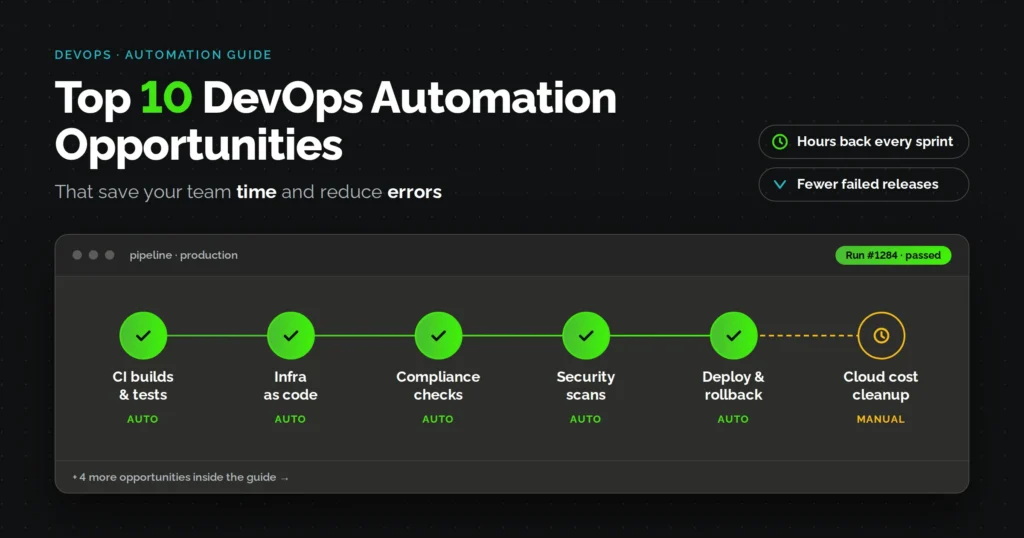

Most engineering teams do not lack the tools to automate. They lack the time to figure out where automation actually pays off first. This article breaks down ten specific opportunities, ranked by the time saved and the amount of errors they typically prevent, so you can prioritize instead of guessing.
Fullstacktechies works with engineering leaders across SaaS, healthcare technology, and FinTech who are past the “should we automate” question and are now stuck on “what next.” The list below reflects where those conversations usually start.
Devops Automation Opportunities at a Glance
- CI/CD pipeline automation removes manual build, test, and release handoffs
- Infrastructure as code eliminates configuration drift and manual provisioning
- Compliance automation replaces one-off audit scrambles with continuous evidence
- Automated security scanning catches vulnerabilities before they reach production
- Rollback and release automation cuts incident recovery time
- Cloud cost automation prevents budget overruns without manual spend reviews
- Automated patch and dependency management closes security gaps faster
- Team resistance to automation is usually a time and training gap, not a tooling problem
- Over-automating low-frequency tasks adds maintenance overhead instead of reducing errors
- AI agents are starting to handle routine DevOps tickets without waiting on a human
1. How Much Time Does CI/CD Pipeline Automation Actually Save Your Team?
Teams with mature CI/CD automation deploy far more often than teams relying on manual builds and releases, and they recover from failures faster too. According to the DORA (DevOps Research and Assessment) program’s long-running State of DevOps research, elite performing teams deploy on demand, multiple times a day, with lead times measured in hours rather than weeks. Low performing teams, by contrast, often take a month or longer to move a single change from commit to production.
The mechanism is simple even if the outcome sounds dramatic. Every commit automatically triggers a build, a test suite, and a deployment step, so nobody is manually shepherding code through a spreadsheet of steps. That alone removes hours of coordination between developers and operations each week, and it removes the guesswork of “did someone remember to run the tests.”
| Manual release process | Automated CI/CD |
|---|---|
| Developer pings ops to schedule a build | Build triggers automatically on commit |
| Manual regression testing before release | Test suite runs on every push |
| Release notes written after the fact | Deployment logs generated automatically |
| Rollbacks require a war room | Rollback is a scripted, repeatable step |
What breaks when CI/CD stays manual?
Manual pipelines break in predictable ways. A tester forgets to run one suite before a release, and a bug reaches production. Two engineers deploy the same environment in slightly different configurations, and now nobody can reproduce the bug that shows up only in staging.
The most common failure, honestly, is just fatigue. When every release require a person to babysit five separate steps, teams start skipping steps under deadline pressure, and that is where change failure rates climb.
2. Why Does Infrastructure as Code Eliminate Manual Provisioning Errors?
Infrastructure as code (IaC) replaces manually clicking through cloud consoles with version-controlled configuration files that describe exactly what an environment should look like. Tools like Terraform and Ansible read that file and build the environment the same way every single time, whether it is the first server or the five-hundredth.
Configuration drift is the real villain here. It happens when someone makes a “quick fix” directly on a production server and forgets to document it, and six months later nobody can explain why staging and production behave differently. IaC prevents this because the configuration file is the single source of truth, and any manual change outside that file gets flagged or overwritten on the next apply.
This matters more for FinTech and healthcare technology teams than most, since regulators expect environments to be reproducible and auditable, not assembled from memory.
How does IaC shorten disaster recovery time?
Rebuilding a server manually after a failure can take hours, and that is assuming the person who originally configured it is even still on the team. With IaC, recovery is closer to running one command, since the entire environment definition already exists in version control and can be reapplied to a fresh instance.
3. Can Compliance Automation Cut Your Audit Prep Time in Half?
Policy as code is what makes this possible. Instead of scrambling to gather evidence before an audit, teams bake compliance checks like HIPAA, PCI-DSS, or SOC 2 controls directly into the deployment pipeline, so every release automatically produces a log of what was checked and passed.
This shifts compliance from a once-a-year fire drill to a continuous, low-effort process. According to IBM’s Cost of a Data Breach Report, the global average cost of a data breach reached 4.88 million dollars in 2024, and breaches involving regulated data tend to cost more due to notification and remediation requirements. Automated compliance checks do not eliminate that risk, but they catch misconfigurations before they become the breach that triggers those costs.
- Continuous evidence logs instead of point-in-time snapshots
- Automatic blocking of non-compliant deployments
- Faster audit turnaround since evidence already exists
4. How Does Automated Security Scanning Catch Vulnerabilities Before Production?
Shift-left security means moving vulnerability detection earlier in the pipeline, at the commit or build stage, instead of discovering issues after code is already live. Static application security testing (SAST) and dependency scanning tools run automatically on every build, and they block merges when a known vulnerability is detected.
This matters because the cost of fixing a vulnerability grows the later it is caught. A flaw caught in code review costs a few minutes of a developer’s time, the same flaw caught in production can mean an incident response, a patch, and possibly a disclosure to customers or regulators.
What happens when vulnerability scanning is left to manual review?
Manual security review depends entirely on who is doing the reviewing and how much time they have that week. Under deadline pressure, security review is often the first step that gets rushed or skipped, which is exactly how known vulnerabilities end up shipping to production anyway.
5. What Changes When Rollback and Release Management Run on Autopilot?
Automated rollback means the system watches health metrics after a deployment, like error rates or response times, and reverts automatically if something looks wrong. Canary and blue-green deployment patterns support this by releasing changes to a small slice of traffic first, so a bad deploy affects a few users instead of everyone.
The impact shows up most clearly in recovery time. DORA’s research consistently finds that elite performing teams restore service from an incident in under an hour, while low performers can take a week or more, largely because their process for identifying and reverting a bad change is manual and improvised.
- Health checks trigger automatic rollback, no war room needed
- Canary releases limit blast radius of a bad deploy
- Deployment history is version-controlled, so reverting is a known, tested action
6. How Does Cloud Cost Automation Prevent Budget Overruns Without Manual Audits?
Cloud cost automation applies rules that shut down idle non-production environments overnight, right-size over-provisioned instances, and flag unusual spend spikes as they happen rather than at the end of the billing cycle. This replaces the quarterly ritual of someone combing through a cloud bill trying to explain a spike that already cost the company money.
Gartner has repeatedly flagged cloud cost management as one of the top priorities for infrastructure leaders, particularly as more workloads move to multi-cloud and hybrid setups where costs are harder to track manually. Automated tagging and budget alerts are the practical entry point most teams start with.
For startup founders watching burn rate closely, this is often the single automation opportunity with the fastest visible return, since the savings show up directly on the next invoice.
7. Why Does Automated Patch and Dependency Management Reduce Security Debt?
Every dependency in your codebase is a small, ongoing liability, and manually tracking which ones have known vulnerabilities does not scale past a handful of services. Automated dependency scanning tools flag outdated or vulnerable packages and can open pull requests to update them on a schedule, rather than waiting for a security audit to surface the backlog.
The gap between a vulnerability being disclosed and a team actually patching it is where most breaches happen, not the initial disclosure itself. Automation closes that window by making patching a routine, low-friction pull request instead of a special project that keeps getting deprioritized.
- Scheduled dependency updates instead of ad hoc patch days
- Automatic flagging of known CVEs in current dependencies
- Smaller, more frequent patches instead of large risky batches
8. Why Do So Many Devops Teams Still Resist Adopting Automation Tools?
A widely discussed r/devops thread describes a pattern seen across different companies: teams keep doing manual deployment and post-configuration work long after automation tools are available, often because of time pressure, siloed adoption, and management that does not fully grasp what the tools solve.
The resistance rarely comes from the tools failing to work. It usually comes from the gap between what leadership approves and what teams are actually given time to learn.
When automation adoption is left to whoever has spare time on evenings or weekends, it stalls, and the same manual process keeps getting repeated on every release. The fix is not a better tool, it is treating automation rollout as a scheduled project with dedicated hours, not an extra task bolted onto an already full sprint.
9. Where Should You Draw The Line Before Automation Becomes Overboard?
Another r/devops discussion raises a fair question from someone studying DevOps practices: once a team starts automating everything from database creation to configuration imports, where do the diminishing returns kick in, and what do experienced engineers still choose to do by hand.
There is a genuine limit here, and ignoring it creates its own kind of error. Automating a process that changes every few months, or one that needs a human judgment call, often adds more maintenance overhead than it saves.
The practical rule most experienced teams land on is this: automate what repeats often and follows a predictable pattern, like builds, tests, provisioning, and patching, and leave rare, judgment-heavy tasks to a person. That lines up with the ranking logic in this article, since the ten opportunities above were chosen specifically because they are high-frequency and high-error by nature, not because automation is always the answer.
10. Can AI Agents Handle Routine Devops Tickets Without Human Intervention?
Right now, the honest answer is partially. AI agents are handling anomaly detection, root cause analysis on incidents, and natural-language infrastructure requests, but production changes still typically pass through a human approval gate. Industry analysts have described AIOps as moving from a nice-to-have to a core layer of DevOps tooling, with the underlying AIOps market growing at a fast clip as more vendors build detection and triage capabilities directly into their platforms.
What this looks like in practice today is an AI agent scanning logs, correctly identifying that a spike in errors correlates with a recent deployment, and opening a ticket with that context already attached, so an engineer starts troubleshooting with an answer instead of a blank slate. This does not replace the on-call engineer, it just mean they spend less time on detective work and more time on the actual fix.
Teams evaluating this today should treat it as an addition to existing monitoring, not a replacement for human judgment on anything that touches production data or customer-facing systems.
Bottom Line
None of these ten opportunities require a full platform rebuild to get started. The teams that see results fastest usually pick one or two areas where errors are already showing up most, CI/CD and security scanning are common starting points, and expand from there once the pipeline proves itself.
Automating one or two of these areas is manageable in-house. Automating all ten, consistently, across every environment, is closer to a full-time job, which is exactly why teams bring in a DevOps as a Service partner like Fullstacktechies to build and maintain these pipelines instead of stitching them together internally.
Frequently Asked Questions
Q1. What is DevOps automation exactly?
DevOps automation replaces manual steps like building, testing, provisioning, and deploying with scripted, repeatable processes triggered by code changes or events. It reduces human error and speeds up delivery across the software lifecycle.
Q2. Which DevOps process should you automate first?
CI/CD pipeline automation typically delivers the fastest visible return since it touches every release a team ships. Most teams start there before moving on to infrastructure as code and security scanning.
Q3. Does DevOps automation replace the need for a DevOps team?
No, automation handles repetitive execution, not judgment calls, so teams still need engineers to design pipelines and handle exceptions. It changes what a DevOps team spends time on, not whether one is needed.
Q4. How much does DevOps automation typically cost to implement?
Cost varies widely based on how many processes get automated and whether a team builds in-house or uses a managed provider. Most teams start small, automating one pipeline, then expand as they see measurable time and error savings.
Q5. Can automation actually make DevOps errors worse?
Yes, if a process gets automated before it is well understood, mistakes get replicated faster and at a larger scale. That is why stable, well-documented processes are usually automated first, not everything at once.