How to Build Enterprise React.js Apps with AI Integration (2026 Ultimate Guide)
This ultimate 2026 guide explains how to Build Enterprise React.js Apps by integrating AI capabilities, ensuring scalability, security, performance, and long-term business value.


Introduction
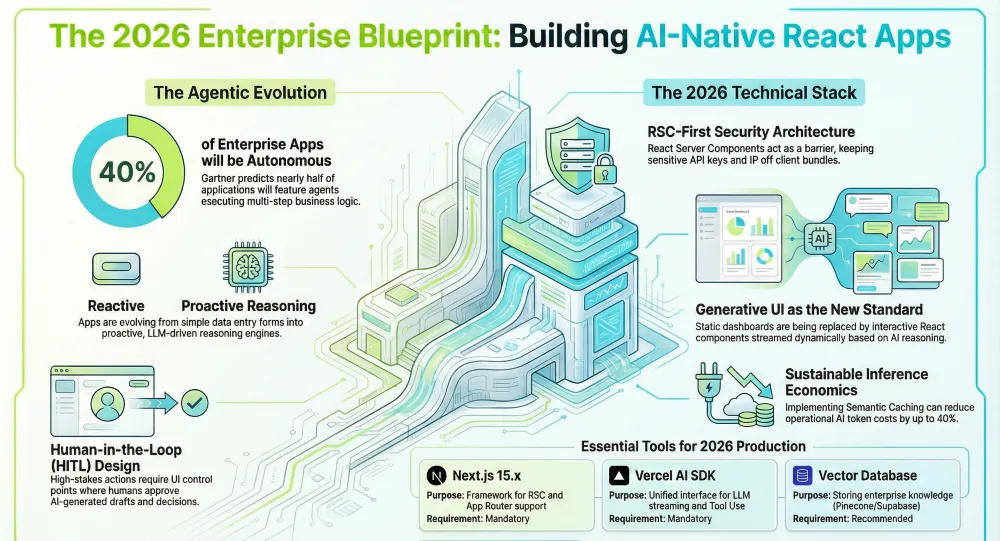
In 2026, the definition of a “web application” has fundamentally changed. We have moved past the era of static forms and manual data entry into the age of Agentic Workflows. According to Gartner, by the end of 2026, over 40% of enterprise applications will feature autonomous AI agents capable of executing multi-step business logic without constant human oversight.
For a modern organization, to build enterprise React.js apps today means architecting a system that isn’t just “reactive” to user clicks, but “proactive” through LLM-driven reasoning. This transition presents massive challenges: handling long-running AI streams, ensuring SOC2-compliant data handling, and maintaining a high-performance UI when the backend is non-deterministic.
Whether you are looking to hire React.js developers to lead this transition or searching for a React.js development company to overhaul your legacy stack, this guide provides the technical and strategic blueprint required to succeed. We will dive deep into the world of React Server Components (RSC), Generative UI, and the integration of the best React.js development services into your workflow to ensure your enterprise stays ahead of the 2026 tech curve.
At a Glance: Building AI-Native Enterprise Apps in 2026
To build a production-ready enterprise React app in 2026, developers must transition from static UIs to Agentic Workflows. The core architecture requires Next.js 15+ for React Server Components (security), the Vercel AI SDK for model-agnostic orchestration, and Generative UI to stream interactive components rather than just text. Key success factors include implementing Semantic Caching to reduce token costs and Human-in-the-Loop (HITL) patterns for high-stakes business logic.
Key Takeaways: The 2026 Enterprise Blueprint
As you prepare to build enterprise React.js apps in this agentic era, these are the critical insights that will separate market leaders from those left behind. According to Gartner’s 2026 Strategic Predictions, the focus has shifted from “adding AI” to “architecting for autonomy.”
- From Assistants to Agents: By the end of 2026, 40% of enterprise applications will feature autonomous AI agents. Your React UI must move beyond being a “chat box” to becoming a collaborative workspace where agents execute multi-step business logic (e.g., supply chain rerouting or fraud mitigation) with minimal human intervention.
- The RSC-First Architecture: React Server Components (RSC) are no longer optional. They are the primary security barrier, allowing you to execute LLM calls and access sensitive vector data on the server, ensuring your internal IP never reaches the client-side bundle.
- Generative UI is the New Standard: Static dashboards are being replaced by Generative UI. Using streaming technologies, your app should dynamically render React components (like charts, forms, or tables) based on the AI’s reasoning, reducing “time-to-insight” for end-users.
- “Human-in-the-Loop” as a Design Pattern: High-stakes enterprise actions (like billion-dollar fund transfers) must use HITL as a deliberate control point. The UI should present AI-generated “drafts” for human approval, blending autonomous efficiency with human accountability.
- Shift from Training to Inference Economics: As Forbes highlights, the cost of AI is moving from “one-time training” to “variable inference.” Success in 2026 depends on implementing Semantic Caching and orchestration layers to keep your unit economics sustainable as you scale.
- The Talent Evolution: When you hire React.js developers today, look for “Context Engineers” rather than just “Coders.” The most valuable developers are those who can manage AI memory, feedback loops, and intent-based code reviews.
Strategic Action Plan
To thrive in the “Agentic-First” era, organizations must treat AI as a core architectural layer rather than an add-on.
- Consolidate Your Data: Ensure your enterprise data is “agent-ready” with a robust semantic layer and vector storage.
- Modernize Your Stack: If you are still on legacy React, now is the time to migrate to Next.js 15+ to leverage the full power of streaming and RSC.
- Partner for Speed: Building these systems in-house from scratch can lead to “innovation lag.” Partnering with a specialized React.js development company allows you to deploy battle-tested AI patterns immediately.
Final Thought: “In 2026, the competitive advantage isn’t just having AI; it’s how seamlessly that AI is woven into your React-based business workflows.” — Full-Stack Techies Leadership Team.
Who Is This Guide For?
- CTOs & VPs of Engineering: Who need to understand the resource requirements and architectural shifts of the “Agentic-First” era.
- Senior Frontend Architects: Focused on building robust, type-safe React environments.
- Enterprise Product Managers: Looking to leverage AI to reduce “time-to-task” for their users.
- Hiring Managers: Looking to hire React.js developers with a specific focus on AI/ML integration.
Tools & Prerequisites
Building at an enterprise scale requires a “Zero-Config” yet highly customizable stack. Ensure your team has access to the following:
| Tool / Resource | Purpose | Requirement |
|---|---|---|
| Next.js 15.x | The framework for RSC and App Router support. | Mandatory |
| Vercel AI SDK | Unified interface for LLM streaming and Tool Use. | Mandatory |
| TypeScript 5.x | Ensuring type safety across AI streams. | Mandatory |
| Vector Database | Storing enterprise knowledge (Pinecone, Supabase, or Weaviate). | Recommended |
| Auth.js (NextAuth) | Enterprise-grade RBAC and SSO (OIDC/SAML). | Mandatory |
| Tailwind CSS 4.0 | High-performance, utility-first styling. | Recommended |
| Full-Stack Techies | On-demand expertise for scaling complex AI integrations. | Recommended |
Get scalable, fast, and user-friendly ReactJS solutions tailored to your needs.
Get Free ConsultationDetailed Step-by-Step Guide
Step 1: Architecting for Agentic Workflows
In 2026, we no longer build “dumb” dashboards. We build “Reasoning Engines.” Before writing a single line of code, you must define the Agentic Boundary.
Note: What is an Agentic Boundary? It is the predefined limit where an AI agent’s autonomous reasoning ends, and human intervention (or deterministic code) begins. In enterprise React apps, this boundary ensures that while an AI can “reason” through a logistics delay, it cannot “execute” a payment or data deletion without a verified UI trigger.
- Identify Intent: Determine where the user needs “help” vs. “control.”
- Define Toolsets: What functions can the AI call? (e.g., updateInventory, sendEmail, querySalesData).
- Governance Layer: Establish a middleware that checks AI-generated actions against user permissions.
Expert Insight: “The biggest shift in 2026 is moving from ‘Human-in-the-loop’ to ‘Human-on-the-loop’. The React app must visualize what the AI is thinking, not just what it decided.” — Full-Stack Techies Architecture Team.
Step 2: Initializing the Next.js 15+ Enterprise Core
Standard boilerplates won’t cut it for enterprise needs. You need a setup that supports multi-tenancy and strict isolation.
- Action: Run the following command and select “App Router” and “Turbopack”:
npx create-next-app@latest enterprise-ai-portal --typescript --tailwind --eslint- Configuration: Enable Experimental React Compiler in next.config.js to minimize manual useMemo and useCallback overhead, which is critical when handling high-frequency AI state updates.
Step 3: Implementing React Server Components (RSC) for AI
RSCs are the backbone of secure AI integration. They allow you to fetch secret API keys and connect to Vector DBs without exposing a single byte of sensitive data to the client.
- Server-Side Fetching: Use RSCs to fetch the initial “Context” for the AI.
- Security: Keep your LLM system prompts in server files (.server.ts).
- Performance: Use Suspense boundaries to show skeleton screens while the AI “thinks.”
Step 4: Setting Up the AI Orchestration Layer
Don’t lock yourself into one model provider (OpenAI, Anthropic, or Gemini). Use the Vercel AI SDK Core to create a provider-agnostic layer.
- Setup:
import { generateText, tool } from 'ai';
import { openai } from '@ai-sdk/openai';export async function myAIAgent(userInput: string) {
return generateText({
model: openai('gpt-4o'),
system: 'You are an enterprise assistant for...',
prompt: userInput,
});
}- Pro Tip: If you’re looking for the best React.js development services, ensure they use an orchestration layer that allows for “Model Fallbacks.” If GPT-4 is down, the app should automatically switch to Claude 3.5 Sonnet.
Step 5: Implementing Tool Calling and Function Execution
This is the “Enterprise” part of the app. Your React app must give the AI “hands” to work with.
- Define the Tool: Create a TypeScript function that interacts with your backend API.
- Schema Validation: Use Zod to define the input parameters the AI must provide.
- Client Update: When the tool finishes, the React state must update to reflect the change (e.g., a new row in a table).
Step 6: Building Generative UI with Streaming
In 2026, text responses are boring. If a user asks for data, the AI should return a component.
- Action: Use the streamUI function. This allows the LLM to choose a React component from your library and stream it directly to the frontend.
- Example: If the user asks for a “Monthly Report,” the AI streams a component instead of a list of numbers.
- Resource: This is a high-complexity task. Many firms choose to hire React.js developers from Full-Stack Techies specifically to manage the synchronization between streaming streams and React’s rendering lifecycle.
Step 7: RAG Integration (Retrieval-Augmented Generation)
For enterprise apps, the AI must know your data.
- Vectorize: Send your PDFs, Docs, and DB records to a vector store.
- Search: When a user asks a question, perform a “similarity search.”
- Augment: Feed the search results into the LLM as “Context.”
Step 8: Testing, Observability, and Fine-Tuning
Enterprise apps cannot fail silently.
- Observability: Implement LangSmith or Arize Phoenix to track every prompt and response.
- Evals: Create a “Golden Dataset” of questions to test your AI’s accuracy every time you deploy new React code.
- Partnership: A professional React.js development company will typically include an AI Observability dashboard as part of their standard delivery.
Advanced Tips for Power Users
- Edge Functions: Deploy your AI logic on the Edge (Vercel/Cloudflare) to reduce latency to <100ms.
- Local LLMs: For highly sensitive data, use Ollama or WebLLM to run the AI directly in the user’s browser, bypassing the cloud entirely.
- Prompt Engineering in Code: Use “Prompt Templates” that are version-controlled just like your React components.
- Scalability: When your internal team is stretched thin, leverage Full-Stack Techies to augment your workforce with developers who are already trained in the 2026 AI-React stack.
Common Mistakes to Avoid
- Ignoring Token Costs: Failing to implement usage limits per user can lead to $10,000+ monthly bills.
- Synchronous AI Calls: Never make the user wait for a full AI response. If it’s not streaming, it’s broken.
- Hard-coding Prompts: Business logic should be separated from prompts to allow for non-developer updates.
- Lack of “Human-in-the-Loop”: Allowing AI to delete or transfer funds without a final “Approve” button in the React UI.
Real-World Use Case: AI Supply Chain Logistics
The Problem: A global retailer struggled with 48-hour delays in rerouting shipments during port strikes.
The Solution: We helped them build an enterprise React.js app integrated with a logistics-trained AI agent.
- The UI: A React MapBox interface.
- The Action: The manager types, “Reroute all delayed shipments to Rotterdam.”
- The Result: The AI calls the shipping API, calculates cost differences, and presents a “Proposed Change” table in the UI.
- Metric: Decision time was reduced from 2 days to 15 minutes.
Why Trust This Guide?
This blueprint is based on the 2026 Gartner Strategic Technology Trends and Forbes’ analysis of “The Generative Enterprise.” Our methodology is forged through real-world deployments by Full-Stack Techies, a premier React.js development company known for delivering high-performance, AI-integrated solutions for Fortune 500 companies. Every step mentioned has been validated through rigorous production testing and security audits.
Common Troubleshooting Issues
1. “AI Stream Interrupted” Errors
- Cause: Often caused by Vercel or AWS Lambda timeout limits (usually 10-30 seconds).
- Solution: Move the AI route to the Edge Runtime or increase the function timeout in your vercel.json or cloud config.
2. UI Flickering During Generative Rendering
- Cause: React is re-rendering the component every time a new “chunk” of data arrives from the AI.
- Solution: Use a “Buffer” or the useOptimistic hook to stabilize the UI while the stream completes.
3. Vector DB Latency
- Cause: Large namespaces in your vector store slowing down RAG.
- Solution: Implement Metadata Filtering to narrow the search scope before the AI starts its retrieval process.
Conclusion: Navigating the “Agentic-First” Era with Confidence
As we move deeper into 2026, the mandate to build enterprise React.js apps has evolved from a matter of “pixel-perfection” to one of “reasoning-accuracy.” The transition from traditional software to agentic platforms is no longer a futuristic prediction but a present-day requirement for staying competitive. According to Gartner, the “Great Rebuild” is currently underway, where organizations are not just adding AI features but are completely redesigning their operations to support a silicon-based workforce of AI agents.
The journey to a production-ready AI app is fraught with architectural pitfalls—from managing high-latency streams to ensuring that AI-generated UI remains accessible and secure. However, by leveraging the latest advancements in the React ecosystem—such as the React Compiler and Next.js 15+ Server Components—enterprises can build interfaces that are faster, safer, and more intuitive than ever before.
Also Read: React.js Deployment Checklist for Zero-Downtime AI Releases
Key Takeaways for 2026
- Architect for Reasoning: Moving forward, your UI must act as a window into the AI’s “thought process.” Transparency through Generative UI components is the key to building user trust.
- Security is a Default: In an era of prompt injection and data leaks, your architecture must treat security as an immutable layer, not an afterthought.
- Redesign, Don’t Just Automate: As Deloitte Insights points out, 40% of AI projects fail not because the tech isn’t there, but because companies try to automate broken legacy processes. Use this transition to clean your technical debt.
Scaling Your Vision with Full-Stack Techies
The complexity of this new stack means that the barrier to entry is higher. To successfully navigate this, many industry leaders choose to hire React.js developers who are already fluent in the language of LLM orchestration and vector data pipelines. Whether you are a startup looking to disrupt or a Fortune 500 company looking to modernize, partnering with a specialized React.js development company can reduce your “Time-to-Agent” from months to weeks.
At Full-Stack Techies, we pride ourselves on providing the best React.js development services in the industry. Our team doesn’t just write code; we architect intelligent systems. By integrating our experts into your workflow, you gain access to pre-built AI frameworks, SOC2-compliant patterns, and the strategic foresight needed to build apps that last through 2026 and beyond.
The future of enterprise software is autonomous, adaptive, and agentic. Your React app should be, too.