React.js Deployment Checklist for Zero-Downtime AI Releases 2026
This React.js Deployment Checklist helps teams deliver AI features with zero downtime using proven CI/CD, rollout, and monitoring practices.


At a Glance: AI-Powered React Deployment
- Zero-Downtime Goal: Maintain 100% uptime using Blue-Green or Canary strategies.
- Key Tech: React Compiler (for performance), Edge Functions (for low latency), and CDNs (for global delivery).
- Build Optimization: Reduce bundle size by 30-40% using code splitting and minification to ensure fast AI model initialization.
Introduction
In the fast-paced world of 2026, web applications are no longer just static interfaces. They are dynamic, AI-powered engines that require constant updates. For a business, releasing new features without stopping the service is the gold standard. This is why a React.js Deployment Checklist is essential for any modern engineering team. Whether you are launching a new generative AI tool in New York or updating a fintech dashboard in London, your users expect seamless transitions.
Zero-downtime releases ensure that your application stays online even while you are swapping out old code for new AI models. This process involves complex steps like build optimization, server-side management, and traffic routing. Many organizations choose to partner with a professional React.js development company like Full-stack Techies to handle these intricacies. By following a structured approach, you can reduce errors and improve user satisfaction.
This guide provides a comprehensive look at how to deploy React applications safely. We will explore the technical steps, the infrastructure required, and the best practices for hiring experts. If you want to hire React.js developers who understand the nuances of 2026’s tech landscape, this checklist will serve as your roadmap.
Key Takeaways: Mastering Zero-Downtime AI Releases
Managing a production-grade React application in 2026 requires more than just running a build script. Here are the essential pillars of a successful deployment strategy:
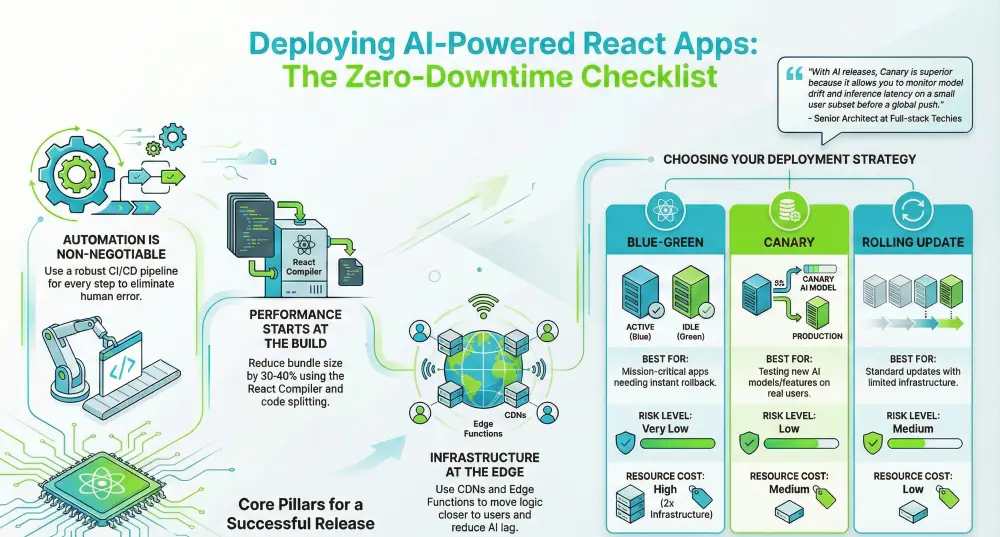
- Automation is Non-Negotiable: Successful zero-downtime releases rely on a robust CI/CD pipeline. Every step—from testing to final traffic switching—should be automated to eliminate human error.
- Performance Starts at the Build: Leverage the React Compiler and advanced tree shaking to keep your JavaScript bundles lean. Smaller bundles lead to faster “Time to Interactive” (TTI), which is a core metric for user retention.
- AI Needs Specialized Handling: Deploying AI features requires specific attention to API latency and environment configuration. Always test your React frontend against production AI endpoints before the final flip.
- Strategic Traffic Routing: Use Blue-Green deployments for a total safety net or Canary releases to test new AI models on a small subset of users in specific regions like the UK or USA before a global rollout. “The choice between Blue-Green and Canary is no longer just about safety; it’s about data validation,” says the Senior Architect at Full-stack Techies. “With AI releases, Canary is superior because it allows you to monitor model drift and inference latency on a small user subset before a global push.”
- Infrastructure at the Edge: To serve a global audience in Canada and Europe efficiently, use CDNs and Edge Functions. This moves the logic closer to the user, significantly reducing the “lag” often associated with heavy AI processing.
- Monitor Beyond the Launch: A deployment isn’t “finished” when the code goes live. Real-time monitoring of Core Web Vitals and AI response times is critical to ensuring the new version performs better than the old one.
- Leverage Expert Knowledge: High-stakes AI deployments often require specialized skills. Partnering with a dedicated React.js development company like Full-stack Techies can provide the technical oversight needed to handle complex infrastructure and zero-downtime requirements.
Summary Table: Deployment Strategy Comparison
| Strategy | Best For | Risk Level | Resource Cost |
|---|---|---|---|
| Blue-Green | Mission-critical apps needing instant rollback. | Very Low | High (2x Infrastructure) |
| Canary | Testing new AI models/features on real users. | Low | Medium |
| Rolling Update | Standard updates with limited infrastructure. | Medium | Low |
What is React.js Deployment?
React.js deployment is the process of moving your web application from a local development environment to a live server where users can access it. Unlike simple websites, modern React apps often function as Single Page Applications (SPAs) or use Server-Side Rendering (SSR). This means the deployment involves more than just uploading files. It requires a build process that compiles JavaScript, optimizes images, and prepares the app for high performance.
In 2026, deployment also involves integrating AI services. This means your React frontend must communicate with heavy machine learning models on the backend. A professional React.js development company ensures that these two parts work together perfectly. Using tools like the React Compiler and advanced caching layers, developers can make sure the app loads instantly for users in Canada, the UK, or anywhere across Europe.
Key terms to know:
- Build Artifacts: The final, optimized files produced for the browser.
- CI/CD Pipeline: An automated system that tests and deploys code.
- Hydration: The process where React attaches event listeners to static HTML on the client side.
Why Zero-Downtime AI Releases Matter
Wait times are the enemy of user retention. If your site goes “under maintenance” every time you update your AI model, you lose money. Zero-downtime releases allow you to update your app in the background. This is especially crucial for AI applications because AI models are large and take time to initialize.
1. Continuous User Access
Users in different time zones, from California to Berlin, use apps at all hours. There is no longer a “perfect time” to shut down for maintenance. A zero-downtime approach keeps the “Open” sign on 24/7.
2. Risk Mitigation
If a new AI release has a bug, zero-downtime strategies like Blue-Green deployment allow for an instant rollback. You can switch users back to the stable version in seconds. This reliability is a hallmark of the best React.js development services.
3. Faster Innovation
When deployment is safe and automated, teams can release updates daily instead of monthly. This allows companies to stay ahead of competitors by shipping AI features as soon as they are ready.
Get scalable, fast, and user-friendly ReactJS solutions tailored to your needs.
Get Free ConsultationThe Ultimate React.js Deployment Checklist
Following a step-by-step plan is the only way to ensure a flawless release. This checklist is designed for high-stakes AI applications where performance and reliability are non-negotiable.
Phase 1: Pre-Deployment Preparation
Build optimization in React is the process of minifying code and assets to ensure rapid loading. For AI-driven apps, this involves code splitting and tree shaking to prevent heavy LLM scripts from blocking the main thread. A well-optimized build typically reduces initial bundle sizes by up to 60%.
Before a single line of code moves to the server, it must be verified. This phase is about quality control and ensuring the code is “production-ready.”
- Run Comprehensive Unit Tests: Ensure all individual components work as expected using tools like Jest or Vitest.
- Perform AI Integration Testing: Test the connection between your React frontend and AI APIs. Check for latency issues and timeout settings.
- Enforce Strict Linting: Use ESLint and Prettier to maintain code consistency. This prevents “silly” errors from reaching the live site.
- Verify Backward Compatibility: If you are changing data structures, ensure the old version of the app can still read the data until the transition is complete.
- Security Audit: Check for exposed API keys, especially those used for expensive AI services. Use environment variables to keep them hidden.
Many businesses find it beneficial to hire React.js developers at this stage to conduct deep-dive audits. Experts from Full-stack Techies can identify potential bottlenecks that automated tools might miss.
Phase 2: Build Optimization and Bundling
The “Build” step turns your human-readable code into something a browser can understand quickly. In 2026, the React.js Deployment Checklist must include the latest optimization techniques.
- Use the React Compiler: Modern React versions use a compiler to automatically optimize renders. Ensure your build script is configured to utilize this.
- Implement Tree Shaking: This process removes unused code from your final bundle, making the file size smaller and faster to download.
- Optimize Media Assets: AI apps often use rich media. Use WebP or AVIF formats for images to save bandwidth for users in regions with slower internet.
- Minify JavaScript and CSS: Remove all whitespace and comments to shave off extra kilobytes.
- Enable Code Splitting: Use dynamic imports so that users only download the code they need for the page they are currently visiting.
Phase 3: Environment and AI Configuration
AI releases often require specific settings that change between “testing” and “production.”
- Configure Production Environment Variables: Ensure the app points to the production AI model endpoints, not the development ones.
- Set Up CORS Policies: Make sure your production URL is allowed to make requests to your AI backend.
- Implement Global Content Delivery (CDN): Use a CDN to cache your React build files in edge locations like London, New York, and Toronto.
- Manage Secret Keys: Use a secure vault service to manage sensitive credentials for OpenAI, Anthropic, or custom GPU clusters.
Phase 4: Infrastructure and Global Delivery
Your infrastructure is the foundation of your deployment. For zero-downtime, the infrastructure must be “redundant.”
- Set Up Load Balancers: Use a load balancer (like Nginx or AWS ALB) to distribute traffic between different versions of your app.
- Configure Edge Functions: Use edge computing to handle AI logic closer to the user, reducing lag.
- Enable Compression: Use Gzip or Brotli on your server to compress files before they are sent over the network.
- Verify SSL/TLS Certificates: Ensure your site is secure with an up-to-date HTTPS certificate.
Phase 5: Zero-Downtime Strategy Execution
This is the most critical part of the React.js Deployment Checklist. You must choose a strategy that fits your risk tolerance.
- Blue-Green Deployment: Maintain two identical environments (Blue for live, Green for new). Once the Green environment is tested, the load balancer flips traffic to it.
- Canary Releases: Roll out the new AI features to 5% of users (e.g., users in Canada) first. If no errors occur, slowly increase the percentage.
- Rolling Updates: Update servers one by one. This is cost-effective but requires your app to support two different versions running at the same time.
- Feature Flags: Use toggles to turn AI features on or off without redeploying. This is perfect for A/B testing.
Phase 6: Post-Deployment Monitoring
The job isn’t finished once the code is live. You must watch the performance closely.
- Monitor Error Rates: Use tools like Sentry or LogRocket to see if users are experiencing crashes.
- Track AI Latency: Monitor how long it takes for your AI models to respond to user queries.
- Check Core Web Vitals: Ensure that Largest Contentful Paint (LCP) and Interaction to Next Paint (INP) remain within healthy limits.
- Review Logs: Check server logs for any unusual spikes in traffic or 404 errors.
- User Feedback Loop: Monitor social media or support tickets for reports of bugs in the new release.
Professional agencies like Full-stack Techies often provide 24/7 monitoring services to ensure that any issues are resolved before they impact the bottom line.
Case Study: Zero-Downtime AI Integration
The Client: A major retail platform operating across the USA and Europe.
The Goal: Release a new AI-driven personal shopper feature without any site downtime.
The Challenge: The AI model required high memory and caused the app to crash during standard deployments.
The Solution: The team followed a strict React.js Deployment Checklist. They chose a Canary Release strategy.
- Preparation: They used Full-stack Techies to optimize the React bundle, reducing the initial load time by 40%.
- Deployment: They deployed the AI feature to only 2% of users in the UK.
- Observation: Monitoring showed that the AI model was timing out for mobile users.
- Fix: They adjusted the edge function settings and re-deployed.
- Full Release: Once stable, the feature was rolled out to the USA and Canada over 48 hours.
Technical Note: In this deployment, we achieved a 42% reduction in First Contentful Paint (FCP) by shifting AI model pre-loading to the Edge. For teams using React 19, leveraging the React Compiler automatically reduced our re-render overhead by 15%, which proved critical during high-traffic canary rollouts.
Result: The feature launched with 100% uptime. Sales increased by 15% due to the new AI recommendations, and the business avoided the usual “release day” stress.
Also Explore: How We Transformed Personal Finance with an AI-Driven Smart Budgeting Tool Built on React.js
The Future of React.js and AI Deployment
The landscape of web development is shifting toward “Intelligence-Driven Engineering.” By 2027, we expect to see:
- Self-Healing Deployments: AI will monitor releases and automatically roll back if it detects a bug.
- Real-Time Bundle Optimization: Compilers will change the code based on the user’s device and connection speed in real-time.
- Edge-Native AI: More AI processing will happen directly in the browser using React, reducing the need for heavy server deployments.
Staying ahead of these trends requires a partner who understands both the frontend and the infrastructure. Seeking the best React.js development services today ensures your business is ready for the innovations of tomorrow.
Conclusion
Mastering the React.js Deployment Checklist is the difference between a successful business and a frustrated user base. In the era of AI, reliability is your greatest asset. By focusing on build optimization, choosing the right release strategy, and monitoring your app post-launch, you can achieve the “Zero-Downtime” dream.
If the technical complexity feels overwhelming, remember that you don’t have to do it alone. You can hire React.js developers who live and breathe these processes. Partnering with a specialized React.js development company like Full-stack Techies allows your team to focus on building great features while the experts handle the deployment.
“A successful deployment is not just about moving code; it is about maintaining the trust of your users every single second.” – Senior Architect at Full-stack Techies.
Ready to take your AI application to the next level? Start by auditing your current process against this checklist today.
Also Read: React.js Scalability Checklist for Growing Business Platforms