Ultimate React.js Performance Checklist for Enterprise AI Apps in 2026
This React.js Performance Checklist outlines proven strategies enterprises use in 2026 to improve AI app speed, scalability, and user experience while reducing infrastructure costs.


Introduction to React.js Performance for AI
In the current tech landscape of 2026, building an AI application is no longer just about the model. It is about user experience. As more businesses in the USA, UK, Canada, and Europe move their AI tools from experimental stages to full-scale production, frontend speed has become a key differentiator. A slow interface can make even the most advanced AI feel broken. This is why a React.js Performance Checklist is essential for every engineering team.
If you are a CTO or a product manager looking to scale, you know that enterprise AI apps often handle massive amounts of real-time data. Whether it is a generative AI chat or a predictive analytics dashboard, the UI must stay responsive. To achieve this, many firms choose to hire React.js developers who specialize in high-performance architectures. Partnering with a leading React.js development company ensures that your application can handle the heavy lifting required by modern AI.
This guide provides a deep dive into the most effective strategies for 2025 and 2026. By following this checklist, you will reduce latency, improve core web vitals, and provide a seamless experience for your global users. Full-Stack Techies is committed to helping you navigate these technical hurdles with ease.
2026 Performance Quick-Hits
- Primary Metric: Focus on INP (Interaction to Next Paint) for AI responsiveness.
- State Management: Prefer Zustand for high-frequency AI data updates.
- Modern Rendering: Deploy React Server Components (RSC) to minimize client-side JS.
- Infrastructure: Use Edge Functions to reduce latency between users and LLM APIs.
Key Takeaways: Mastering the React.js Performance Checklist
If you are in a hurry, here are the essential points from our React.js Performance Checklist to ensure your enterprise AI app stays fast and reliable in 2026:
- Adopt React 19 Early: The new React Compiler is a game-changer. It automatically handles code optimization, which means your developers spend less time fixing lag and more time building AI features.
- Prioritize Server Components: By using React Server Components (RSC), you can move heavy data processing to the server. This reduces the amount of work the user’s browser has to do in places like London, New York, or Toronto.
- Streaming is Mandatory for AI: Don’t make users wait for a full response. Use data streaming to show AI results piece by piece. This makes the app feel instant and keeps users engaged.
- Manage Large Data with Windowing: For enterprise apps handling thousands of rows of AI data, always use “windowing” tools. This ensures the browser only renders what the user sees, preventing crashes and slow scrolling.
- Focus on the INP Metric: In 2026, “Interaction to Next Paint” (INP) is the most important speed test. It measures how quickly your app reacts when a user clicks a button. High-performance apps must aim for an INP under 200 milliseconds.
- Choose Expert Partners: Building AI tools is complex. Many successful firms in the UK and Canada choose to hire React.js developers from specialized teams like Full-Stack Techies to ensure their architecture is ready for global scale.
- Offload Heavy Math to WebAssembly: If your React app does heavy data calculations, move that logic to WebAssembly. This allows the UI to stay smooth while the “heavy lifting” happens in the background.
What is an Enterprise AI App in the React Ecosystem?
An enterprise AI application is a software platform designed for large-scale business use that integrates machine learning or artificial intelligence. In the context of React.js, these apps are characterized by:
- Real-time Data Streams: Frequently updated views based on AI model outputs.
- Complex Visualizations: Massive charts, graphs, and data tables that require high frame rates.
- High Interactivity: Users often “chat” with the data or manipulate complex parameters.
- Heavy Client-side Logic: Using the browser to run small models or process data.
When you look for the best React.js development services, you want a team that understands how these elements interact with the React Virtual DOM. In 2026, the definition of a “fast” app has changed. It is no longer just about the first page load; it is about “Interaction to Next Paint” (INP) and how smoothly the AI responses appear on the screen.
Why Performance Matters for AI Applications
Why should you care about a React.js Performance Checklist? For enterprise users in New York, London, or Berlin, time is money.
- Reduced Latency: AI models already take time to “think.” If your React frontend adds another 2 seconds of rendering lag, the user will leave.
- Scalability: As your user base grows across Europe and North America, unoptimized code will lead to high server costs and browser crashes.
- User Trust: In the AI world, “speed equals intelligence.” A laggy UI makes users doubt the accuracy of the AI results.
- SEO and Accessibility: Google’s algorithms in 2026 heavily favor apps that pass all Core Web Vitals tests.
Using professional React.js development services can help you avoid the common pitfalls that slow down enterprise tools.
The Ultimate React.js Performance Checklist
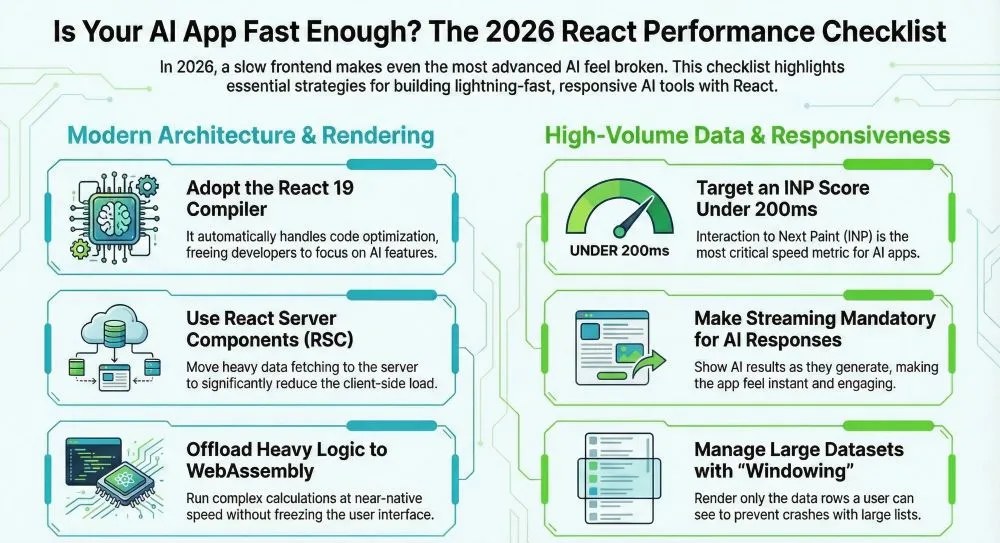
Below is the definitive React.js Performance Checklist specifically designed for enterprise-grade AI applications.
1. Implement the React 19 Compiler
Direct Answer: To optimize rendering for AI apps in 2026, leverage React 19’s Selective Hydration and the React Compiler. These features eliminate manual memoization and allow the UI to remain interactive while heavy AI data chunks load in the background.
Overview: The React Compiler (formerly React Forget) is now a standard for enterprise apps in 2026. It automatically optimizes your code by memoizing values and functions.
- Actionable Steps:
- Enable the React Compiler in your build pipeline (Vite or Webpack).
- Audit legacy components to ensure they are compatible with the compiler’s rules.
- Remove unnecessary useMemo and useCallback hooks that the compiler now handles automatically.
- Why it is crucial: It reduces the “mental overhead” for developers and prevents common “over-rendering” bugs that slow down AI dashboards.
2. Use React Server Components (RSC)
Overview: RSC allows you to render parts of your AI UI on the server, reducing the amount of JavaScript sent to the user’s browser in the UK or Canada.
- Actionable Steps:
- Move data-heavy AI fetching logic to Server Components.
- Only use Client Components for interactive elements like chat inputs or toggle buttons.
- Use frameworks like Next.js or Remix that support RSC natively.
- Why it is crucial: Smaller bundles mean faster load times on mobile devices and slower networks common in rural parts of Europe.
3. Optimize AI Data Streaming
Overview: Most AI models today stream data token by token. Your React app must handle this without locking the UI thread.
- Actionable Steps:
- Use Server-Sent Events (SSE) or WebSockets for streaming AI responses.
- Implement “Optimistic Updates” to show user input immediately while the AI processes.
- Use the Suspense component to show beautiful loading skeletons while the stream builds.
- Why it is crucial: Streaming makes the AI feel faster and more interactive, which is vital for high-end enterprise tools.
4. Master Component Memoization
Overview: Even with the new compiler, large AI apps often need manual checks to prevent the re-rendering of complex components like 3D data maps.
- Actionable Steps:
- Wrap heavy visualization components in
React.memo. - Ensure that props passed to these components are primitive values or stable references.
- Use the React DevTools Profiler to find “wasted” renders.
- Wrap heavy visualization components in
- Why it is crucial: In an AI dashboard with 100+ components, one small mistake can trigger a cascade of renders that freezes the page.
5. Apply Advanced Code Splitting
Overview: Don’t make your users download the entire “Admin” and “AI Analysis” modules at once.
- Actionable Steps:
- Use
React.lazyand dynamicimport()for route-based splitting. - Implement “Component-level splitting” for heavy AI libraries (like D3.js or Three.js).
- Pre-fetch the “likely next” route using link
rel="prefetch"to give a “zero-lag” feel.
- Use
- Why it is crucial: Smaller initial payloads are essential for users in the USA and Europe who expect instant access to enterprise software.
Get scalable, fast, and user-friendly ReactJS solutions tailored to your needs.
Get Free Consultation6. Leverage Windowing for Large Data
Overview: AI often generates thousands of lines of logs or data. Rendering them all will crash the browser.
- Actionable Steps:
- Integrate libraries like
react-windoworreact-virtualized. - Only render the items currently visible in the user’s viewport.
- Use “Dynamic Height” support for AI chat bubbles that vary in size.
- Integrate libraries like
- Why it is crucial: This keeps memory usage low and the frame rate high, even with 10,000+ data rows.
7. Fine-Tune Global State Management
Overview: Avoid using the Context API for frequently changing AI state.
- Actionable Steps:
- Use atomic state libraries like Zustand or Jotai for AI chat histories.
- Split your state into “slices” to ensure only the necessary components re-render when an AI value changes.
- Use TanStack Query (React Query) for managing server-side AI data and caching.
- Why it is crucial: Efficient state management is the backbone of any application built by a top-tier React.js development company.
8. Offload Logic to WebAssembly (Wasm)
Overview: For 2026, many AI apps run small models or data processing directly in the browser.
- Actionable Steps:
- Identify heavy math or data processing tasks in your React code.
- Rewrite these parts in Rust or C++ and compile them to WebAssembly.
- Call these Wasm modules from your React hooks using Web Workers.
- Why it is crucial: Wasm runs at near-native speed, preventing your React UI from “stuttering” during heavy calculations.
9. Implement Asset and Image Optimization
Overview: High-resolution AI-generated images or icons can bloat your page.
- Actionable Steps:
- Use modern formats like WebP or AVIF.
- Implement “Lazy Loading” for images that are not on the screen (using the
loading="lazy"attribute). - Use a Content Delivery Network (CDN) with nodes in the USA, UK, Canada, and Europe.
- Why it is crucial: Fast image loading is a key part of the React.js Performance Checklist for any visual AI platform.
10. Continuous Performance Monitoring
Overview: You cannot fix what you do not measure.
- Actionable Steps:
- Set up Lighthouse CI to run on every pull request.
- Use Sentry or LogRocket to monitor real-user performance in production.
- Focus on the “Total Blocking Time” (TBT) metric, as it most accurately reflects AI app lag.
- Why it is crucial: Performance is not a one-time task; it requires constant attention to keep your enterprise app competitive.
Case Study: Optimizing a Fintech AI Dashboard
A major financial firm in London was struggling with its AI-powered risk assessment tool. The app, built in React, took over 8 seconds to become interactive. This delay was costing the company time and frustrating their analysts in New York and Toronto.
They decided to hire React.js developers from a specialized agency to perform a deep audit. By following a structured React.js Performance Checklist, the team implemented the following:
- Virtualized Lists: They used React-Window for the 5,000+ daily transactions shown on the screen.
- Streaming SSR: They switched to Next.js to stream AI risk scores as they were calculated.
- Zustand State: They replaced a bloated Redux store with Zustand to handle real-time price updates.
The Result:
- Load Time: Dropped from 8.2 seconds to 1.4 seconds.
- Memory Usage: Reduced by 60%.
- User Retention: Increased by 25% within the first quarter.
This case study proves that choosing the best React.js development services can have a direct impact on your business’s bottom line.
Also Explore: How Full-Stack Techies Built an AI-Powered Healthcare Appointment Booking System with React.js
The Future of React and AI
As we look toward 2027, the synergy between React and AI will only grow. We expect to see:
- AI-Native Frameworks: React frameworks that automatically optimize component placement based on AI predicted user behavior.
- Edge-Side Rendering: Moving logic even closer to the user (in local city hubs) to eliminate the “speed of light” delay.
- Voice-First UIs: Performance will be measured by how quickly the UI can react to voice-to-text AI inputs.
Companies that prioritize these trends today will lead the market tomorrow. If you want to stay ahead, it is time to work with a React.js development company like Full-Stack Techies that understands the future of the web.
“Performance is the most important feature of any AI application. If it isn’t fast, it isn’t useful.” — Industry Lead, Full-Stack Techies
Conclusion
Building a high-performance AI application in 2026 requires more than just clean code. It requires a strategic approach to rendering, data handling, and infrastructure. By following this React.js Performance Checklist, you can ensure that your platform remains competitive in the demanding markets of the USA, UK, Canada, and Europe.
Don’t let a slow UI hold back your AI’s potential. Whether you need to hire react.js developers to fix existing bottlenecks or you are looking for the best react.js development services to build a new product from scratch, focus on performance from day one.
Full-Stack Techies is here to help you build the next generation of enterprise AI. Our experts are ready to turn your vision into a lightning-fast reality.
Also Read: React.js Security Checklist for AI-Driven Enterprise Apps