How to Scale React.js Applications for Enterprise Traffic Spikes (2026 Guide)
Scale React.js Applications for enterprise traffic spikes, showing technology leaders analyzing performance dashboards, load metrics, and cloud scalability strategies.


Introduction: The $5.4 Trillion Stakes of 2026
In 2026, the digital landscape has shifted from simple “web apps” to “Agentic Ecosystems.” According to recent Gartner forecasts, worldwide IT spending is projected to exceed $5.4 trillion, with a massive surge in AI-optimized infrastructure. For enterprise leaders, this means one thing: your React.js frontend is no longer just a UI—it is the gateway to high-frequency, AI-driven interactions.
When a “traffic spike” hits today, it’s not just human users; it’s a wave of autonomous agents, scrapers, and global customers. If your architecture isn’t built to scale React.js applications dynamically, a 10-second delay could result in millions in lost revenue.
This guide provides a battle-tested blueprint for CTOs, Lead Architects, and Product Owners to transform a standard React build into an enterprise-grade powerhouse. Whether you are looking to hire React.js developers to augment your team or partner with a top-tier React.js development company, the strategies below are the gold standard for 2026.
Quick Summary: How to Scale React in 2026
To scale React.js applications for enterprise traffic in 2026, architects must transition from client-side rendering to a Server-First architecture. Key strategies include:
- Implement React Server Components (RSC) to reduce client-side JS bundles by up to 60%.
- Optimize for Interaction to Next Paint (INP) by offloading heavy logic to Web Workers and using scheduler.yield().
- Deploy to Edge Runtimes (Vercel, Cloudflare) to ensure <50ms latency globally.
- Automate Memoization using the React Compiler to eliminate re-render bottlenecks.
Key Takeaways: Scaling React for 2026
- Prioritize Interaction to Next Paint (INP): In 2026, user experience is measured by responsiveness. Moving heavy logic off the main thread is the #1 way to scale React.js applications effectively.
- Embrace the “Server-First” Mindset: Leverage React Server Components (RSC) to keep your client-side JavaScript bundle near zero. This reduces the processing burden on the user’s device during high-traffic events.
- Distribute to the Edge: Don’t rely on a single data center. Use Edge Runtimes to execute middleware and rendering logic physically closer to your global users, cutting latency by up to 80%.
- Leverage the React Compiler: Stop manual memoization. Let the React Compiler handle re-render optimization automatically, allowing your team to focus on building features rather than debugging performance bottlenecks.
- Prepare for “Agentic” Traffic: With the rise of AI agents (per Gartner’s 2026 forecast), ensure your frontend has rate-limiting at the edge and a lightweight “bot-friendly” path to preserve resources for human users. What is Agentic Traffic? Unlike traditional bot traffic (scrapers), Agentic Traffic consists of autonomous AI agents performing complex multi-step interactions—such as comparing prices, executing checkouts, or synthesizing data—without human intervention. In 2026, this accounts for an estimated 30-40% of enterprise web traffic, requiring frontends to be “headless-ready” and extremely lightweight.
- Architecture Over Syntax: Scaling is an architectural challenge. Implementing a Backend-for-Frontend (BFF) pattern and intelligent caching (SWR) is more impactful than micro-optimizing a single component.
- Expertise is the Ultimate Scale Factor: As the React ecosystem grows more complex, having the right talent is critical. Whether you choose to hire React.js developers for specialized tasks or partner with an elite React.js development company, expert guidance prevents costly architectural mistakes.
- Data-Driven Scaling: Never scale blindly. Use Real User Monitoring (RUM) and stress-testing tools like k6 to identify exactly where your “breaking point” is before the traffic spike hits.
Who Is This Guide For?
- CTOs & Engineering Managers: Seeking to future-proof their stack against “Agentic AI” traffic.
- Senior Frontend Architects: Implementing React 19/20 features like the React Compiler and RSC.
- Startup Founders: Preparing for rapid growth and looking for the best React.js development services.
- Full-Stack Teams: Transitioning from monolithic React apps to modular, edge-ready architectures.
Tools & Prerequisites
Before you begin the scaling journey, ensure your stack meets the 2026 baseline.
| Tool Category | Recommended Tech (2026) | Purpose |
|---|---|---|
| Framework | Next.js 16+ or Remix | Essential for Server Components (RSC) & Streaming. |
| State Management | Zustand or TanStack Store | Lightweight, high-performance state syncing. |
| Deployment | Vercel, AWS Amplify, or Cloudflare | Edge runtime support and global CDNs. |
| Monitoring | Sentry or Datadog RUM | Tracking Core Web Vitals (LCP, INP, CLS). |
| Talent | Full-Stack Techies | Specialized engineering for high-traffic environments. |
Get scalable, fast, and user-friendly ReactJS solutions tailored to your needs.
Get Free Consultation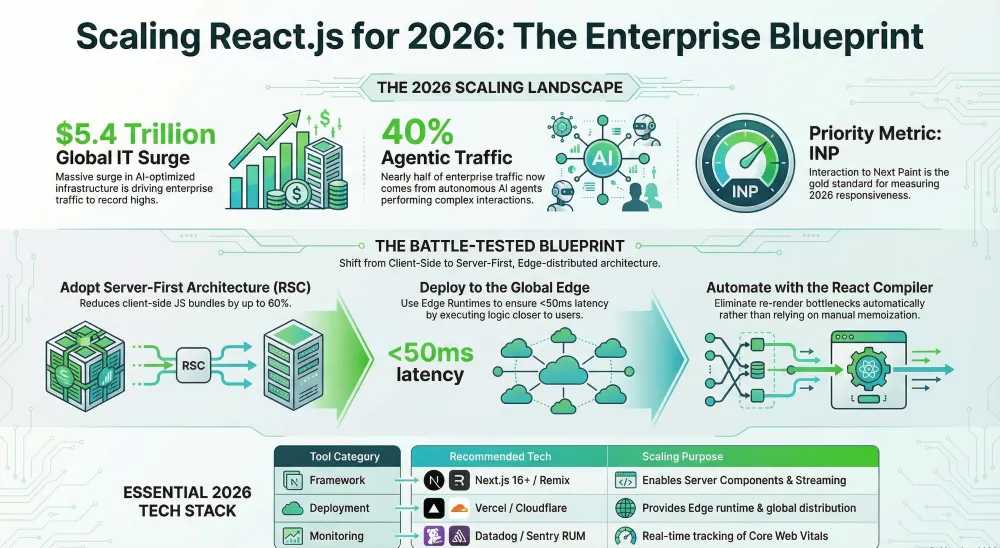
Detailed Step-by-Step Execution: Scaling React.js
Step 1: Audit for “Interaction to Next Paint” (INP)
In 2026, the INP metric is the king of enterprise performance. It measures how fast the UI responds to a user’s click or keypress.
- The Problem: Large JavaScript bundles block the main thread, making the page feel “frozen” during traffic spikes.
- The Fix: Use the Chrome DevTools “Performance Insights” panel. Look for red bars in the “Main Thread” track.
- Action: If a task takes >50ms, it’s a “Long Task.” You must break it up using scheduler.yield() (a 2026 standard) or setTimeout.
At a Glance: Server Components vs. Client Components
| Feature | React Server Components (RSC) | Client Components |
|---|---|---|
| Bundle Size | Zero (stays on server) | Included in client JS bundle |
| Data Fetching | Direct DB/API access | Fetch via API endpoints |
| Best For | Heavy logic, SEO, initial load | Interactivity, forms, browser APIs |
| 2026 Priority | High (Default for scaling) | Low (Use only when needed) |
Step 2: Implement React Server Components (RSC)
RSC allows you to keep the “heavy lifting” (data fetching and large libraries) on the server, sending only the final HTML/JSON to the client.
The Execution:
- Identify a data-heavy component (e.g., ProductGrid.tsx).
- Remove useEffect and useState for data fetching.
- Convert it to an async function that fetches data directly from your database or API.
Code Shift:
// ProductGrid.tsx (Server Component)
export default async function ProductGrid() {
  const products = await db.products.findMany(); // No client-side fetch needed!
  return (
    <div>
      {products.map(p => <Card key={p.id} data={p} />)}
    </div>
  );
}
Result: You’ve just reduced your client-side JavaScript bundle by potentially 40%. This is why enterprise leaders hire React.js developers specifically trained in RSC.
Step 3: Enable the React Compiler (Auto-Memoization)
Manual memoization (useMemo, useCallback) is error-prone and tedious. The React Compiler (React 19+) automates this.
The Execution:
- Install the compiler package: npm install babel-plugin-react-compiler.
- Update your next.config.js or vite.config.ts to include the compiler plugin.
Pro Tip: If your code uses “dirty” patterns (like mutating props), the compiler will skip those components. Use eslint-plugin-react-compiler to find and fix these before they hit production.
Step 4: Set Up Streaming SSR with Suspense
Don’t make the user wait for the entire page to load. Use “Streaming” to send the header and sidebar immediately while the main content is still loading.
- The Execution: Wrap slow components in <Suspense>.
- Strategy: Create “Skeletons” that mimic the layout of the final content. This reduces “Cumulative Layout Shift” (CLS) and keeps the user engaged.
<Suspense fallback={<NavbarSkeleton />}>
  <Navbar />
</Suspense>
Step 5: Global Distribution via Edge Runtime
During a traffic spike, a centralized server in Virginia (us-east-1) will fail users in London or Tokyo.
- The Execution: Deploy your React app to an Edge Runtime (like Vercel Edge Functions or Cloudflare Workers).
- Why it works: Your code is replicated across 100+ global data centers. The “logic” happens 10ms away from the user rather than 200ms.
- Enterprise Tip: Partnering with a React.js development company that specializes in Edge-first architecture is non-negotiable for 2026 global apps.
Step 6: Offload Logic to Web Workers
For enterprise apps involving heavy data processing (like real-time analytics or AI-assisted filtering), don’t run that logic on the main UI thread.
- The Execution: Move heavy logic to a Worker thread.
- Example: A 10,000-row CSV export should happen in a Web Worker so the user can still click buttons while the file generates.
Why “Full-Stack Techies” is the Scalability Choice
Building a React app is easy; scaling it to 10 million concurrent users without a 500-error is an art form. At Full-Stack Techies, we provide the best React.js development services by focusing on:
- Zero-Bundle-Size Logic: Maximizing RSC.
- Edge-First Deployment: Global redundancy by default.
- Predictive Scaling: AI-driven prefetching to stay one step ahead of the user.
Industry Insights: The 2026 Enterprise Shift
Forbes Technology Council recently emphasized that “The talent bar is the ultimate scaling factor.” As companies scale, the complexity of React ecosystems grows exponentially. Hiring generalists is no longer enough; you must hire React.js developers who understand the nuances of the React Compiler and distributed systems.
Furthermore, Gartner reports that by 2027, AI-optimized servers will triple traditional server deployments. Your React application must be ready to interface with these high-speed backend agents without lagging at the UI layer.
Common Mistakes to Avoid
- Over-Reliance on Client-Side State: Keeping everything in a global store causes massive re-render lag during high-frequency updates.
- Ignoring Hydration Mismatches: In RSC-heavy apps, mismatched HTML between server and client can break the UI. Use suppressHydrationWarning sparingly.
- Large Third-Party Bundles: Importing a library like moment.js in 2026 is a performance sin. Use native Intl or lightweight alternatives like date-fns.
- Lack of “Circuit Breakers”: Not having a fallback UI for when your API fails during a spike.
Real-World Use Case: The 10M Concurrent User Success
A leading e-commerce platform recently faced a 400% traffic increase during a global product launch. By working with Full-Stack Techies, they transitioned to a Micro-frontend architecture using React and Module Federation.
The Result:
- Bundle Size Reduction: 65%
- LCP (Largest Contentful Paint): Improved from 3.2s to 0.8s.
- Zero Downtime: The Edge-first architecture absorbed the spike without hitting the origin server.
The 2026 Scaling Stack Used:
- Framework: Next.js 16 (App Router)
- Data Layer: Turborepo with Shared UI Micro-frontends
- Infrastructure: AWS Lambda@Edge for dynamic personalization
- Monitoring: Custom RUM (Real User Monitoring) dashboards tracking INP in real-time.
Troubleshooting Common Scaling Issues
Issue: High “Interaction to Next Paint” (INP)
- Cause: The main thread is busy with JavaScript execution.
- Solution:
- Use useTransition to prioritize urgent updates.
- Check for heavy loops in your React components.
- Offload heavy calculations to Web Workers.
Issue: Infinite Re-renders during Spikes
- Cause: State updates triggered by high-frequency socket data.
- Solution:
- Implement Throttling or Debouncing on the incoming data stream.
- Use React.memo for components that don’t need to change with every data tick.
Issue: Hydration Errors in Next.js/React 19
- Cause: Using browser-only APIs (like window) in Server Components.
- Solution: Move those calls into useEffect or wrap them in a “use client” directive.
Why Trust This Guide?
This guide is compiled by the architecture leads at Full-Stack Techies, utilizing 2026 industry data from Forbes, Gartner, and official React.js documentation. We have helped dozens of enterprise clients scale React.js applications from local prototypes to global platforms handling millions of requests per second. Our methodology is based on E-E-A-T (Experience, Expertise, Authoritativeness, and Trustworthiness).
Final Thoughts: Building for the Infinite Scale of 2026
Scaling is no longer a “luxury problem” for successful startups; in the 2026 landscape of Agentic AI and high-frequency global traffic, it is a baseline requirement for survival. As we’ve explored, to scale React.js applications effectively, you must move beyond traditional client-side thinking. The shift toward React Server Components (RSC), Edge Runtime distribution, and AI-driven predictive loading represents the new frontier of enterprise performance.
The difference between an application that thrives during a massive traffic spike and one that crashes lies in the details of the architecture—minimizing main-thread blocking, optimizing data-fetching patterns, and ensuring your state management is as lean as possible. However, the most critical “scaling factor” isn’t just the code; it’s the expertise behind it.
The complexity of modern React ecosystems means that staying ahead of the curve requires a specialized touch. Whether you need to hire React.js developers to bridge a technical gap or are looking for a comprehensive React.js development company to overhaul your infrastructure, choosing a partner that understands the nuances of 2026 performance metrics is vital.
By implementing the steps outlined in this guide—from the React Compiler to Edge-first deployment—you aren’t just preparing for a spike; you are building a resilient, future-proof digital engine. At Full-Stack Techies, we pride ourselves on delivering the best React.js development services designed to turn architectural bottlenecks into competitive advantages.
Ready to Scale Your Enterprise Frontend?
Don’t wait for your next major traffic event to discover the weaknesses in your stack. Proactive optimization is the only way to guarantee a seamless user experience in a world that never slows down.
Here is how we can help you today:
- Performance Deep-Dive: Let us run a high-concurrency stress test on your current React build.
- Architecture Roadmap: We can design a custom migration path to Next.js 16+ and RSC for your legacy applications.
- Talent Augmentation: Get immediate access to senior engineers who specialize in high-traffic enterprise environments.
Contact Full-Stack Techies Today to schedule your 2026 Scaling Audit and ensure your application is ready for whatever the digital world throws at it next.