Top 10 Best DevOps Platforms Compared: Features, Automation, CI/CD & Use Cases
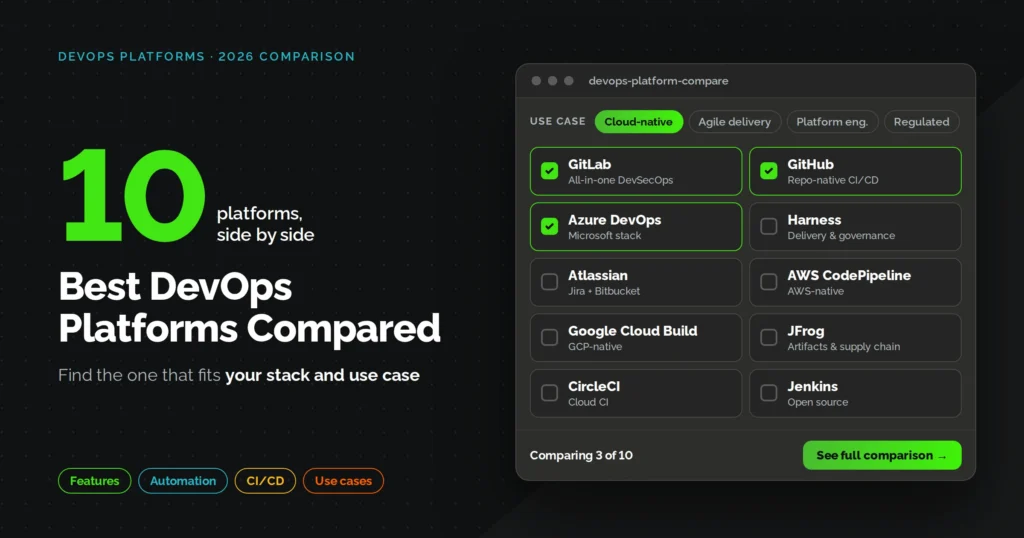

Picking a DevOps platform used to mean choosing between a handful of CI servers and calling it done. That is not true anymore. The global DevOps market is valued at roughly 24.30 billion dollars in 2026 and analysts project it to climb past 125 billion dollars by 2034, which tells you how fast the tooling category is expanding and how crowded it has gotten.
Every platform on this list claims to automate your pipeline, cut deployment risk, and get code to production faster. Some of those claims hold up under real usage, some don’t. We compared these ten platforms strictly on features, automation depth, CI/CD support, and where each one actually fits, so you can skip the marketing copy and get to a decision.
Overview
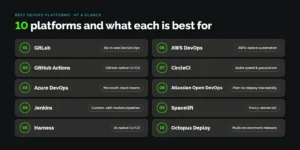
- GitLab is the best all-in-one DevOps platform for teams that want source control, CI/CD, and security scanning under one roof.
- GitHub Actions is the best DevOps automation platform for teams already living inside the GitHub ecosystem.
- Azure DevOps is the best DevOps platform for organizations standardized on Microsoft and Azure infrastructure.
- Jenkins is the best open source DevOps automation platform for teams that need full pipeline customization.
- Harness is the best AI native DevOps platform for automating CI/CD, testing, and release verification.
- AWS DevOps is the best DevOps platform for teams building natively on AWS infrastructure.
- CircleCI is the best CI/CD automation platform for teams that care most about build speed and parallelism.
- Atlassian Open DevOps is the best DevOps platform for teams that need tight planning to deployment traceability.
- Spacelift is the best DevOps platform for policy driven infrastructure as code automation.
- Octopus Deploy is the best DevOps platform for release management across multi cloud and on premises environments.
Best DevOps Platforms at a Glance: Quick Comparison Table
Here is the short version before we get into detail on each platform.
| Platform | Best For | Deployment Model | Free Tier | Starting Price |
|---|---|---|---|---|
| GitLab | All-in-one DevSecOps | Cloud, self-managed | Yes | $29/user/month (Premium) |
| GitHub Actions | GitHub-native CI/CD | Cloud, self-hosted runners | Yes | $4/user/month (Team) |
| Azure DevOps | Microsoft-stack teams | Cloud, on-premises | Yes (5 users) | $6/user/month (Basic) |
| Jenkins | Custom, self-hosted pipelines | Self-hosted | Yes, fully free | Free (infra cost only) |
| Harness | AI-native CI/CD and CD | Cloud, self-hosted | Yes (up to 5 devs) | Free tier, paid from ~$50/month |
| AWS DevOps | AWS-native automation | Cloud | Yes (usage-based free tier) | Pay-as-you-go per service |
| CircleCI | Build speed and parallelism | Cloud, self-hosted | Yes (6,000 min/month) | $15/month (Performance) |
| Atlassian Open DevOps | Planning-to-deployment traceability | Cloud, Data Center | Yes (up to 10 users) | $7.91/user/month (Jira Standard) |
| Spacelift | Policy-driven IaC orchestration | Cloud, self-hosted workers | Yes, limited | Custom, consumption-based |
| Octopus Deploy | Multi-environment release management | Cloud, self-hosted | Yes, limited | Custom, scales with deployment targets |
How We Evaluated These DevOps Platforms
We didn’t rank these on brand recognition alone. Each platform was checked against six practical criteria: CI/CD pipeline depth, source control integration, infrastructure-as-code support, security and compliance tooling, ecosystem breadth, and pricing transparency.
That matters because the gap between average and elite DevOps teams keeps widening every year. DORA’s own research puts hard numbers on it: elite performing teams now deploy 182 times more frequently than low performers, with roughly eight times lower change failure rates and recovery times that are over 2,000 times faster. A platform doesn’t close that gap by itself, but the wrong one absolutely slows you down.
We also weighed how each vendor talks about AI inside the pipeline, since that’s where most 2026 roadmaps are headed, and whether the platform has been independently recognized. Harness, for instance, was named a Leader in the 2026 Gartner Magic Quadrant for DevSecOps Platforms for the third year running, which is one of the reasons it made this list.
The 10 Best DevOps Platforms for CI/CD and Automation
1. GitLab
GitLab remains the reference point for “all-in-one” DevOps, and for good reason. It bundles source control, CI/CD, container registry, and built-in SAST/DAST scanning into a single application, which cuts down on the tool sprawl that plagues a lot of mid-size engineering orgs.
Best for: Teams that want to consolidate three or four separate tools into one governed platform.
Key features:
- Auto DevOps for language detection and pipeline auto-configuration
- Built-in SAST, DAST, and dependency scanning without third-party add-ons
- GitLab Duo for AI-assisted code review and pipeline suggestions
- Self-managed or SaaS deployment, useful for regulated industries
Pricing: Free tier available; Premium runs $29/user/month billed annually; Ultimate is roughly $99/user/month or custom for larger orgs.
One recurring theme in developer discussions is that GitLab’s biggest advantage isn’t a single flashy feature, its the fact that security scanning and CI/CD live in the same YAML file instead of three different vendor dashboards.
2. GitHub Actions
GitHub Actions is where most new projects start their CI/CD journey in 2026, mainly because there’s no separate tool to adopt if your code already lives on GitHub. Pipelines are defined as YAML workflows that trigger directly off repository events.
Best for: Teams already on GitHub who want CI/CD automation without adding another vendor relationship.
Key features:
- Massive marketplace of prebuilt actions, so less custom glue code
- Matrix builds across OS and language versions
- Self-hosted runner support for private infrastructure
- Native integration with pull requests, issues, and code scanning
Pricing: Free for public repos with 2,000 minutes/month on private ones; Team is $4/user/month with 3,000 minutes; Enterprise runs $21/user/month with 50,000 minutes included.
3. Azure DevOps
Azure DevOps is the safe, mature choice for organizations already committed to Microsoft infrastructure. It bundles Repos, Pipelines, Boards, Test Plans, and Artifacts into one suite that plays cleanly with Entra ID and existing Microsoft licensing.
Best for: Enterprises standardized on Azure or Microsoft 365 that want centralized governance.
Key features:
- Azure Boards for sprint planning and work item tracking
- Azure Pipelines with both Microsoft-hosted and self-hosted agents
- Native Entra ID (Azure AD) single sign-on and RBAC
- Azure Artifacts for package and dependency management
Pricing: First five users free; Basic license is $6/user/month; Basic + Test Plans jumps to $52/user/month. Pipelines include 1,800 free minutes, then $40 per extra Microsoft-hosted parallel job. According to Stack Overflow’s 2025 developer survey, 18.6% of professional developers reported using Azure DevOps, which puts real numbers behind its enterprise reach.
4. Jenkins
Jenkins is the oldest name on this list and it’s still standing, largely because nothing else matches its plugin ecosystem when you need something truly custom. It requires more setup than any SaaS competitor here, but that flexibility is the whole point.
Best for: Enterprises with the engineering resources to self-host and maintain a fully customizable pipeline.
Key features:
- Over 1,900 plugins covering nearly every tool in the DevOps toolchain
- Pipeline-as-code through Jenkinsfile, both declarative and scripted
- Distributed builds across multiple agent nodes
- Complete control over infrastructure, useful for air-gapped environments
Pricing: Free and open source. Your real cost is the infrastructure and the engineer-hours needed to maintain it, which many teams underestimate at the start.
5. Harness
Harness has repositioned itself from a pure CD tool into a broader AI-native software delivery platform, and the 2026 Gartner Magic Quadrant recognition backs that shift up. Its differentiator is Continuous Verification, which analyzes post-deployment metrics against a baseline automatically.
Best for: Teams that want AI-assisted rollback decisions and governed CD without hand-writing verification scripts.
Key features:
- AI-driven anomaly detection and automated rollback
- Feature flags, chaos engineering, and cost management modules on one platform
- GitOps-based CD built on Argo CD under the hood
- Policy-as-code enforcement across every module
Pricing: Free Community Edition for up to five developers; paid Essentials tier starts around $50/month; Enterprise is custom quoted and typically negotiated per organization.
6. AWS DevOps
AWS doesn’t sell a single “DevOps platform” the way GitLab or Azure do. Instead it offers a modular suite, CodePipeline, CodeBuild, CodeDeploy, and CloudFormation, that you wire together, which suits teams who want granular control over each stage.
Best for: Organizations running most of their infrastructure on AWS who want native, pay-as-you-go automation.
Key features:
- CodePipeline for build, test, and deploy orchestration
- CloudFormation for declarative infrastructure as code
- CloudWatch for real-time performance and log monitoring
- Deep native integration with ECS, Lambda, and EKS
Pricing: No flat platform fee. Each service is billed individually, usage-based, so a small team’s monthly cost can be a few dollars while an enterprise workload scales into the thousands.
7. CircleCI
CircleCI built its reputation on raw build speed, and that focus hasn’t changed even as competitors added more platform features around it. It’s a good fit for teams who have already picked their source control and just need a faster CI layer on top.
Best for: Teams bottlenecked by slow builds who want configurable parallelism without managing their own runners.
Key features:
- Resource classes you can size up for CPU or memory-heavy jobs
- Docker layer caching to speed up repeated builds
- Test splitting across parallel containers
- Self-hosted runner option for private networks
Pricing: Free tier includes 6,000 build minutes/month; Performance plan starts at $15/month with 30,000 credits included; Scale and Enterprise are custom quoted for larger teams.
8. Atlassian Open DevOps
Atlassian’s answer to the “all-in-one” question ties Bitbucket, Jira, and Confluence together, which matters most for teams that live and die by sprint tracking. The pitch here isn’t the fastest CI/CD engine, it’s the traceability from a ticket to the actual deployed commit.
Best for: Product-led teams that need visibility from planning through release inside one connected workflow.
Key features:
- Jira for sprint planning, backlogs, and roadmaps
- Bitbucket Pipelines for CI/CD tied directly to Jira issues
- Confluence for shared documentation across dev and ops
- Strong third-party marketplace for compliance and reporting add-ons
Pricing: Jira Cloud is free for up to 10 users; Standard runs $7.91/user/month; Premium is $14.54/user/month on annual billing. Bitbucket and Confluence are priced separately, so total cost depends on which pieces you actually use.
9. Spacelift
Spacelift is the newest name on this list, and it’s earned its spot by solving a problem most CI/CD platforms treat as an afterthought, governance over infrastructure changes. Its policy engine, built on Open Policy Agent, lets platform teams block risky Terraform or OpenTofu changes before they ever run.
Best for: Platform engineering teams managing infrastructure at scale across multiple clouds who need real change control.
Key features:
- Native drift detection with automated remediation
- Stack dependencies to control run order across environments
- Blueprints for pre-configured infrastructure templates
- Support for Terraform, OpenTofu, Pulumi, CloudFormation, and Ansible
Pricing: Free and Starter tiers exist for smaller usage; most teams land on consumption-based pricing tied to managed resources, runs, and seats, which means the real number depends heavily on your infrastructure footprint.
10. Octopus Deploy
Octopus Deploy focuses on the last mile that a lot of CI tools handle poorly, actually getting a release out across dozens of environments without a human clicking through each one. It plugs into whatever CI tool you already use rather than competing with it.
Best for: Teams managing releases across multiple environments, including hybrid and on-premises setups, that need a dedicated deployment layer.
Key features:
- Over 500 pre-built deployment step templates
- Environment-based release promotion with approval gates
- Runbooks for repeatable, non-deployment operational tasks
- Native integrations with Azure DevOps, Jenkins, GitHub Actions, and Kubernetes
Pricing: Free tier available for small teams; paid plans scale with the number of deployment targets rather than seats, so cost is quoted based on your environment count.
GitLab vs GitHub Actions vs Azure DevOps: Which One Fits Your Team?
This is the comparison most teams actually search for, so here’s the direct answer.
Pick GitLab if you want one platform to replace three or four separate tools and you need built-in security scanning without extra vendor contracts.
Pick GitHub Actions if your code already lives on GitHub and you want the fastest path to a working pipeline with minimal setup.
Pick Azure DevOps if your organization already runs on Microsoft infrastructure and needs centralized governance through Entra ID.
The honest answer for a lot of growing teams is that this isn’t a permanent choice. Plenty of organizations start on GitHub Actions, then add GitLab or Azure DevOps once compliance or scale demands it.
How to Choose the Best DevOps Automation Platform
Feature lists only get you so far. Before you commit budget, run your shortlist through this checklist.
- Team size and maturity: A five-person startup doesn’t need the same governance layer as a 500-engineer enterprise.
- Existing tool stack: Switching source control just to gain a CI/CD feature rarely pays off; check what plugs into what you already run first.
- Compliance and regulatory needs: Regulated industries usually need self-managed or air-gapped deployment options, which narrows the field fast.
- Multi-cloud vs single-cloud: If you’re locked into one cloud provider, that provider’s native tooling can save real money.
- Budget model: Per-seat pricing punishes growing teams differently than usage-based pricing, so model both against your actual headcount.
If you’d rather not run this evaluation solo, this is exactly the kind of decision a managed DevOps partner like FullStackTechies gets asked to weigh in on regularly, since the “right” platform genuinely does depend on your existing stack and compliance posture rather than any single universal answer.
What Do These DevOps Platforms Actually Cost?
Published list prices rarely tell the full story, since most of these platforms charge separately for build minutes, storage, or add-on security modules. Here’s a rough snapshot based on current vendor pricing pages.
| Platform | Entry Paid Tier | What It Typically Adds |
|---|---|---|
| GitLab | $29/user/month | CI/CD minutes, merge approvals, code owners |
| GitHub Actions | $4/user/month | Extra Actions minutes, package storage |
| Azure DevOps | $6/user/month | Additional parallel pipeline jobs at $40 each |
| CircleCI | $15/month | 30,000 monthly credits, larger resource classes |
| Atlassian (Jira) | $7.91/user/month | Higher automation run limits, audit logs |
| Harness | ~$50/month | AI verification, additional service instances |
Jenkins, AWS DevOps, Spacelift, and Octopus Deploy don’t fit neatly into a per-seat table since they bill on infrastructure usage, consumption, or deployment targets instead. Budget for those based on your actual workload, not a flat headcount number.
What DevOps Engineers Are Saying: Real Team Experiences
Vendor pricing pages and feature lists only tell half the story, so it’s worth checking what practitioners say once the honeymoon period is over.
In one r/devops thread, an engineer at a small company described actively debating whether to move off Azure DevOps, pointing to a cluttered interface and convoluted pipeline setup as the main pain points, while naming GitLab and GitHub Actions as the two most mature alternatives worth considering.
In a separate r/devops thread, someone transitioning from a developer role into platform engineering listed the stack they were building toward, Terraform for infrastructure, Jenkins and CodeDeploy for CI/CD, Kubernetes for orchestration, and CloudFormation alongside Prometheus for infrastructure and monitoring.
Both threads point to the same reality: almost nobody runs a single DevOps platform end to end. Most real-world stacks combine two or three tools from this list, which is worth keeping in mind before you assume one platform has to replace everything you already use.
The Bottom Line
There isn’t one best DevOps platform, there’s a best fit for where your team is right now. GitLab and Azure DevOps make sense when you want governance built in from day one, GitHub Actions and CircleCI win when speed to first pipeline matters more, and Spacelift or Octopus Deploy earn their place once your infrastructure or release process outgrows what a general CI/CD tool can handle.
The Reddit threads above make the same point our comparison table does: most teams end up running two or three of these platforms together, not one. Start with whatever already integrates with your existing source control and compliance requirements, then add specialized tools as gaps actually show up rather than buying for a scale you haven’t reached yet.
If you want a second opinion on what fits your environment, FullStackTechies works with engineering teams on exactly this kind of DevOps platform evaluation and rollout.
FAQs
Q1. What is the best DevOps platform for small teams?
GitHub Actions or GitLab's free tier usually covers small teams well, since both include enough CI/CD minutes without upfront cost.
Q2. Is GitLab or GitHub Actions better for CI/CD automation?
GitLab wins if you need built-in security scanning bundled in; GitHub Actions wins on setup speed and marketplace breadth.
Q3. Can one DevOps platform handle both CI/CD and infrastructure as code?
GitLab and Harness both support IaC workflows directly, though dedicated tools like Spacelift offer deeper policy controls for infrastructure specifically.
Q4. How much does a DevOps automation platform typically cost?
Costs range from free (Jenkins, GitHub Actions free tier) to $50 or more per user each month for enterprise tiers with advanced security and AI features.
Q5. Do DevOps platforms replace the need for a DevOps engineer?
No. These platforms automates the repetitive parts of delivery, but someone still has to design the pipeline, set policies, and troubleshoot when things break.