10 Best DevOps Automation Tools to Streamline Your Workflow in 2026
Explore the Best DevOps Automation Tools to streamline your development workflow in 2026. This guide covers top tools that enhance CI/CD, automate infrastructure, and boost team productivity for faster, more reliable software delivery.


Quick Summary
This guide covers the 10 best DevOps automation tools of 2026, evaluated across CI/CD, Infrastructure as Code, container orchestration, configuration management, monitoring, and security. Whether you’re a startup scaling fast or an enterprise modernizing legacy pipelines, this DevOps tools list has you covered.
Introduction: Why the Best DevOps Automation Tools Define Engineering Velocity in 2026
The pace of software delivery has never been more relentless. In 2026, high-performing engineering teams ship code dozens — sometimes hundreds — of times per day. Manual processes are no longer just inefficient; they’re an active competitive liability. The best DevOps automation tools eliminate toil, reduce human error, compress feedback loops, and give teams real-time visibility across the entire software delivery lifecycle.
But here’s the challenge: the DevOps tooling landscape has exploded. There are now hundreds of platforms competing for a spot in your stack. Choosing the wrong ones means integration overhead, hidden costs, and engineering bottlenecks that compound over time.
That’s exactly why the team at Full-Stack Techies spent months rigorously evaluating the top platforms against real-world criteria — not marketing claims. We ran these tools through actual production-representative pipelines, stress-tested their AI capabilities, and consulted with senior DevOps engineers across startups, scale-ups, and enterprise organizations.
Whether you’re a startup founder building your first CI/CD pipeline, a platform engineer modernizing a legacy deployment process, or a CTO evaluating DevOps toolchain consolidation — this guide gives you the clarity you need to make confident, high-impact tooling decisions.
Also Read: The Ultimate Guide to DevOps as a Service (DaaS) in 2026
Key Takeaways
1. There is no single “best” DevOps tool — there is only the right combination for your context. The most effective DevOps toolchains are built intentionally, matching tools to actual team needs rather than industry hype. A startup needs a lean, managed stack. An enterprise needs control, compliance, and scale.
2. AI is no longer a bonus feature — it is a core differentiator. In 2026, every major DevOps platform ships with native AI capabilities. Teams that actively use DevOps AI tools like Pulumi AI, GitLab Duo, Ansible Lightspeed, and Datadog Watchdog are compressing pipeline authoring time, reducing MTTR, and catching failures before they reach production.
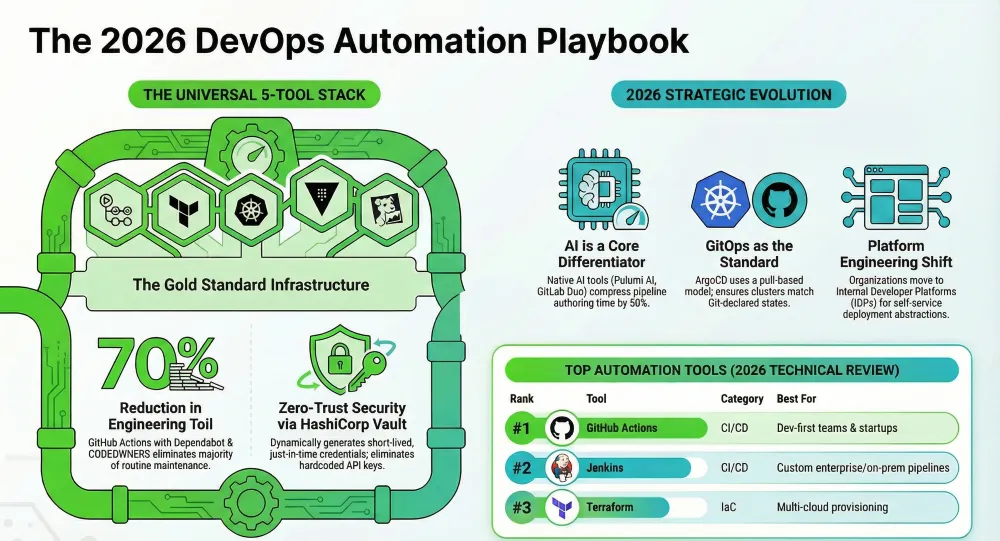
3. The recommended universal starting stack is five tools. GitHub Actions + Terraform + Kubernetes + Datadog + HashiCorp Vault covers the full DevOps lifecycle — CI/CD, infrastructure provisioning, container orchestration, observability, and secrets management — and scales from startup to enterprise without a full toolchain overhaul.
4. GitOps is the modern standard for Kubernetes deployments. ArgoCD’s pull-based GitOps model provides better security, cleaner audit trails, instant rollbacks, and stronger separation between CI and CD compared to traditional push-based pipelines. Any team running Kubernetes should evaluate ArgoCD as their delivery layer.
5. Security must be automated, not bolted on at the end. DevSecOps is not optional in 2026. Integrating HashiCorp Vault for dynamic secrets, GitLab’s security scanners in the pipeline, and Terraform policy-as-code for infrastructure compliance turns security from a deployment bottleneck into a fully automated guardrail.
6. Open-source tools dominate this DevOps tools list — cost is not a barrier. Jenkins, Terraform, Kubernetes, Ansible, ArgoCD, and HashiCorp Vault all have fully functional open-source editions. Teams can build a production-grade DevOps automation pipeline at little to no licensing cost, reserving budget for managed services or enterprise support only when scale genuinely demands it.
7. Platform engineering is the next evolution of DevOps. The most forward-thinking engineering organizations are moving beyond individual DevOps tools toward internal developer platforms (IDPs) — self-service abstractions that let developers deploy and operate services without deep DevOps expertise. Building familiarity with the tools in this list is the essential foundation for that shift.
What Are DevOps Automation Tools?
DevOps automation tools are software platforms and frameworks that automate the repetitive, manual tasks involved in building, testing, deploying, monitoring, and securing software applications. They form the backbone of modern DevOps and DevSecOps workflows, enabling continuous integration (CI), continuous delivery (CD), infrastructure provisioning, configuration management, and real-time system observability.
In 2026, the category has expanded significantly to include DevOps AI tools — intelligent platforms that use machine learning to predict deployment failures, auto-remediate incidents, optimize resource usage, and generate infrastructure-as-code automatically. The convergence of AI and DevOps (often called AIOps) is no longer a future trend — it’s the present reality for high-performing engineering teams.
How We Evaluated Each DevOps Automation Tool
Every tool in this DevOps tools list was assessed against seven criteria developed by the Full-Stack Techies technical review board:
- Integration Ecosystem — How well it connects with existing CI/CD, cloud platforms, and observability stacks
- AI and Automation Depth — Native AI features, intelligent suggestions, anomaly detection, and predictive capabilities
- Developer Experience — Setup friction, documentation quality, CLI ergonomics, and learning curve
- Scalability — Performance under enterprise-grade workloads and multi-cloud environments
- Security Posture — Built-in DevSecOps features, secrets handling, RBAC, and compliance controls
- Community and Support — Active open-source communities, plugin ecosystems, enterprise SLA quality
- Total Cost of Ownership — Free tier generosity, open-source viability, and enterprise licensing transparency
Quick Comparison: Top 10 DevOps Automation Tools at a Glance
| Tool | Category | AI-Powered | Best Use Case | Free Tier | Best For |
|---|---|---|---|---|---|
| GitHub Actions | CI/CD | Yes | Code automation & deployment | Yes | Dev-first teams |
| Jenkins | CI/CD | Partial | Custom enterprise pipelines | Open Source | Enterprise teams |
| Terraform | IaC | Yes | Multi-cloud provisioning | Yes | Cloud infra teams |
| Kubernetes | Orchestration | Partial | Container orchestration at scale | Open Source | Scale-up & enterprise |
| Ansible | Config Mgmt | Yes | Agentless server automation | Open Source | Ops & SRE teams |
| ArgoCD | GitOps / CD | No | Kubernetes GitOps deployments | Open Source | Kubernetes shops |
| Datadog | Monitoring | Yes | Full-stack observability & AIOps | Limited | All team sizes |
| HashiCorp Vault | Security | Partial | Secrets & identity management | Open Source | DevSecOps teams |
| Pulumi | IaC | Yes | Code-first infrastructure | Yes | Dev-led infra teams |
| GitLab CI/CD | All-in-One | Yes | End-to-end DevSecOps platform | Yes | Unified DevOps teams |
The 10 Best DevOps Automation Tools for 2026
1. GitHub Actions — The Developer-Favourite CI/CD Automation Platform
Category: CI/CD
Best For: Development teams on GitHub, startups, and SaaS companies scaling pipelines fast
Pricing: Free: 2,000 min/month · Team: $4/user/mo · Enterprise: Custom · Public repos: Unlimited
Overview
GitHub Actions has cemented its status as the default CI/CD tool for developer-first teams. Its zero-friction integration with GitHub repositories — from pull requests to packages and deployments — eliminates the traditional overhead of standing up a separate pipeline server. Since the rollout of Copilot-assisted workflow generation in 2025, authoring complex YAML pipelines has become accessible even to engineers who aren’t DevOps specialists. For teams already living in GitHub, it’s not a choice — it’s the obvious starting point.
Key Features:
- Native CI/CD integrated directly into GitHub repositories
- 15,000+ reusable Actions in the Marketplace
- Matrix builds for parallel multi-environment testing
- Built-in secrets management and environment variables
- Self-hosted and GitHub-hosted runner support
- Reusable workflows for DRY pipeline architecture
AI and Automation Capabilities:
- Copilot-powered workflow YAML suggestions and generation
- GitHub Advanced Security AI-driven code review
- Smart dependency caching via ML usage patterns
- Dependabot for fully automated dependency PRs
- Copilot Workspace for AI-driven end-to-end PR pipelines
Full-Stack Techies Pro Tip: Combine GitHub Actions’ reusable workflow feature with Dependabot and GitHub’s CODEOWNERS file for a near-fully-automated code review and dependency pipeline. This three-tool combination alone can eliminate 60–70% of routine engineering toil on mid-sized repositories.
2. Jenkins — The Battle-Hardened Enterprise CI/CD Workhorse
Category: CI/CD
Best For: Large enterprises, on-premise deployments, complex custom pipeline architectures
Pricing: Open Source (Free) · CloudBees enterprise fork: Starts ~$24/user/month
Overview
Jenkins remains one of the most widely deployed DevOps automation tools in the world, powering CI/CD pipelines at thousands of enterprises. Its unmatched plugin ecosystem — over 1,800 plugins — means Jenkins can integrate with virtually any tool in your stack. While its setup complexity is higher than cloud-native alternatives, that flexibility is precisely its superpower. For organizations with complex, non-standard pipeline requirements, multi-language monorepos, or strict on-premises compliance mandates, Jenkins is still the gold standard in 2026.
Key Features:
- 1,800+ plugins covering virtually every DevOps tool
- Declarative and Scripted Jenkinsfile pipeline-as-code
- Distributed build architecture with Jenkins agents
- Granular RBAC and audit logging
- On-premise deployment with full data sovereignty
- Blue Ocean UI for visual pipeline management
AI and Automation Capabilities:
- CloudBees AI: build failure predictions and root cause analysis
- ML-based test selection to skip redundant test runs
- Jenkins Configuration as Code (JCasC) for automated setup
- AI-assisted log parsing plugins for faster debugging
Full-Stack Techies Pro Tip: If you’re managing Jenkins at scale, invest early in Jenkins Configuration as Code (JCasC). It transforms a traditionally brittle, click-through setup into a reproducible, version-controlled infrastructure config — dramatically reducing ops overhead and making disaster recovery trivially easy.
3. Terraform — The Industry-Standard Infrastructure as Code Tool
Category: Infrastructure as Code (IaC)
Best For: Cloud infrastructure teams, multi-cloud provisioning, and teams requiring state management
Pricing: Open Source (Free) · HCP Terraform Free: up to 500 managed resources · Plus: $20/user/mo
Overview
When engineers talk about Infrastructure as Code tools in 2026, Terraform remains the first name in the conversation. HashiCorp’s flagship platform lets you define, provision, and version cloud infrastructure across AWS, Azure, GCP, and 3,000+ other providers using a human-readable declarative language (HCL). The introduction of Terraform Stacks and AI-assisted configuration generation has significantly lowered the barrier to managing complex multi-cloud architectures. It’s the definitive standard for cloud-native teams serious about repeatable, auditable infrastructure.
Key Features:
- Declarative HCL language for human-readable infrastructure code
- 3,000+ provider integrations (AWS, Azure, GCP, Kubernetes, and more)
- State management for infrastructure drift detection
- Terraform Modules for reusable infrastructure components
- Remote state with locking via HCP Terraform
- Policy-as-code enforcement via Sentinel
AI and Automation Capabilities:
- AI-assisted HCL generation via Copilot and Terraform AI extensions
- Automated drift detection and remediation suggestions
- Cost estimation integrations with AI forecasting (Infracost)
- Automated security scanning via Checkov and tfsec
Full-Stack Techies Pro Tip: Always pair Terraform with a policy-as-code tool like Sentinel or Open Policy Agent (OPA). Enforce cost caps, tagging standards, and security baselines as code — catching policy violations at plan time, before they ever touch production infrastructure.
4. Kubernetes — The Container Orchestration Platform That Runs the Internet
Category: Container Orchestration
Best For: Scale-up and enterprise teams running microservices, containerized workloads, and cloud-native apps
Pricing: Open Source (Free) · Managed (EKS/GKE/AKS): ~$0.10–$0.20/cluster/hour plus node costs
Overview
Kubernetes (K8s) is the undisputed backbone of modern cloud-native application deployment. Born at Google and now governed by the CNCF, Kubernetes automates the deployment, scaling, and management of containerized applications at any scale — from a single-node dev cluster to globally distributed production systems serving millions of requests per second. In 2026, managed services (EKS, GKE, AKS) have dramatically reduced operational overhead, and AI-powered autoscaling through tools like KEDA and Karpenter has made cluster efficiency a largely solved problem for most teams.
Key Features:
- Automated container scheduling and self-healing pods
- Horizontal and vertical auto-scaling (HPA/VPA)
- Rolling deployments, canary releases, and blue-green strategies
- Service discovery and internal load balancing
- Persistent storage orchestration
- RBAC, NetworkPolicies, and Pod Security Standards
AI and Automation Capabilities:
- Karpenter: AI-driven just-in-time node provisioning
- KEDA: event-driven autoscaling based on real workload signals
- K8sGPT: AI-powered cluster diagnostics in natural language
- Predictive autoscaling via Kubernetes VPA with ML backends
Full-Stack Techies Pro Tip: If you’re new to Kubernetes, start with a managed service like GKE Autopilot or EKS Fargate rather than self-managing the control plane. You’ll get 80% of Kubernetes’ power with 20% of the operational overhead — and can graduate to full control as your team’s expertise grows.
5. Ansible — Agentless IT Automation for Configuration Management at Scale
Category: Configuration Management
Best For: Ops and SRE teams managing large server fleets, configuration drift remediation, and hybrid-cloud automation
Pricing: Community Edition (Free/OSS) · Red Hat Ansible Automation Platform: Subscription-based (~$14,000/yr for 100 nodes)
Overview
Ansible’s greatest strength is its simplicity. Unlike Puppet or Chef, Ansible requires no agents on managed hosts — it communicates over SSH, uses human-readable YAML playbooks, and can be mastered by an ops engineer in days rather than weeks. Red Hat’s stewardship has brought enterprise-grade support, and Ansible Lightspeed — its generative AI assistant — now lets engineers describe infrastructure tasks in natural language and receive production-ready playbooks in return. For configuration management, patch automation, and server provisioning, Ansible remains the tool of choice for operations and SRE teams worldwide.
Key Features:
- Agentless architecture — zero footprint on managed hosts
- Human-readable YAML playbooks with no special syntax required
- Idempotent task execution — safe to run repeatedly
- Ansible Galaxy: 10,000+ community roles and collections
- Event-Driven Ansible for automated remediation workflows
- AWX / Ansible Tower for enterprise orchestration GUI
AI and Automation Capabilities:
- Ansible Lightspeed: natural language to playbook generation (powered by IBM WatsonX)
- Event-Driven Ansible: real-time automated response to monitoring alerts
- AI-powered content recommendations in Automation Hub
- Predictive compliance scanning and drift detection
Full-Stack Techies Pro Tip: Combine Ansible with Event-Driven Ansible (EDA) and Datadog webhooks to build a self-healing infrastructure loop. When Datadog detects a failing service, EDA triggers an Ansible playbook to automatically diagnose and remediate — all without human intervention. This pattern alone can eliminate 30–50% of on-call pages for mature teams.
6. ArgoCD — The GitOps Continuous Delivery Engine for Kubernetes
Category: GitOps / Continuous Delivery
Best For: Teams running Kubernetes who want Git-driven deployments, full audit trails, and zero-touch continuous delivery
Pricing: Open Source (Free) · Akuity Platform (managed enterprise): Custom pricing
Overview
ArgoCD pioneered the GitOps delivery model that has become the gold standard for Kubernetes deployments. The core principle is elegant: your Git repository is the single source of truth for your cluster state. ArgoCD continuously monitors your Git repos and automatically synchronizes Kubernetes clusters to match the declared state — making deployments auditable, rollbacks trivial, and configuration drift a thing of the past. In 2026, ArgoCD is the cornerstone of GitOps-centric DevOps toolchains, with widespread adoption across both startups and Fortune 500 organizations.
Key Features:
- Git-driven continuous synchronization of Kubernetes clusters
- Real-time health status and visual diff of live vs. desired state
- Multi-cluster management from a single control plane
- Helm, Kustomize, Jsonnet, and plain YAML support
- One-click rollback to any previous Git commit
- SSO, RBAC, and full audit trail out of the box
AI and Automation Capabilities:
- Automated sync policies with health check gates
- Progressive delivery via Argo Rollouts (canary deployments with automated analysis)
- Automated drift detection and self-healing reconciliation
- Notifications Controller for intelligent alert routing
Full-Stack Techies Pro Tip: Pair ArgoCD with Argo Rollouts for progressive delivery. Combining canary deployments with automated metric analysis means you can ship with confidence — if your error rate climbs above threshold, Argo Rollouts automatically aborts and rolls back without any human involvement.
7. Datadog — The AI-Powered Full-Stack Observability Platform
Category: Monitoring and Observability
Best For: All team sizes needing unified metrics, APM, logs, and RUM in a single platform with AI-powered alerting
Pricing: Free: 5 hosts, 1-day retention · Pro: $15/host/mo · Enterprise: $23/host/mo · Usage-based plans available
Overview
When it comes to DevOps monitoring tools, Datadog stands alone in breadth and depth. It offers unified observability across metrics, traces, logs, and user experience data — all on a single platform with an agent that takes minutes to deploy. What makes Datadog particularly powerful in 2026 is its AI layer: Watchdog continuously analyzes telemetry data to surface anomalies and correlate incidents automatically, while Bits AI — Datadog’s conversational AI assistant — allows engineers to query complex system state in plain English. For teams that need end-to-end visibility without stitching together multiple monitoring tools, Datadog is the definitive answer.
Key Features:
- Unified metrics, APM, logs, and distributed tracing on one platform
- 600+ out-of-the-box integrations
- Real User Monitoring (RUM) and Synthetic Testing
- Infrastructure maps with real-time health visualization
- SLO tracking and error budget management
- Incident management with automated timeline generation
AI and Automation Capabilities:
- Watchdog AI: automated anomaly detection across all telemetry streams
- Bits AI: natural language system queries and incident investigation
- ML-based forecasting for capacity planning and trend prediction
- Automated root cause analysis with correlated event timelines
- LLM Observability for monitoring AI/ML pipelines in production
Full-Stack Techies Pro Tip: Enable Datadog’s Watchdog across APM, infrastructure, and logs simultaneously from day one. The cross-signal correlation is where its real value emerges — a Watchdog insight that links a spike in p99 latency to a memory anomaly on a specific host is worth more than three separate alert emails pointing you in the wrong direction.
8. HashiCorp Vault — The Zero-Trust Secrets Management Standard
Category: Security / DevSecOps
Best For: DevSecOps teams, regulated industries (fintech, healthcare), any organization handling sensitive credentials at scale
Pricing: Open Source (Free) · HCP Vault Starter: $0.03/hour · Plus: $0.15/hour · Enterprise: Custom
Overview
Secrets leaking into version control, hardcoded API keys in Lambda functions, service credentials checked into CI pipelines — these are among the most common and most catastrophic security failures in modern DevOps. HashiCorp Vault is the industry-standard solution for centralized secrets management, dynamic credential generation, and identity-based access control. In 2026, as supply chain attacks have grown in sophistication, Vault’s dynamic secrets capability — generating short-lived, just-in-time credentials that expire automatically — has become a DevSecOps best practice, not an optional enhancement.
Key Features:
- Dynamic secrets: auto-generated, short-lived credentials for every service
- Encryption as a Service for application-level data protection
- Identity-based access via Kubernetes, AWS IAM, LDAP, and more
- PKI Secrets Engine for automated TLS certificate management
- Comprehensive audit logging for every secrets access event
- Vault Agent for transparent secrets injection into workloads
AI and Automation Capabilities:
- Automated credential rotation with zero-downtime lease renewal
- ML-based anomalous access pattern detection (HCP Vault)
- Automated mTLS certificate lifecycle management
- Integration with AI/ML pipeline secret injection for LLM API key management
Full-Stack Techies Pro Tip: Start Vault adoption by targeting your highest-risk secrets first: database credentials and cloud provider API keys. Enable dynamic secrets for PostgreSQL and MySQL — every application gets unique credentials that live for only one hour. This single change eliminates entire categories of credential-based breach vectors overnight.
9. Pulumi — Code-First Infrastructure as Code for Developer Teams
Category: Infrastructure as Code
Best For: Developer-led infrastructure teams, polyglot organizations, teams who want real programming languages over domain-specific languages
Pricing: Individual (Free): 1 user, unlimited resources · Team: $50/mo · Enterprise: Custom
Overview
Pulumi takes Infrastructure as Code in a fundamentally different direction from Terraform: instead of a domain-specific language (HCL), you write real code — TypeScript, Python, Go, Java, or .NET — to define, provision, and manage cloud infrastructure. This approach resonates deeply with developer-led teams who want the full power of loops, conditionals, functions, and testing frameworks applied to their infrastructure. Pulumi AI, launched in late 2024, goes further still: describe your infrastructure requirements in plain English, and Pulumi generates production-ready infrastructure code in your language of choice. It’s one of the most compelling DevOps AI tools on the market in 2026.
Key Features:
- Real programming languages: TypeScript, Python, Go, Java, .NET
- 120+ cloud provider integrations (AWS, Azure, GCP, Kubernetes, and more)
- Pulumi ESC: centralized environment and secrets configuration
- Pulumi Deployments: GitOps-style automated deployments
- State management with concurrent-safe locking
- Policy as Code via CrossGuard (OPA-compatible)
AI and Automation Capabilities:
- Pulumi AI: natural language to infrastructure code generation
- Pulumi Copilot: conversational cloud management and cost insights
- AI-assisted resource remediation suggestions
- Automated infrastructure testing with built-in test frameworks
- Drift detection and automated reconciliation
Full-Stack Techies Pro Tip: Pulumi’s real differentiator is the ability to unit test your infrastructure. Use Pulumi’s built-in test framework to write tests that validate your infrastructure logic before it ever touches a real cloud account — catching misconfigurations, wrong regions, and missing tags at PR review time, not after a production incident.
10. GitLab CI/CD — The All-in-One DevSecOps Platform
Category: All-in-One DevOps
Best For: Teams wanting a single DevSecOps platform, organizations consolidating toolchains, regulated industries
Pricing: Free: Core features · Premium: $29/user/mo · Ultimate: $99/user/mo · Self-hosted available
Overview
GitLab’s defining competitive advantage is breadth: it’s not just a CI/CD tool — it’s a complete, integrated DevSecOps platform covering source code management, CI/CD pipelines, container registry, artifact management, security scanning, dependency analysis, license compliance, incident management, and feature flags — all under a single login with a unified data model. For organizations tired of stitching together 15 different tools with brittle integrations, GitLab’s single-application approach is extraordinarily compelling in 2026. GitLab Duo — its AI assistant embedded throughout the platform — brings intelligent code suggestions, security vulnerability explanations, pipeline configuration generation, and merge request summaries into every workflow.
Key Features:
- Fully integrated SCM, CI/CD, and container registry in one platform
- 400+ CI/CD pipeline templates for instant project bootstrap
- Built-in SAST, DAST, container scanning, and dependency scanning
- Feature flags and A/B testing natively in the platform
- GitLab Agent for Kubernetes (GitOps-native delivery)
- Self-hosted (on-premises) or GitLab.com SaaS options
AI and Automation Capabilities:
- GitLab Duo: AI code completion, chat assistant, and root cause analysis
- AI-powered vulnerability explanation and remediation suggestions
- Duo CI/CD: natural language pipeline generation and optimization
- AI merge request summaries and code review acceleration
- Predictive test selection to dramatically cut pipeline runtime
Full-Stack Techies Pro Tip: If your team is evaluating GitLab, start by calculating your current “integration tax” — the engineering hours spent maintaining connections between your Git host, CI/CD, registry, and security scanners. For teams with 20+ engineers, GitLab’s unified platform typically delivers measurable ROI within the first quarter through eliminated integration overhead alone.
Also Read: CI/CD vs DevOps (2025–2026): Which Delivers More Value?
Get scalable, fast, and user-friendly DevOps solutions tailored to your needs.
Get Free ConsultationHow to Choose the Right DevOps Tools for Your Team
Not every team needs every tool in this DevOps tools list. Your optimal stack depends on team size, cloud provider, existing infrastructure, and growth stage:
Startup / Early Stage — Start lean, ship fast
Minimize operational overhead. Choose hosted, fully managed services. Prioritize delivery speed over control. Recommended: GitHub Actions + Terraform + Datadog
Scale-Up / Growth Stage — Systematize and standardize
Introduce GitOps, container orchestration, and security controls. Build the foundation for enterprise scale. Recommended: Kubernetes + ArgoCD + Vault + GitLab
Enterprise / Regulated — Control, compliance, and scale
On-premises options, audit trails, fine-grained RBAC, policy enforcement, and enterprise SLA requirements. Recommended: Jenkins + Ansible Automation Platform + Vault Enterprise
AI-First DevOps Teams — Maximize automation intelligence
Embrace DevOps AI tools, predictive pipelines, AIOps monitoring, and natural language infrastructure management. Recommended: Pulumi AI + GitLab Duo + Datadog Bits AI
Full-Stack Techies’ Universal Stack Recommendation
For most engineering teams in 2026, a pragmatic starting stack is: GitHub Actions (CI/CD) + Terraform (IaC) + Kubernetes (orchestration) + Datadog (observability) + HashiCorp Vault (secrets). This five-tool combination covers the full DevOps lifecycle, integrates natively with each other, and scales from startup to enterprise without requiring a full toolchain replacement.
Also Read: Top 10 React.js Outsourcing Models for Enterprise Cost Control 2026
Key DevOps Automation Trends Shaping 2026
1. DevOps AI Tools Are Becoming Standard, Not Optional
Every major DevOps platform now ships with native AI capabilities — from Copilot-assisted pipeline generation in GitHub Actions to Datadog’s Bits AI and Pulumi AI’s natural-language IaC generation. Teams that master AI-augmented DevOps workflows are reporting 30–50% reductions in pipeline authoring time and significant drops in mean time to resolution (MTTR) for production incidents.
2. Platform Engineering Is Replacing “DevOps as Everyone’s Problem”
The most mature engineering organizations are investing in internal developer platforms (IDPs) — self-service golden paths that abstract Kubernetes, IaC, and CI/CD complexity behind developer-friendly interfaces. Tools like Backstage (Spotify), Port, and Cortex are becoming the orchestration layer above the DevOps tools list covered in this guide.
3. GitOps + AIOps Convergence
The combination of GitOps delivery (ArgoCD, Flux) with AI-driven observability (Datadog, Dynatrace) is creating self-healing, self-optimizing deployment pipelines. ArgoCD detects drift, Datadog detects performance regressions, and Event-Driven Ansible closes the remediation loop — all without a human in the critical path. The Full-Stack Techies team has published hands-on guides to implementing this pattern at full-stacktechies.com.
Final Verdict: Best DevOps Automation Tools Summary
| Rank | Tool | Best For |
|---|---|---|
| #1 | GitHub Actions | Best CI/CD for developer-first teams |
| #2 | Jenkins | Best for custom enterprise pipelines |
| #3 | Terraform | Best for multi-cloud provisioning |
| #4 | Kubernetes | Best for container workloads at scale |
| #5 | Ansible | Best for agentless server automation |
| #6 | ArgoCD | Best for Kubernetes GitOps deployments |
| #7 | Datadog | Best full-stack monitoring and AIOps platform |
| #8 | HashiCorp Vault | Best secrets management solution |
| #9 | Pulumi | Best DevOps AI tool for code-first IaC |
| #10 | GitLab CI/CD | Best unified DevSecOps platform |
No matter where your team sits on the DevOps maturity curve, the tools above provide a clear, evidence-based path forward. Start with the fundamentals, add complexity only when you’ve genuinely outgrown simpler solutions, and embrace AI-powered DevOps tools to compound your team’s velocity over time.
Frequently Asked Questions
Q1: What are the best DevOps automation tools in 2026?
The best DevOps automation tools in 2026 are GitHub Actions, Jenkins, Terraform, Kubernetes, Ansible, ArgoCD, Datadog, HashiCorp Vault, Pulumi, and GitLab CI/CD. The right combination for your team depends on your size, cloud provider, and DevOps maturity level.
Q2: What are DevOps AI tools and how are they different from traditional DevOps tools?
DevOps AI tools incorporate machine learning and generative AI to go beyond static automation. While traditional DevOps tools execute predefined scripts, DevOps AI tools predict deployment failures, generate infrastructure code from natural language, automatically identify incident root causes, intelligently select which tests to run, and optimize pipeline performance based on historical patterns. Examples include Pulumi AI, GitLab Duo, Datadog Watchdog, Ansible Lightspeed, and GitHub Copilot for CI/CD.
Q3: Which DevOps automation tool is best for beginners?
GitHub Actions is the best DevOps automation tool for beginners. Its zero-setup integration with GitHub, massive marketplace of pre-built workflow actions, and AI-assisted YAML generation via GitHub Copilot make it the lowest-friction path to pipeline automation. Most engineers can have a working CI/CD pipeline running within a few hours.
Q4: What is the difference between Terraform and Pulumi?
Terraform uses HCL u2014 a declarative domain-specific language u2014 to define infrastructure. Pulumi uses general-purpose programming languages (TypeScript, Python, Go, Java, .NET), allowing you to use loops, conditionals, functions, and unit tests natively. Terraform is the industry standard with a larger community. Pulumi is preferred by developer-led teams who want the full power of real programming languages for infrastructure management.
Q5: Do I need all 10 tools in this DevOps tools list?
Absolutely not. The best DevOps toolchain is the minimal one that solves your actual problems. For most startups, 3u20134 tools are sufficient: a CI/CD tool, an IaC tool, and a monitoring platform. Add orchestration, GitOps delivery, and secrets management as you scale. Avoid adopting tools before youu2019ve outgrown simpler solutions.
Q6: What is GitOps and how is it different from traditional CI/CD?
GitOps is a deployment model where Git is the single source of truth for both application and infrastructure state. Traditional CI/CD pipelines push changes to a cluster. In GitOps, a tool like ArgoCD continuously monitors Git and pulls any drift back into sync. GitOps provides better audit trails, simpler rollbacks, stronger security, and a cleaner separation between build/test (CI) and deploy (CD). Itu2019s the recommended approach for Kubernetes deployments in 2026.
Q7: Is Jenkins still worth using in 2026 when cloud-native CI/CD tools exist?
Yes, Jenkins is still worth using in 2026, especially for enterprises with on-premises requirements, complex multi-language pipelines, or strict data sovereignty mandates. However, if youu2019re starting fresh with no legacy constraints, cloud-native tools like GitHub Actions or GitLab CI/CD offer a faster, lower-maintenance path.
Q8: What is the difference between ArgoCD and traditional CI/CD tools like Jenkins or GitHub Actions?
Jenkins and GitHub Actions handle the CI side u2014 building, testing, and packaging code. ArgoCD handles the CD side exclusively, using a GitOps pull-based model where your cluster continuously syncs itself to Git. They are complementary, not competing. Most mature teams use GitHub Actions or Jenkins for CI and ArgoCD for Kubernetes deployments.
Q9: Can small teams or solo developers benefit from DevOps automation tools?
Absolutely. GitHub Actions, Terraform, and Datadog all offer generous free tiers that make enterprise-grade DevOps automation accessible to solo developers and small teams. Even a two-person startup can automate testing, deployment, and infrastructure provisioning at zero cost using open-source and free-tier tools from this list.rnrn
Q10: How do DevOps automation tools improve security?
DevOps automation tools improve security in several ways: HashiCorp Vault eliminates hardcoded credentials through dynamic secrets, GitLabu2019s built-in SAST and DAST scanners catch vulnerabilities before production, Terraform policy-as-code enforces compliance guardrails on every infrastructure change, and Kubernetes NetworkPolicies restrict lateral movement between services. Automating security checks into the pipeline u2014 often called DevSecOps u2014 catches vulnerabilities at the earliest and cheapest stage possible.