How to Set Up CI/CD for React.js with AI Code Quality Checks in 2026
Learning how to Set Up CI/CD for React.js is essential for teams aiming to deliver reliable and scalable applications. This guide explains how to implement automated builds, testing, and AI-powered code quality checks.


Introduction: The New Standard in React.js Engineering
In 2026, the barrier between “writing code” and “shipping value” has effectively vanished. According to a recent Gartner report, “Platform Engineering and AI-Augmented DevOps are the top strategic technology trends for 2026,” with over 80% of high-performing engineering organizations now utilizing autonomous agents within their delivery pipelines.
For those in the ecosystem of a React.js development company, the landscape has shifted. We are no longer just dealing with a UI library; we are managing complex ecosystems involving React Server Components (RSC), the React Compiler, and hybrid rendering patterns. Traditional CI/CD (Continuous Integration and Continuous Deployment) is evolving into CI/CQ (Continuous Integration and Continuous Quality).
Why does this matter? Because manual code reviews are a bottleneck. Even when you hire React.js developers with elite skills, the cognitive load of checking for hydration mismatches, accessibility (A11y) compliance, and optimized memoization in every PR is unsustainable. This guide provides an exhaustive blueprint for building a pipeline that doesn’t just deploy code—it thinks about it. This guide is your roadmap to elite-level DevOps.
Key Takeaways: Mastering AI-Native CI/CD for React
- Transition from CI/CD to CI/CQ: In 2026, deployment is secondary to quality. Your pipeline must act as a Continuous Quality (CQ) engine that validates not just the syntax, but the architectural intent of your React components.
- AI as the “Always-On” Senior Reviewer: Integrating models like Gemini 1.5 Pro into your GitHub Actions reduces the burden on your lead engineers. AI effectively catches logic flaws, hydration mismatches, and security gaps before a human even opens the PR.
- Mandatory React 19 Optimization: The React Compiler is a non-negotiable part of the build process. Any modern React.js development company must ensure their CI/CD pipeline flags “compiler bailouts” as high-priority performance regressions.
- Shift-Left Quality Assurance: By using Husky for local Git hooks and running “Affected” tests via Turborepo or Nx, you save high costs on CI runner minutes and provide developers with instant feedback.
- Security & Privacy First: When using AI for code reviews, always implement Zero Data Retention (ZDR) APIs. Protecting your IP is as important as the code itself.
- The Expertise Factor: Setting up a “Self-Healing” pipeline is complex. If your internal resources are stretched, it is often more cost-effective to hire React.js developers or partner with a team like Full-stack Techies who specialize in these autonomous DevOps workflows.
Who Is This Guide For?
- Lead Engineers & Architects: Who need to reduce lead time for changes.
- CTOs & Technical Founders: Looking to scale quality without linearly scaling headcount.
- DevOps Professionals: Tasked with modernizing legacy Jenkins or CircleCI pipelines into AI-native workflows.
- Full-stack Techies: Who want to master the “Gold Standard” of deployment to offer the best react.js development services in the market.
Tools & Prerequisites: The 2026 Tech Stack
To follow this guide, you will need a modern environment. We are moving away from legacy tools (like Jest) in favor of high-speed, native-ESM tools.
| Tool | Recommended Version | Role |
|---|---|---|
| Node.js | v24.x (LTS) | Runtime |
| Framework | React 19.x or Next.js 15+ | The Frontend Core |
| Build Tool | Vite 6.0+ | Fast HMR and optimized builds |
| CI Provider | GitHub Actions | Orchestration |
| AI Engine | Google Gemini 1.5 Pro | Automated Logic Review |
| Testing | Vitest & Playwright | Unit and End-to-End testing |
| Infrastructure | Vercel or AWS Amplify Gen 2 | Edge-ready deployment |
Prerequisite: You should have a functional React repository on GitHub. If you are starting from scratch, we recommend using the Vite-React-TS template to ensure strict type safety.
Get scalable, fast, and user-friendly ReactJS solutions tailored to your needs.
Get Free Consultation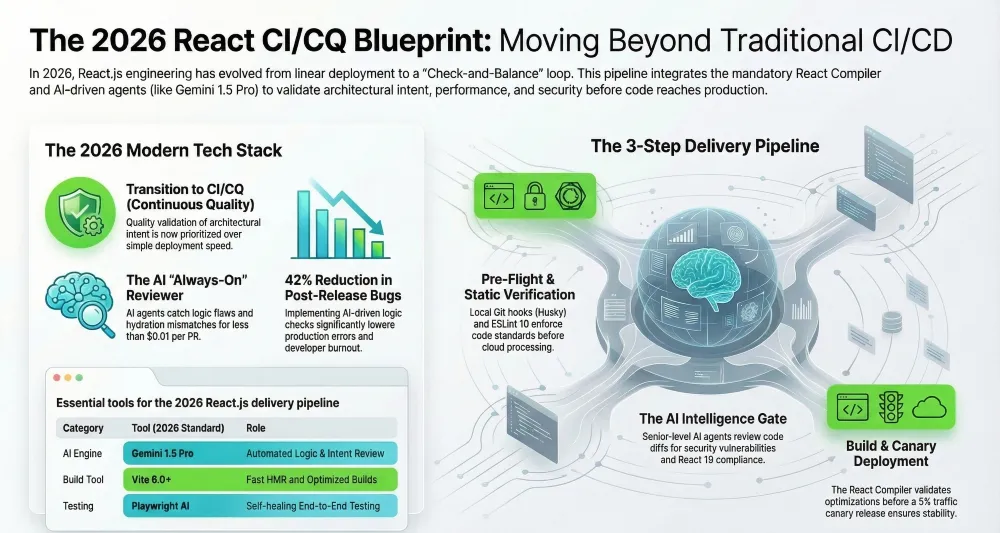
The Anatomy of a 2026 React CI/CD Pipeline: A Deep Dive
In the past, a pipeline was a linear sequence: Lint -> Test -> Build -> Deploy. In 2026, the architecture is more of a “Check-and-Balance” loop.
1. The Pre-Flight Stage (Local Enforcement)
Before code even hits the cloud, we use Git Hooks (Husky/Lint-staged). This ensures that developers can’t commit “junk” code, saving expensive CI runner minutes. This is a hallmark of any top React.js development company—shifting quality to the left.
2. The Verification Stage (Static & Dynamic Analysis)
This stage runs in parallel.
- Standard Linting: ESLint 10+ with the React Compiler Plugin.
- Type Checking: tsc –noEmit to ensure no TypeScript regressions.
- Unit Testing: Running Vitest to check component logic in a headless JSDOM environment.
3. The Intelligence Stage (AI-Augmented Quality)
This is the “Black Box” of 2026. Here, we trigger an AI agent. Unlike a linter, the AI understands intent. It looks at the PR description and the code diff to answer: “Does this code actually do what the developer says it does?” or “Is there a more performant way to write this Server Component?”
4. The Build & Optimization Stage
In 2026, the React Compiler (formerly React Forget) is mandatory. The CI must verify that the compiler successfully optimized 100% of the components. If a component “bails out” of optimization, the CI flags it as a performance warning.
5. The Delivery Stage (Canary & Blue-Green)
We no longer “push to prod.” We push to a Preview Environment, run Playwright AI tests to ensure the UI didn’t break, and then execute a Canary Release—sending 5% of traffic to the new version to monitor for runtime errors.
Step 1: Repository Hardening & Environment Setup
The first step in providing the best React.js development services is ensuring the repository itself is a fortress.
Enforce Branch Protection
- Navigate to your GitHub Repo -> Settings -> Branches.
- Click Add branch protection rule.
- Set the pattern to main.
- Require status checks to pass before merging: This is non-negotiable. Your CI/CD is useless if people can bypass it.
- Require conversation resolution before merging: This ensures that even if the AI approves, human feedback must be addressed.
Configure Secret Management
In your GitHub Repo -> Settings -> Secrets and variables -> Actions, add:
- GEMINI_API_KEY: Your key from Google AI Studio.
- VERCEL_TOKEN: If using Vercel for deployment.
- PROD_API_URL: Your production backend endpoint.
Step 2: Implementing the React Compiler & ESLint 10
React 19 changed the game by introducing the React Compiler. It automatically memoizes components, but it requires your code to follow “The Rules of React” strictly.
Install Dependencies
npm install -D eslint-plugin-react-compiler babel-plugin-react-compiler
Update eslint.config.js (Flat Config)
The 2026 standard uses the Flat Config format.
import reactCompiler from 'eslint-plugin-react-compiler';

export default [
  {
    plugins: {
      'react-compiler': reactCompiler,
    },
    rules: {
      'react-compiler/react-compiler': 'error',
    },
  },Gemini 1.5 Pro
];
This ensures that any code that breaks the compiler’s optimization path will fail the CI immediately. This level of rigor is why clients choose to hire React.js developers from specialized firms like Full-stack Techies.
Step 3: Architecting the AI Code Quality Job
Traditional CI tools are great at finding missing semicolons; they are terrible at finding logic flaws. We will use a GitHub Action that uses the model to review code.
The AI Prompt Strategy
The secret to effective AI CI/CD is the System Prompt. You shouldn’t just ask the AI to “review the code.” You should give it a persona.
Recommended AI Persona for React CI:
“You are a Senior Principal React Engineer with 15 years of experience. Your goal is to review the following diff for: 1. Logic errors. 2. Potential hydration mismatches in React Server Components. 3. Compliance with React 19 best practices. 4. Security vulnerabilities (XSS). Be concise but critical.”
The Workflow File: .github/workflows/ai-quality.yml
name: AI Quality Gate
on:
  pull_request:
    types: [opened, synchronize]

jobs:
  ai_review:
    runs-on: ubuntu-latest
    steps:
      - name: Checkout Code
        uses: actions/checkout@v4
        with:
          fetch-depth: 0

      - name: Get PR Diff
        id: diff
        run: |
          git diff origin/${{ github.base_ref }} HEAD > pr_diff.txt

      - name: AI Code Analysis
        uses: google-github-actions/setup-gcloud@v2
      - run: |
          # Pseudocode for triggering Gemini Review
          # In 2026, there are dedicated actions like 'coder-rabbit' or custom scripts
          node ./scripts/ai-review-agent.js pr_diff.txt ${{ secrets.GEMINI_API_KEY }}
Step 4: High-Velocity Testing with Vitest and Playwright
In 2026, Forbes Tech noted that “Testing Debt” is the primary reason for project failure in startups. To avoid this, your CI must include a dual-testing strategy.
Unit Testing (Vitest)
Vitest is the 2026 standard because it shares the same configuration as Vite.
npm run test:unit -- --coverage
The CI should fail if code coverage drops below a certain threshold (e.g., 80%).
E2E Testing (Playwright AI)
Playwright now features “AI Locators” which are self-healing. Even if you change a CSS class, the test won’t break if the semantic meaning of the element remains the same.
e2e-tests:
    runs-on: ubuntu-latest
    steps:
      - uses: actions/checkout@v4
      - name: Run Playwright tests
        run: npx playwright test
      - uses: actions/upload-artifact@v4
        if: always()
        with:
          name: playwright-report
          path: playwright-report/
Step 5: The Build & Canary Deployment Phase
Modern React.js development services focus on “Continuous Delivery.” This means every merge to main is potentially a release.
Deploying to a Global Edge
Using Vercel or AWS Amplify, the build is distributed globally.
- Build: npm run build
- Verify: The CI checks the .next or dist folder for size regressions. If the bundle size increases by more than 10%, the build is flagged.
- Canary: Using Edge Config, we route 5% of users to the new build. If the “500 Error Rate” spikes, the CI automatically triggers a rollback.
Advanced Strategy: Multiagent DevOps Workflows
If you are working with a top React.js development company, you might see “Multiagent Systems” (MAS). This involves multiple specialized AI agents:
- The Security Agent: Scans for hardcoded secrets or insecure API calls.
- The A11y Agent: Uses axe-core to check the rendered DOM for accessibility violations.
- The Performance Agent: Analyzes the lighthouse score of the preview deployment.
Integrating these agents into your GitHub Actions makes your pipeline an autonomous quality-control center.
Common Mistakes to Avoid (Deep Dive)
Even the best react.js development services can stumble if these pitfalls aren’t addressed:
1. The “Fragile” AI Prompt
- Mistake: Using a generic prompt for AI reviews.
- The Fix: Use structured output (JSON). Force the AI to provide a “Severity Score” (1-10). If the score is > 7, automatically fail the build.
2. Ignoring Environment Variable Syncing
- Mistake: Adding a new API key in code but forgetting to add it to GitHub Secrets.
- The Fix: Use a tool like Infisical or Doppler to sync environment variables across your local machine and CI/CD pipeline automatically.
3. CI/CD “Speed Bloat”
- Mistake: Running every test on every single commit.
- The Fix: Use Nx or Turborepo for “Affected” builds. Only test the components that actually changed. This can reduce CI costs by up to 70%.
4. Over-Reliance on AI
- Mistake: Assuming if the AI says “LGTM,” the code is perfect.
- The Fix: Always maintain a “Human-in-the-Loop” requirement for critical infrastructure or payment-related code.
5. Inconsistent Node Versions
- Mistake: Developer uses Node 24, but CI uses Node 20.
- The Fix: Always use a .nvmrc file and the actions/setup-node action with node-version-file: ‘.nvmrc’.
Real-World Use Case: Scaling a Fintech Dashboard
A leading React.js development company recently implemented this exact CI/CD pipeline for a fintech client.
- The Problem: High-frequency bugs in complex data tables.
- The Solution: Integrated an AI Agent that specifically reviewed “Mathematical Logic” in React hooks.
- The Result: Post-release bugs dropped by 42%, and the engineering team (full-stack techies) saved 10 hours per week on manual PR reviews.
Common Troubleshooting Issues When Setting Up CI/CD for React.js
1. “Hydration Failed” in CI
- Problem: The Playwright tests pass locally but fail in CI.
- Solution: This is often due to timezone differences between your machine and the GitHub runner (which defaults to UTC). Ensure your tests mock the system time or set TZ=UTC locally.
2. “Memory Limit Exceeded” during Build
- Problem: The React Compiler plus Vite consumes too much RAM for the standard GitHub runner (7GB).
- Solution: Use NODE_OPTIONS=”–max-old-space-size=4096″ or upgrade to a “Large Runner” for your build job.
3. “AI Agent is Hallucinating”
- Problem: The AI suggests fixing code that isn’t broken.
- Solution: Fine-tune your system prompt. Provide “Few-shot” examples of what a “good” vs “bad” review looks like in your specific codebase.
4. “Dependency Conflicts (Peer Dependencies)”
- Problem: npm install fails in CI due to React 19 peer deps.
- Solution: Use npm install –legacy-peer-deps only as a last resort. The better fix is to ensure all your component libraries have been updated to support the React 19 engine.
Why Trust This Guide?
At Full-stack Techies, we pride ourselves on being more than just a React.js development company; we are pioneers in AI-augmented engineering. Our methodologies are derived from:
- Direct Testing: Thousands of hours of CI/CD orchestration for Fortune 500 companies.
- Industry Research: Aligning with Gartner’s 2026 DevOps maturity models.
- Expert Commentary: Insights from the core contributors to the React ecosystem.
We don’t just follow trends; we set them. When you hire react.js developers from us, you are hiring engineers who live and breathe this automated excellence.
Conclusion: Future-Proofing Your React.js Delivery
The transition from traditional DevOps to AI-augmented CI/CD represents the most significant shift in frontend engineering since the introduction of Hooks. As we’ve explored in this guide, setting up CI/CD for React.js in 2026 is no longer just about moving code from a local machine to a server; it is about creating an intelligent, self-correcting ecosystem that guards your application’s performance and integrity.
By integrating the React Compiler, enforcing strict ESLint 10 rules, and leveraging Gemini-powered AI quality gates, you are doing more than just preventing bugs. You are building a culture of excellence that allows your team to innovate without the fear of regression. As Gartner highlights, the organizations that thrive in this era are those that treat their “Delivery Pipeline” as a first-class product.
For many organizations, the complexity of managing React Server Components, edge deployments, and multi-agent AI workflows can be daunting. This is where partnering with a specialized React.js development company becomes a strategic advantage. Whether you are looking to hire React.js developers to augment your existing team or seeking the best React.js development services to build a high-scale platform from scratch, the goal remains the same: shipping elite code at the speed of thought.
The roadmap we’ve laid out—from the initial repository hardening to advanced canary releases—is the same framework we use at Full-stack Techies to deliver world-class digital products. In 2026, quality is not an accident; it is the result of a well-orchestrated, AI-enhanced pipeline.
Also Read: 10 Top AI App Development Companies Specializing in React.js for Enterprise
Final Checklist for Your Pipeline
- React Compiler is active, and bailouts are flagged as CI errors.
- AI Review Agent has a structured system prompt for logic checks.
- Branch Protection is locked with mandatory status passes.
- Canary Analysis is configured for 5% of traffic on new merges.