How to Implement Azure DevOps as a Service in Your Organization (Complete 2026 Guide)
This complete 2026 guide explains how to implement Azure DevOps as a Service in your organization. Learn best practices for setting up CI/CD pipelines, automating workflows, and scaling DevOps operations using Microsoft Azure for faster, more reliable software delivery.


Introduction
If you are wondering how to implement Azure DevOps as a Service in 2026, you are not alone. With the escalating complexity of modern IT environments, manual deployments and siloed development teams are no longer viable. According to recent 2026 insights from Gartner, over 80% of software development companies are adopting internal development platforms to unify tools and accelerate delivery, and 73% of enterprises are actively implementing AI-driven operations (AIOps). Furthermore, Microsoft continues to be recognized as a Leader in the Gartner® Magic Quadrant™ for Cloud-Native Application Platforms.
As the global DevOps market surges toward a projected $139 billion by 2034, organizations are shifting away from maintaining fragmented internal infrastructure. They are embracing DevOps as a Services models to offload pipeline management, improve security, and cut operational costs. Implementing Azure DevOps as a Service means leveraging cloud-hosted tools—Azure Boards, Repos, Pipelines, Test Plans, and Artifacts—managed and optimized by external experts or dedicated internal platform teams, allowing your developers to focus purely on coding.
This comprehensive guide will walk you through exactly how to implement Azure DevOps as a Service from the ground up. Whether you are migrating legacy on-premise infrastructure or scaling a cloud-native application, this step-by-step tutorial will help you build a resilient, automated, and secure software delivery engine.
Key Takeaways: Mastering Azure DevOps as a Service
- Shift from Ownership to Orchestration: Implementing DevOps as a Service means moving away from maintaining fragmented internal infrastructure to a managed model where developers focus 100% on code while experts handle pipeline health and security.
- The 2026 Market Standard: With 73% of enterprises adopting AIOps and the DevOps market projected to hit $139 billion by 2034, managed service models are no longer optional for organizations seeking to scale.
- A Unified Five-Tool Suite: Success relies on the seamless integration of Azure Boards (planning), Repos (version control), Pipelines (CI/CD), Test Plans (QA), and Artifacts (package management).
- Security is Continuous, Not Final: In 2026, DevSecOps must be baked into the pipeline through automated secret scanning, dependency checks, and container vulnerability audits to ensure a secure delivery mechanism.
- Efficiency via Infrastructure as Code (IaC): Leveraging tools like Terraform or Azure Bicep allows teams to automate environment provisioning, ensuring consistency and rapid recovery.
- FinOps and Cost Governance: To prevent budget bloat, organizations must implement automated “tear-downs” for testing environments and utilize tagging strategies to monitor cloud spend.
- The Power of Partnership: Engaging Azure DevOps consulting services, such as Full-Stack Techies, can reduce the learning curve, optimize cloud costs by up to 30%, and transition teams from monthly to daily deployments.
Quick Implementation Checklist
- Audit your current toolchain and define measurable KPIs like Deployment Frequency.
- Centralize identity management using Microsoft Entra ID and MFA.
- Automate builds and releases using YAML-based Azure Pipelines.
- Monitor performance with Azure Monitor and Application Insights for real-time observability.
Why Azure DevOps as a Service? The Market Reality
Before diving into implementation, it helps to understand why organizations worldwide are moving to DevOps as a Service at a record pace. The numbers make a compelling case:
- $51.43 Billion — Projected global DevOps market value by 2031, growing at 21.33% CAGR (Mordor Intelligence, 2025)
- 86% of businesses now use DevOps methodology to accelerate software releases
- 48% increase in deployment frequency reported by organizations using CI/CD pipelines (IDC, 2024)
- 13.62% — Azure DevOps’ share of the DevOps services market, making it one of the most widely adopted platforms globally
According to Gartner, over 85% of organizations will adopt a cloud computing strategy by 2025, with 95% of new digital workloads running on cloud platforms — a 30% jump from 2021. Meanwhile, Forrester (2024) found that CI/CD automation cuts deployment cycles by up to 50%, helping organizations respond faster to market demands. These aren’t vanity metrics — they directly translate to competitive edge, reduced operational cost, and happier engineering teams.
What Is Azure DevOps as a Service?
Azure DevOps as a Service refers to consuming Microsoft’s Azure DevOps platform in a fully managed or externally supported model — where your organization leverages the platform’s capabilities (Boards, Repos, Pipelines, Test Plans, and Artifacts) as a unified, cloud-hosted service, often augmented by expert Azure DevOps managed services from a technology partner.
Unlike a traditional, self-managed DevOps toolchain, DevOps as a Service shifts operational responsibility away from your in-house team. Your partner handles infrastructure, toolchain maintenance, security hardening, governance configuration, and continuous optimization — while your developers stay focused on writing great code.
Full-Stack Techies Insight: At Full-Stack Techies, we define DevOps as a service, not just as a platform subscription, but as a living delivery model. We combine Azure DevOps consulting services with hands-on managed services so your teams get expert guidance from day one — through migration, optimization, and long-term scaling.
Internal vs. Managed Azure DevOps: 2026 Comparison
| Feature | Self-Managed Model | DevOps as a Service |
|---|---|---|
| Setup Time | 3–6 Months | 4–6 Weeks |
| Cost Predictability | Variable (Ops overhead) | Fixed Monthly Retainer |
| Security Updates | Manual / Internal | Automated & Expert-Led |
| Scaling Capability | Limited by Internal Staff | On-Demand Scaling |
| Team Focus | Ops & Infrastructure | Code & Product Innovation |
Core Components of Azure DevOps You’ll Be Implementing
To implement Azure DevOps as a Service effectively, you need to understand what you’re working with. Azure DevOps is composed of five key services:
1. Azure Boards
A powerful Agile project management tool that supports Scrum, Kanban, and custom work item tracking. Teams use it to plan sprints, manage backlogs, and track progress in real time.
2. Azure Repos
A fully featured Git-based version control system that supports branching strategies, pull requests, and code review workflows at scale.
3. Azure Pipelines
The heart of CI/CD automation — Azure Pipelines enables you to build, test, and deploy to any cloud or on-premise target. It supports YAML-based pipelines and integrates with GitHub, Bitbucket, and more.
4. Azure Test Plans
An end-to-end testing solution covering manual testing, exploratory testing, and automated testing. It gives QA teams visibility across the entire testing lifecycle.
5. Azure Artifacts
A universal package management service that lets teams share Maven, npm, NuGet, and Python packages securely within pipelines and across projects.
Who Is This Guide For?
This guide is tailored to help various technical and business stakeholders self-identify their needs within the Azure ecosystem:
- CTOs and IT Leaders: Looking to reduce operational overhead, embrace a cloud-native strategy, and partner with Azure DevOps consulting services.
- DevOps & Platform Engineers: Seeking a structured, highly technical roadmap for configuring CI/CD pipelines, containerization, and DevSecOps within Azure.
- Software Development Managers: Wanting to streamline sprint planning and code integrations using Azure Boards and Repos.
- Enterprise Teams: Needing strict compliance, scalable infrastructure, and the reliability of Azure DevOps managed services to ensure 24/7 uptime.
- Beginners & Startups: Moving away from manual deployments and looking for an accessible entry point into continuous integration.
Tools & Prerequisites
Before you implement Azure DevOps as a Service, ensure you have the following prerequisites in place.
| Requirement | Description | Beginner-Friendly? |
|---|---|---|
| Azure Account | An active Microsoft Azure subscription with billing configured. | Yes |
| Azure DevOps Organization | A registered organization at dev.azure.com. | Yes |
| Version Control Client | Git installed locally for code migration and repository management. | Yes |
| Infrastructure as Code (IaC) Tools | Terraform, ARM templates, or Bicep for automated provisioning. | Intermediate |
| Access Permissions | Global Administrator or Azure DevOps Organization Owner privileges. | Yes |
| DevOps Service Partner (Optional) | A trusted partner like Full-Stack Techies for managed implementation. | Yes |
Get scalable, fast, and user-friendly DevOps solutions tailored to your needs.
Get Free Consultation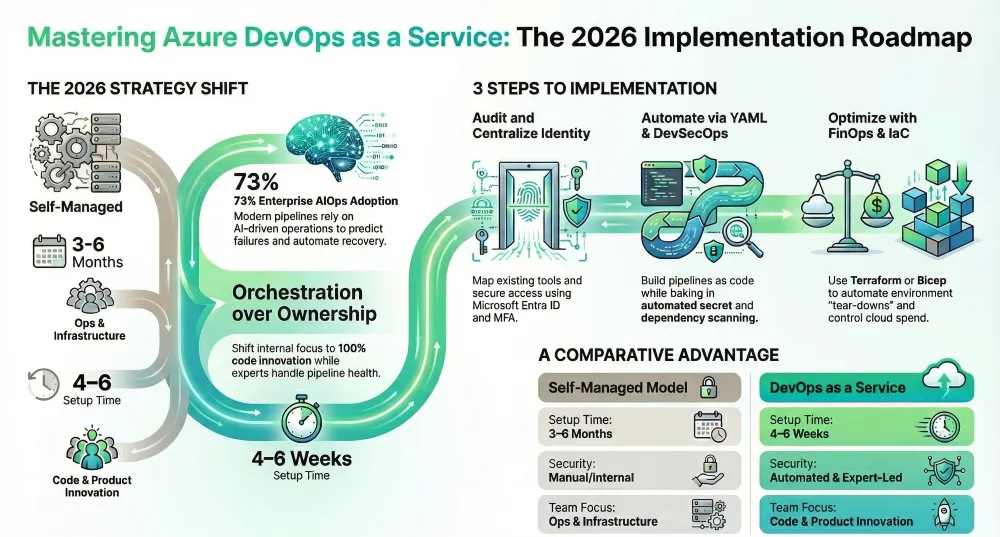
Step-by-Step Guide: How to Implement Azure DevOps as a Service
Step 1: Assess Current Infrastructure and Define Objectives
You cannot automate what you do not understand. The first step to implement Azure DevOps as a Service is mapping your current development lifecycle, identifying bottlenecks, and setting measurable goals for your new cloud-hosted platform.
- Audit Existing Tools: Document every tool currently used for version control (e.g., SVN, older Bitbucket), CI/CD (e.g., Jenkins, Bamboo), and project management (e.g., Jira, Trello).
- Define KPIs: Establish what success looks like. Common 2026 metrics include Deployment Frequency, Lead Time for Changes, Mean Time to Recovery (MTTR), and Change Failure Rate.
- Choose a Service Model: Decide whether you will manage the Azure DevOps platform in-house or utilize Azure DevOps managed services through a specialized agency to handle platform engineering, pipeline maintenance, and 24/7 monitoring.
Pro Tip: Engaging Azure DevOps consulting services like Full-Stack Techies during the assessment phase can save hundreds of hours by preventing architectural missteps and ensuring compliance from day one.
The 2026 Decision Rule: As a general rule of thumb for CTOs, if your internal “Ops-to-Dev” ratio exceeds 1:5, you are spending too much on maintenance. Implementing the “as a Service” model is most effective when your goal is to achieve sub-1-hour Lead Time for Changes, a metric that 2026 high-performers now consider the industry gold standard.
Step 2: Set Up the Azure DevOps Organization and Workspaces
Your Azure DevOps Organization is the top-level container for all your projects, users, and billing.
- Create the Organization: Navigate to dev.azure.com and log in with your Azure Entra ID (formerly Azure Active Directory) credentials. Click “New organization”.
- Configure Region: Select a hosting region closest to your development team or governed by your data residency compliance requirements (e.g., GDPR).
- Connect Entra ID: Go to Organization Settings > Azure Active Directory, and connect your directory. This is crucial for centralized access management and enforcing Multi-Factor Authentication (MFA).
- Create Projects: Click “New Project.” Choose a visibility level (Private is recommended for proprietary code) and select an Agile, Scrum, or CMMI process model for Azure Boards.
Step 3: Migrate and Structure Source Code in Azure Repos
Azure Repos provides unlimited, cloud-hosted private Git repositories. Consolidating your code here is foundational to the “as a Service” model.
- Initialize the Repository: In your new project, navigate to Repos > Files. You can initialize a new repository with a README.md and .gitignore file based on your tech stack (e.g., Node.js, .NET).
- Import Existing Code: If migrating from GitHub, Bitbucket, or GitLab, use the “Import repository” feature in the top-right dropdown. Paste the clone URL and authenticate.
- Establish Branching Policies: Go to Project Settings > Repositories > Policies. Enforce minimum reviewer counts, require linked work items, and mandate successful CI builds before code can be merged into the main branch.
Common Mistake: Migrating code without cleaning up branch history. Archive stale branches before moving to Azure Repos to reduce clutter.
Step 4: Build CI/CD Automation with Azure Pipelines
Azure Pipelines is the engine of DevOps as a Service. It automates the building, testing, and deployment of your code.
- Create a Build Pipeline (CI): Navigate to Pipelines > Create Pipeline. Select Azure Repos Git as your source.
- Define the YAML File: Azure Pipelines uses YAML to define as-code workflows. Choose a starter template (e.g., Docker, .NET Core, Node.js).
- Add Test Tasks: Ensure your YAML includes steps to run unit tests and publish code coverage results.
- Create a Release Pipeline (CD): While YAML can handle both, the classic Release Pipelines UI offers excellent visual deployment gates. Define environments (Dev, QA, Staging, Prod) and set up pre-deployment approvals.
- Utilize Managed Agents: Leverage Microsoft-hosted agents for zero-maintenance compute, or configure self-hosted agents if you require access to internal network resources.
Step 5: Integrate Security (DevSecOps) and Compliance
In 2026, security cannot be an afterthought. Integrating DevSecOps turns your standard pipeline into a secure delivery mechanism.
- Implement Secret Scanning: Use the Advanced Security add-on for Azure DevOps to automatically block secrets (passwords, API keys) from being pushed to your repositories.
- Add Dependency Scanning: Integrate tools like Dependabot (via GitHub integration) or Mend Bolt to scan open-source libraries for known vulnerabilities during the build phase.
- Container Security: If deploying Docker containers to Azure Kubernetes Service (AKS), integrate Microsoft Defender for Cloud into your pipeline to scan images before they are pushed to the Azure Container Registry.
Step 6: Transition to a Managed DevOps as a Service Model
To truly achieve “as a Service” efficiency, the day-to-day management of this infrastructure should be abstracted from your core product developers.
- Implement Infrastructure as Code (IaC): Use Terraform or Azure Bicep to define your environments. Store these IaC scripts in Azure Repos and deploy them via Pipelines.
- Set Up Observability: Integrate Azure Monitor and Application Insights. Create dashboards in Azure Boards to display real-time telemetry, build failure rates, and deployment frequencies.
- Engage a Managed Service Provider: Partnering with experts like Full-Stack Techies transforms your setup into true DevOps as a Service. They manage pipeline health, update agent pools, handle cloud cost optimization (FinOps), and resolve deployment bottlenecks 24/7, allowing your team to scale without hiring a massive internal ops department.
Advanced Tips & Automation Strategies
For enterprise users looking to push their Azure DevOps implementation further:
- AIOps Integration: Utilize AI-driven monitoring tools to predict pipeline failures before they happen. Forbes notes that AI-driven anomaly detection is becoming standard in 2026 for proactive incident management.
- Dynamic Environments: Configure your pipelines to spin up ephemeral (temporary) testing environments in Azure App Service or AKS for every pull request, and tear them down once merged to save costs.
- Automated Rollbacks: Implement blue-green or canary deployments in your Azure Release Pipelines. Configure automated rollback triggers based on Azure Monitor alerts if error rates spike post-deployment.
- ChatOps Integration: Connect Azure Boards and Pipelines to Microsoft Teams or Slack. Developers can approve deployments, receive build alerts, and create bugs directly from their chat client.
Common Troubleshooting Issues When Implementing Azure DevOps as a Service
Even with a flawless strategy, technical hiccups occur. Here are the most common issues and how to fix them.
Why Is My YAML Pipeline Failing to Trigger?
If your CI pipeline isn’t running automatically when code is pushed, the trigger configuration is likely flawed.
- Verify the trigger section in your azure-pipelines.yml file. Ensure the correct branch name is listed (e.g., – main).
- Check if branch policies are overriding the trigger.
- Ensure the YAML file is located in the root directory of the repository or the path is correctly specified in the pipeline settings.
Self-Hosted Agent Shows as “Offline”
When using custom hardware to run builds, the agent must maintain a connection to Azure DevOps.
- Check the server where the agent is installed to ensure the service (e.g., vstsagent.network…) is running.
- Verify that your Personal Access Token (PAT) hasn’t expired. You may need to generate a new PAT and reconfigure the agent.
- Confirm that outbound traffic on port 443 to *.dev.azure.com is not blocked by your corporate firewall.
Azure Pipeline Fails with “No available agents”
This occurs when your job requests capabilities that no currently active agent possesses.
- Check the pool demands in your YAML file. Are you requesting a specific OS or software version?
- Navigate to Project Settings > Agent Pools. Ensure the pool has idle agents.
- If using Microsoft-hosted agents, check your organization’s billing and parallel job limits. Free tiers have concurrency constraints.
Deployment to Azure Fails with Authentication Errors
If your pipeline cannot deploy to Azure Web Apps or AKS, the service connection is broken.
- Go to Project Settings > Service Connections.
- Locate the connection targeting your Azure subscription. Click “Edit” and “Verify” to check its health.
- If using a Service Principal, ensure its secret hasn’t expired in Azure Entra ID. If so, generate a new secret and update the service connection.
Common Mistakes to Avoid
- Ignoring Branch Policies: Allowing developers to push directly to main without pull requests completely undermines code quality and peer review processes.
- Hardcoding Secrets: Storing database connection strings or API keys in your Git repository or YAML files is a massive security risk. Always use Azure Key Vault linked to Azure DevOps Variable Groups.
- Treating DevOps as Just a Tool: Assuming that buying Azure DevOps automatically makes you Agile. DevOps is a cultural shift. If your teams don’t communicate, the tools won’t fix your delivery speed.
- Overcomplicating the Pipeline Early On: Don’t start with complex microservices deployments and canary releases. Start with a basic CI build, achieve consistent successes, and iterate.
- Neglecting FinOps: Cloud resources spun up by automated pipelines can rapidly inflate costs. Ensure you have tagging strategies and automated tear-downs for testing environments.
Real-World Use Case
Scenario: A mid-sized FinTech company was struggling with monthly, manual deployments that required weekend downtime and suffered a 25% change failure rate.
Solution: They decided to implement Azure DevOps as a Service by partnering with Full-Stack Techies for Azure DevOps consulting services. The consulting team migrated the legacy SVN codebase to Azure Repos, containerized the monolithic application into Docker images, and built multi-stage YAML pipelines.
Outcome: Within three months, the company transitioned from monthly to daily deployments. Their Change Failure Rate dropped to under 3%, and by leveraging Terraform for automated environment provisioning, they reduced cloud infrastructure costs by 30%. The developers reclaimed 15 hours a week previously lost to deployment troubleshooting.
What’s Next?
Now that your Azure DevOps infrastructure is set up, the next step is continuous optimization. Review your Azure Boards to ensure sprint metrics align with your deployment frequencies, and begin exploring Azure Test Plans for deeper automated QA integration.
Ready to accelerate your delivery without the operational headache? Partner with Full-Stack Techies to access elite Azure DevOps managed services. Let our experts handle the pipelines, security, and scalability while you focus on building great products. Book a free DevOps consultation today to audit your current architecture.
Why Trust This Guide?
This guide is built on 2026 best practices synthesized from official Microsoft Azure documentation, industry-leading Azure DevOps consulting services methodologies, and authoritative tech reports from Gartner and Forbes. The steps outlined are based on practical, real-world implementations that prioritize E-E-A-T (Experience, Expertise, Authoritativeness, and Trustworthiness). We have rigorously structured this guide to provide actionable, technically accurate, and impartial advice for modern software teams.