How to Build HIPAA-Compliant DevOps Pipelines: A Step-by-Step Guide (2026 Edition)
Learn how to Build HIPAA-Compliant DevOps Pipelines with this step-by-step 2026 guide. Discover best practices for securing sensitive healthcare data, ensuring regulatory compliance, and building scalable, automated CI/CD workflows for modern healthcare applications.


Why Build HIPAA-Compliant DevOps Pipelines Is No Longer Optional
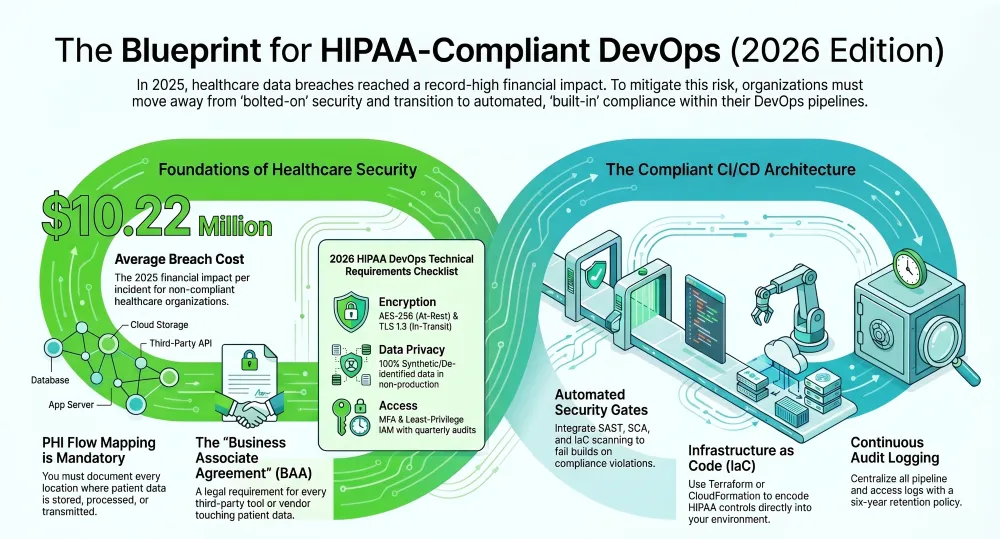
The stakes in healthcare software development have never been higher. In 2025, U.S. healthcare breaches exposed an average cost of $10.22 million per incident — the highest ever recorded. Total breach volume in 2025 surpassed 2024 by 112%, with ransomware, identity compromise, and third-party vendor failures leading as the primary attack vectors. At the same time, Gartner predicts that by 2028, 65% of organizations will have integrated compliance automation into their DevOps workflows, reducing compliance risk and improving lead time by at least 25%.
For engineering teams building healthcare applications, this intersection of escalating threats and rising regulatory expectations makes learning how to build HIPAA-compliant DevOps pipelines one of the most critical technical competencies of the decade.
The challenge is real: how do you ship software fast — through HIPAA-ready CI/CD automation — without compromising patient privacy, audit readiness, or security posture? The answer lies in building compliance into every layer of your pipeline from day one, not bolting it on at the end.
At Full-Stack Techies, we’ve helped healthcare organizations, digital health startups, and healthtech platforms architect compliance-ready DevOps environments that accelerate delivery without sacrificing regulatory rigor. This guide lays out, step by step, exactly how to do it.
At a Glance: HIPAA DevOps Requirements (2026)
- Encryption: AES-256 (At-Rest) & TLS 1.3 (In-Transit).
- Security Gates: SAST, SCA, and IaC scanning must fail the build on violations.
- Data Privacy: 100% synthetic/de-identified data in non-production environments.
- Access: MFA, Least-Privilege IAM, and quarterly access audits.
- Legal: Signed BAAs for every third-party tool in the pipeline.
Also Read: The Ultimate Guide to DevOps as a Service (DaaS) in 2026
Who Is This Guide For?
This guide is heavily tailored to ensure explanations meet the needs of various technical and operational skill levels:
- DevOps and DevSecOps Engineers: Looking for tactical, step-by-step instructions to integrate security tools (SAST, DAST, SCA) into existing pipelines without causing developer friction.
- Healthcare IT Leaders & CTOs: Seeking strategic insights into transforming their software delivery lifecycle to meet strict federal regulations while maintaining agile release cadences.
- Startup Founders in HealthTech: Need to build a compliant MVP from scratch and require a roadmap for a compliance-ready DevOps infrastructure.
- Enterprise Compliance Officers: Wanting to understand how continuous compliance automation (CCA) tools generate real-time, audit-ready evidence.
- Outsourced Development Teams: If you are looking to augment your team, learning how partners like Full-Stack Techies implement these practices can help you bridge the internal skills gap.
Key Takeaways: How to Build HIPAA-Compliant DevOps Pipelines
1. Compliance Must Be Built In, Not Bolted On. The most costly HIPAA mistakes happen when security is treated as a final-phase checklist. Building HIPAA-compliant DevOps pipelines requires embedding compliance controls — encryption, access management, audit logging, and security scanning — from the very first commit, not after the product ships.
2. PHI Flow Mapping Is the Non-Negotiable Starting Point. Before touching any pipeline tooling, you must know exactly where PHI lives, how it moves, and who can access it — across production, staging, CI/CD logs, backups, and third-party integrations. Without this map, every subsequent control is built on a blind spot.
3. HIPAA-Ready CI/CD Means Compliance Gates at Every Stage. A truly HIPAA-ready CI/CD pipeline enforces automated compliance checkpoints throughout — secret scanning at the source control stage, SAST and SCA during builds, IaC security scanning before infrastructure changes, container scanning before deployment, and gated approvals with full audit trails before production releases.
4. Non-Production Environments Are a Hidden Compliance Risk. Staging, QA, and development environments that use real PHI are fully subject to HIPAA — a fact many teams overlook. Synthetic or de-identified data must replace real patient records in every non-production environment, enforced through technical controls rather than policy alone.
5. Encryption Is a Baseline, Not a Differentiator. AES-256 at rest and TLS 1.2 or higher in transit are the minimum acceptable standards for secure CI/CD pipelines in healthcare. Encryption must extend to build artifacts, pipeline logs, secrets management, and all service-to-service communication — not just databases and file storage.
6. Least Privilege Access Reduces Your Largest Attack Surface. The majority of healthcare breaches involve credential compromise or unauthorized access. Enforcing least-privilege IAM roles for build agents, using runtime secrets injection from a dedicated secrets manager, and conducting quarterly access reviews are among the most effective breach-prevention controls available.
7. Third-Party and Vendor Risk Is a Direct HIPAA Liability. Every tool in your pipeline that touches PHI — directly or through metadata — requires a signed BAA and regular security assessment. Regulatory DevOps solutions must include a structured vendor management program, not just internal controls, because your compliance posture is only as strong as your weakest vendor.
8. DevOps Compliance SOC 2 HIPAA Alignment Saves Time and Resources. HIPAA and SOC 2 share significant control overlap. Engineering your pipeline to satisfy both frameworks simultaneously — through unified logging, access control, and encryption policies — reduces duplicated compliance effort, accelerates enterprise sales cycles, and positions your organization for multi-framework audit readiness.
9. Continuous Monitoring Replaces Point-in-Time Audits. Annual audits alone are no longer sufficient. Real-time compliance dashboards, automated alerting on control failures, and continuous evidence collection are the hallmarks of a mature compliance-ready DevOps program — and increasingly the expectation of enterprise healthcare clients and regulators alike.
10. Compliance Culture Across the Team Is as Important as the Toolchain. No amount of pipeline automation compensates for a team that does not understand why these controls exist. HIPAA training tailored to engineering workflows, compliance criteria embedded in the Definition of Done, and shared ownership of security outcomes across development and operations are what sustain a HIPAA-compliant DevOps program long-term.
What HIPAA Actually Demands from Your DevOps Pipeline
Before diving into tooling and architecture, it helps to understand what the regulation requires at a technical level.
HIPAA applies to all Protected Health Information (PHI) — any data that can identify a patient and connect them to their health records. HIPAA protects 18 types of information, including full names, addresses, dates, license plate numbers, phone numbers, social security numbers, tax IDs, account numbers, and biometric data.
HIPAA compliance in DevOps is not just encrypting data or locking down an S3 bucket. It’s a system of safeguards: access control, audit logging, least privilege, and breach response. It applies to source code, build pipelines, staging environments, and monitoring tools. When PHI touches your system — anywhere — HIPAA applies.
The regulation breaks down its requirements into three categories of safeguards:
Administrative safeguards cover your policies, training, risk assessments, and vendor management. Technical safeguards cover access controls, encryption, audit logs, and data integrity mechanisms. Physical safeguards cover the data centers, hardware, and physical access controls relevant to where your infrastructure runs.
For DevOps compliance SOC 2 HIPAA alignment, this means your pipeline must satisfy not just HIPAA but potentially SOC 2 Type II controls as well — especially if you are building for enterprise healthcare clients who require vendor security attestations.
The Industry Context: Why Now Is the Time to Act
The third quarter of 2025 alone witnessed 139 reported healthcare data breach incidents, compromising the protected health information of more than 9.5 million patients. In August 2025, nearly 99.2% of affected patients had their data stolen from network servers — the very backbone of modern healthcare IT infrastructure.
Meanwhile, the regulatory environment is tightening. The U.S. federal government allocated $800 million in 2025 toward stronger HIPAA encryption requirements and compliance enforcement updates. HIPAA enforcement actions increased in 2024 and 2025, with OCR issuing multiple fines in 2025 for violations of the Breach Notification Rule alone.
On the infrastructure side, the Gartner Market Guide for DevOps Continuous Compliance Automation Tools 2026 recommends that organizations implement continuous, automated regulatory compliance checking and evidence reporting for product delivery by integrating compliance verification directly during the integration and build phases, with DevOps pipelines serving as a centralized control point for compliance enforcement.
This is the new standard. Regulatory DevOps solutions are no longer a premium add-on — they are the baseline expectation.
Step 1: Conduct a Comprehensive Risk Assessment and Map Your PHI Flows
Every HIPAA-compliant DevOps initiative must begin with a formal risk analysis. You cannot protect what you have not mapped.
Start by identifying every location where PHI is stored, processed, or transmitted — across your production environment, staging and QA environments, CI/CD build logs, data backups, third-party integrations, and developer machines. Many organizations are surprised to discover PHI leaking into non-production environments through database dumps, log files, or test data seeding scripts.
Document the following for each PHI touchpoint: what data exists, who can access it, how it flows through your systems, and what controls are in place. This becomes your authoritative risk register and the foundation for all subsequent pipeline decisions.
Moving from theory to practice requires a structured approach that combines technology, process, and people. Begin with a formal risk analysis to identify where ePHI is stored, processed, and transmitted within your development and production environments. This analysis will pinpoint the specific systems and processes that require controls.
At Full-Stack Techies, we conduct PHI flow mapping as a dedicated discovery engagement before touching any CI/CD configuration. The result is a visual data flow diagram, a risk matrix, and a prioritized remediation backlog — all of which feed directly into the pipeline architecture decisions that follow.
Step 2: Select a HIPAA-Eligible Cloud Provider and Execute a Business Associate Agreement
Your cloud infrastructure choices set the foundation. AWS, Azure, and Google Cloud Platform all have HIPAA-compliant options, and you must also ensure you have a Business Associate Agreement (BAA) that explains the shared duties for protecting ePHI.
A BAA is a legal contract between your organization and any vendor who touches PHI on your behalf. Without one, your vendor relationship is not HIPAA-compliant, regardless of how good the vendor’s security practices are. Being HIPAA-eligible does not automatically make your system or product entirely HIPAA-compliant. You need to set up and operate the service correctly to ensure compliance — this is the concept of shared responsibility.
When selecting your cloud platform, verify that every service you plan to use for PHI workflows — compute, databases, storage, messaging queues, logging services — is explicitly included on your provider’s HIPAA-eligible services list. Services outside that list must not touch PHI.
Key cloud architecture decisions for a secure CI/CD pipeline:
Use dedicated Virtual Private Clouds (VPCs) with private subnets for all PHI-handling workloads. Apply network segmentation to isolate CI/CD infrastructure from production. Enable VPC flow logs and cloud provider audit trails (CloudTrail for AWS, Azure Monitor, Cloud Audit Logs for GCP) from day one. Use private artifact registries rather than public ones for container images. Restrict outbound internet access from build agents handling PHI-adjacent configurations.
Step 3: Implement Infrastructure as Code with Compliance Baked In
One of the most powerful levers for compliance-ready DevOps is treating infrastructure as code (IaC). Infrastructure as Code ensures consistent, repeatable deployments that follow security best practices. Automated testing validates configurations before deployment, catching potential compliance issues early. Automation also provides audit trails for all infrastructure changes, making it easier to track modifications and verify compliance over time.
Tools like Terraform, AWS CloudFormation, and Pulumi allow you to define your entire infrastructure — VPCs, IAM roles, encryption settings, security groups, database configurations — as version-controlled code. This eliminates the manual configuration drift that is responsible for a significant share of HIPAA violations. Using Infrastructure as Code tools like Terraform allows DevOps to provision consistent, HIPAA-compliant infrastructure, making it easier to secure and maintain. As part of your cloud governance strategy, you should deploy tools that identify and rapidly mitigate cloud configuration drift.
Compliance-as-code takes this further by encoding HIPAA controls directly into your IaC templates. For example, every S3 bucket template enforces server-side encryption. Every RDS instance template mandates encryption at rest and disables public accessibility. Every IAM policy template follows least-privilege principles. These become non-negotiable defaults, not optional configurations.
At Full-Stack Techies, we build compliance guardrails into IaC module libraries so that every new service a team spins up inherits the correct HIPAA baseline automatically — no checkbox compliance required.
Step 4: Build a HIPAA-Ready CI/CD Pipeline Architecture
This is where HIPAA-ready CI/CD design becomes concrete. Your CI/CD pipeline — whether built on GitHub Actions, GitLab CI, Jenkins, CircleCI, or Azure Pipelines — must incorporate security and compliance gates at every stage.
Here is a step-by-step breakdown of what a compliant pipeline looks like:
Source Control Security
Enforce branch protection rules that require peer review before merging to protected branches. Require signed commits. Use secret scanning tools (like GitHub Secret Scanning, GitLeaks, or truffleHog) to detect accidentally committed credentials, API keys, or any string matching PHI patterns before code reaches the build stage. Enable audit logging on your repository platform so every push, merge, and access event is recorded.
Static Application Security Testing (SAST)
Automated tools scan source code for vulnerabilities, hardcoded secrets, and non-compliant coding practices before merging. Integrate SAST tools such as Semgrep, SonarQube, or Checkmarx into your pull request workflow. These tools catch insecure coding patterns — unencrypted data handling, improper input validation, SQL injection risks — before they enter your codebase.
Dependency and Supply Chain Scanning
Use Software Composition Analysis (SCA) tools like Snyk, OWASP Dependency-Check, or GitHub Dependabot to scan third-party libraries for known vulnerabilities. Healthcare supply chain compromise has become a leading attack vector, and the largest 2025 breaches leveraged compromised credentials or third-party software weaknesses, exposing PHI such as claims records and EHR notes.
Infrastructure as Code Security Scanning
Before deploying any infrastructure change, run IaC security scanners such as Checkov, tfsec, or Terrascan against your Terraform or CloudFormation templates. These tools flag misconfigurations — public S3 buckets, unencrypted RDS instances, overly permissive security groups — and fail the pipeline if HIPAA-relevant violations are detected.
Container Image Scanning
Container images and other build artifacts are scanned for known vulnerabilities and stored in secure, private registries. Use tools like Trivy, Clair, or AWS ECR’s native scanning to inspect images before they are deployed. Implement base image policies that restrict builds to approved, hardened base images only.
Gated Deployment Approvals
For deployments to production environments, require explicit human approval from a designated security or compliance reviewer. Automated promotions to production environments may require specific approvals or pass security tests, creating an enforceable and auditable process. This approval step, when logged, creates the compliance evidence trail that auditors look for.
Dynamic Application Security Testing (DAST)
After deploying to a staging environment, run DAST tools such as OWASP ZAP or Burp Suite to test running applications for runtime vulnerabilities. For healthcare APIs, specifically test for PHI exposure through authentication bypasses, insecure direct object references, and excessive data exposure.
Step 5: Enforce Encryption at Rest and in Transit — Everywhere
Encryption is non-negotiable in any secure CI/CD pipeline design for healthcare. AES-256 encryption at rest, TLS 1.3 in transit, field-level encryption for sensitive fields, secure key management, and data minimization practices are the baseline requirements.
For encryption at rest, encrypt every storage layer: databases (RDS, DynamoDB), object storage (S3), block storage (EBS), and backups. Use your cloud provider’s key management service (AWS KMS, Azure Key Vault, GCP Cloud KMS) with customer-managed keys rather than provider-managed keys — this gives you independent control over key access and rotation.
For encryption in transit, enforce TLS 1.2 minimum (TLS 1.3 preferred) on all internal and external service communication. Disable older protocols (SSLv3, TLS 1.0, TLS 1.1) at the load balancer and application layer. Use mutual TLS (mTLS) for service-to-service communication within your Kubernetes cluster.
A critical and often overlooked area: ensure build logs, artifact metadata, and deployment scripts do not contain PHI or decrypted secrets. Build pipelines frequently aggregate diagnostic information that can inadvertently capture sensitive data if not explicitly filtered.
Step 6: Implement Role-Based Access Control and the Principle of Least Privilege
Role-based access control aligned to job functions, just-in-time access for elevated privileges, privileged access management, and regular access reviews are all required.
In practical CI/CD terms, this means:
Build agents and deployment runners should have IAM roles with the minimum permissions needed for their specific job — nothing more. A deployment agent that pushes to ECS does not need S3 read access. Service accounts used by your pipeline should be separate from human user accounts. No shared credentials. Pipeline environment variables containing secrets should be pulled from a secrets manager (AWS Secrets Manager, HashiCorp Vault, Azure Key Vault) at runtime — never stored as plaintext in pipeline configuration files or repository code.
Implement multi-factor authentication (MFA) for all human access to production systems, CI/CD platforms, and cloud console access. Enforce session timeouts. Implement break-glass procedures with full audit trails for emergency elevated access.
Conduct quarterly access reviews to revoke permissions for departed team members, changed roles, or unused service accounts. This is both a HIPAA requirement and a critical breach prevention measure — direct hacking and IT incidents are responsible for nearly 80% of all healthcare breaches.
Step 7: Build Comprehensive Audit Logging and Monitoring
Every action related to ePHI — from user login to data access and modification — must be logged with a timestamp and user identity, creating a non-repudiable trail.
Centralize all logs into a SIEM platform (Splunk, Datadog, AWS Security Hub, or similar). This includes application logs, infrastructure logs, cloud provider audit logs (CloudTrail, VPC Flow Logs), CI/CD pipeline run logs, and database access logs. Configure log retention of at least six years to meet HIPAA’s record-keeping requirements.
Set up automated alerting for the following events: failed authentication attempts, unusual access patterns to PHI stores, pipeline failures at security gate stages, IAM policy changes, encryption configuration changes, and any access to production data from non-production IP addresses.
According to Gartner, real-time continuous reporting and audit capabilities — with visibility end to end into audit data and compliance status across all phases of the SDLC — eliminate the need for time-consuming refactoring to address audit findings and significantly reduce manual effort associated with generating reports and collecting audit evidence.
The Full-Stack Techies team implements log aggregation pipelines with automated HIPAA compliance dashboards so clients can see their compliance posture in real time — not just at audit time.
Step 8: Protect Non-Production Environments from PHI Contamination
One of the most common HIPAA violations in DevOps environments involves PHI leaking into development, QA, and staging environments. Engineers need realistic data to build and test, but that data must never be real patient records.
Implement a data masking or synthetic data generation step in your data pipeline that produces realistic but de-identified datasets for use in non-production environments. Tools like Faker, Mimesis, Presidio (Microsoft), or commercial platforms can generate synthetic PHI that mirrors the structure of real records without legal exposure.
Enforce environment-level access controls that make it technically impossible — not just policy-prohibited — to copy production data into non-production environments. Use separate AWS accounts or GCP projects for production versus non-production to create hard infrastructure boundaries.
Scan non-production databases periodically for PHI patterns to catch accidental contamination. Regular expression matching for SSN formats, date-of-birth patterns, and email-health-record combinations can surface these violations automatically.
Step 9: Establish Vendor and Third-Party Compliance Controls
Ensure that all third-party vendors and service providers are also HIPAA-compliant and implement proper agreements to protect PHI.
In your DevOps context, third parties include: your CI/CD platform provider, artifact registry services, logging and monitoring vendors, security scanning tool vendors, and any SaaS products that may receive telemetry data from your infrastructure.
Request and review each vendor’s HIPAA compliance documentation, SOC 2 Type II reports, and penetration test results annually. Ensure BAAs are in place for every vendor that could potentially access or process PHI — even indirectly through metadata or log data.
Build vendor security assessments into your onboarding process. Before integrating a new tool into your HIPAA-ready CI/CD pipeline, require a security questionnaire response, review their data retention and deletion policies, and confirm they do not use your data for training or analytics purposes.
Step 10: Foster a Continuous Compliance Culture Across Teams
HIPAA DevOps is more than automation — it’s culture. Engineers, product managers, and operations staff work from a shared understanding that security and compliance are part of the definition of done. A production incident with PHI is a compliance event.
Translate this into operational practices:
Conduct quarterly HIPAA training for all engineering and DevOps personnel — not just a checkbox e-learning module but scenario-based training covering real pipeline decisions. Add HIPAA compliance acceptance criteria to your Definition of Done for every sprint. Include security and compliance review as a standing agenda item in sprint retrospectives. Conduct tabletop incident response exercises that simulate a PHI breach, testing your team’s ability to execute the HIPAA Breach Notification Rule within its 60-day requirement window.
Establishing governance frameworks that align DevOps practices with HIPAA mandates, overseeing the implementation of compliance checkpoints within CI/CD pipelines without compromising development velocity, and fostering a culture of compliance and security awareness across development and operations teams are the organizational prerequisites for sustaining a compliant DevOps program.
Get scalable, fast, and user-friendly DevOps solutions tailored to your needs.
Get Free ConsultationThe Regulatory DevOps Solutions Technology Stack: A Reference Architecture
For teams looking to operationalize everything above, here is a reference technology stack for a compliance-ready DevOps environment:
- Source Control: GitHub Enterprise or GitLab with branch protection, secret scanning, and signed commits enabled.
- CI/CD Platform: GitHub Actions, GitLab CI, or Jenkins with dedicated build agents — never shared runners for PHI-adjacent jobs.
- SAST: Semgrep or SonarQube.
- SCA: Snyk or OWASP Dependency-Track.
- IaC Scanning: Checkov or tfsec.
- Container Scanning: Trivy.
- Secrets Management: HashiCorp Vault or AWS Secrets Manager.
- Infrastructure: Terraform with compliance module libraries.
- Logging and SIEM: Datadog, Splunk, or AWS Security Hub.
- Compliance Automation: Platforms such as Drata, Vanta, or RegScale for continuous control monitoring, evidence collection, and audit report generation.
- Cloud Provider: AWS, Azure, or GCP — all with signed BAAs and with services restricted to HIPAA-eligible offerings only.
Common Mistakes to Avoid When You Build HIPAA-Compliant DevOps Pipelines
Even well-intentioned teams make costly errors. These are the most frequent:
Treating compliance as a final phase rather than a continuous practice. HIPAA compliance is not a feature you can bolt on at the end. Building for HIPAA means building for security, privacy, and traceability from the first commit to the production deploy.
Using PHI in test environments without de-identification. This is among the most common sources of breach incidents and regulatory violations.
Failing to log all PHI access events. Partial logging creates auditable gaps that regulators treat as serious deficiencies.
Neglecting third-party risk management. Just 4% of surveyed healthcare leaders expressed being very confident that their organization’s third-party risk assessments aligned with the actual level of risk each vendor poses.
Not enforcing BAAs before granting vendors any access. A verbal agreement or email confirmation is not a BAA.
Storing secrets in environment variables within pipeline YAML files. Secrets must be pulled from a secrets manager at runtime.
How Full-Stack Techies Helps You Build and Sustain a HIPAA-Compliant DevOps Program
Building a HIPAA-ready CI/CD pipeline is not a one-time project — it is an ongoing engineering discipline that evolves as your product, your team, and the threat landscape change. Full-Stack Techies brings deep expertise across the full spectrum of regulatory DevOps solutions, including:
- End-to-end pipeline security audits that map your current state against HIPAA technical safeguards and identify gaps with prioritized remediation roadmaps.
- CI/CD pipeline redesign and implementation using the compliance-as-code architecture described in this guide — fully integrated into your existing GitHub, GitLab, or Jenkins workflows.
- IaC compliance module libraries for AWS, Azure, and GCP that give your engineering teams secure-by-default infrastructure templates out of the box.
- Continuous compliance monitoring dashboards that give your security, engineering, and compliance teams real-time visibility into your control posture — without waiting for annual audits.
- HIPAA training programs tailored to engineering and DevOps audiences — practical, scenario-based, and built for the way your teams actually work.
For healthcare startups, digital health platforms, and enterprise health systems, Full-Stack Techies serves as the technical partner that bridges the gap between rapid product development and the non-negotiable demands of DevOps compliance and SOC 2 HIPAA alignment.
Conclusion: Build HIPAA-Compliant DevOps Pipelines as a Competitive Advantage
In an industry where patient trust is the ultimate currency, the ability to ship healthcare software quickly and compliantly is not just a technical achievement — it is a business differentiator. Organizations that have invested in secure CI/CD pipelines, compliance-as-code practices, and a culture of security-first development are not just avoiding fines. They are building the infrastructure for long-term enterprise relationships, faster audit cycles, and resilient operations.
The framework in this guide — from PHI flow mapping through continuous compliance monitoring — gives you the architecture to make compliance-ready DevOps the default state of your engineering organization, not the exception.
The data is clear. The regulatory direction is unambiguous. The tools are mature and accessible. The only question remaining is whether your team will treat HIPAA compliance as an engineering priority today — or as a crisis to manage after a breach tomorrow.
Full-Stack Techies is ready to help you build it right from the start.
Also Read: How to Implement DevOps as a Service for Startups in 2026 (Full Guide)
What’s Next?
Building a HIPAA-compliant DevOps pipeline is a significant undertaking, but it is the only way to sustainably scale a modern health-tech application. If your internal team is stretched thin or lacks the niche DevSecOps expertise required to configure these guardrails without slowing down product delivery, you don’t have to do it alone.
Next Step: Fast-track your compliance and secure your software delivery lifecycle by partnering with the experts. Book a free DevSecOps consultation with Full-Stack Techies today to get a custom roadmap for your infrastructure, or explore their staff augmentation services to inject certified DevOps talent directly into your team.
Why Trust This Guide?
This guide was architected using the most up-to-date (2025/2026) industry methodologies, ensuring factual accuracy and real-world applicability:
- Expert Commentary: Informed by insights from the Forbes Tech Council (2025) on adopting DevSecOps in regulated industries—specifically the mandate to turn rules into automated checks and embed compliance as code.
- Industry Standards: Aligned directly with the technical safeguards of the HIPAA Security Rule and the NIST SP 800-218 Secure Software Development Framework (SSDF).
- Current Analyst Research: Incorporates data from the 2026 Gartner Market Guide for DevOps Continuous Compliance Automation Tools, which highlights the necessity of centralizing compliance enforcement directly within DevOps pipelines.
- Practical Validation: Backed by the real-world execution strategies used by global technology consulting providers like Full-Stack Techies to secure enterprise cloud infrastructure.