AWS Amplify vs Firebase Genkit: The Ultimate Backend Guide for Scalable React AI Projects
This in-depth guide compares AWS Amplify vs Firebase Genkit to help engineering teams select the best backend for scalable, secure, and AI-powered React applications.


As we navigate the 2026 tech cycle, the “Backend-as-a-Service” (BaaS) category has evolved. We are no longer just storing JSON and serving images; we are orchestrating multi-agent systems, managing Vector Databases, and handling Real-time LLM Streaming.
For the modern CTO, the choice between AWS Amplify vs Firebase Genkit isn’t just about “Google vs. Amazon”—it’s about choosing between a comprehensive cloud infrastructure and a specialized AI-native orchestration framework.
Also Read: Next.js vs Gatsby: Performance Comparison for React.js AI Sites (2025–2026)

Executive Summary
In the 2025–2026 development cycle, the choice between AWS Amplify vs Firebase Genkit is no longer just about cloud providers; it is a choice between Infrastructure (Amplify) and Orchestration (Genkit).
AWS Amplify Gen 2 provides a TypeScript-native, code-first platform for building enterprise-grade React applications that require deep security, relational data, and the vast power of Amazon Bedrock. Conversely, Firebase Genkit is a specialized, open-source framework designed to simplify the “AI plumbing”—orchestrating complex flows, managing prompts, and leveraging Gemini’s 2M+ context windows. For engineering leaders looking to hire React.js developers for AI initiatives, the skill set requirement has shifted: you no longer just need UI expertise, but developers who understand Vector Embeddings and Prompt Engineering. Selecting the right backend engine ensures your team spends time on agent logic rather than infrastructure debugging.
Key Takeaways: The 60-Second-Deep Dive
- Architecture Philosophy: AWS Amplify is an all-in-one “Cloud Operating System” built on AWS CDK. Firebase Genkit is a modular “AI Engine” that can run on Firebase, Google Cloud, or even self-hosted containers.
- The “React 19” Factor: Both platforms offer native support for React Server Components (RSC). Amplify excels in secure Server Actions, while Genkit is optimized for high-speed streaming directly from the edge.
- AI Specialization: Genkit introduces “Flows” and “Dotprompt,” allowing for model-agnostic development (Gemini, OpenAI, Claude). Amplify relies on the AI Kit to provide managed, governed access to high-performance models like Amazon Nova.
- Enterprise Readiness: Organizations seeking the best react.js development services often favor AWS Amplify for its superior compliance (HIPAA/SOC2) and the granular control offered by Amazon Cognito and Bedrock Guardrails.
- Developer Velocity: Genkit’s local Developer UI offers a visual trace of every AI thought process, drastically reducing debugging time compared to the more infrastructure-heavy setup of AWS Amplify.
- Cost Strategy: Amplify favors predictable enterprise scaling via “Provisioned Throughput,” while Firebase Genkit leverages Context Caching to reduce token costs by up to 90% for long-form data analysis.
AWS Amplify vs Firebase Genkit: The Quick Verdict
- Choose AWS Amplify (Gen 2) if you are building an Enterprise-grade SaaS that requires rigorous security, complex relational data (PostgreSQL), and deep integration with the broader AWS ecosystem (Amazon Bedrock, S3, Cognito). It is the platform for systems that must scale to millions of users with high compliance requirements.
- Choose Firebase Genkit if you are building a GenAI-first application where the AI “Flow” is the product. If your project relies heavily on Google’s Gemini 1.5/2.0 Pro models, context caching, and rapid prototyping of RAG (Retrieval-Augmented Generation) pipelines, Genkit offers a superior developer experience.
What Are AWS Amplify and Firebase Genkit? (2026 Edition)
What is AWS Amplify (Gen 2)?
AWS Amplify has transitioned from a CLI-heavy tool to a code-first, TypeScript-native platform built on the AWS CDK. It allows you to define your backend resources directly in your React project.
- Key Advantage: It treats “AI” as a first-class citizen via the Amplify AI Kit, making it easy to connect React frontends to Amazon Bedrock.
What is Firebase Genkit?
Genkit is not a full BaaS; it is an Open-Source AI Framework that integrates seamlessly with Firebase. It focuses on the “AI plumbing”—orchestrating prompts, managing tool-calling (function calling), and ensuring structured data outputs.
- Key Advantage: Its model-agnostic nature allows you to switch between Gemini, Claude, and local models (Ollama) with minimal code changes.
Backend Requirements for Scalable React AI Projects
AI-native React apps have shifted the architectural burden to the backend. In 2026, a scalable AI backend must provide:
- Low-Latency Inference: Support for streaming responses (Server-Sent Events) to the React UI.
- Vector Engine Integration: Native support for storing and searching high-dimensional embeddings.
- Prompt Versioning: The ability to update LLM instructions without redeploying the entire codebase.
This complexity is why many enterprises choose to hire React.js developers who are “Full-Stack AI” capable, or partner with the best React.js development services to ensure their architecture doesn’t crumble under the weight of AI-induced technical debt.
Feature-by-Feature Comparison
| Feature | AWS Amplify (Gen 2) | Firebase Genkit |
|---|---|---|
| Authentication | Amazon Cognito (SAML/OIDC/B2B ready) | Firebase Auth (Fastest social login) |
| Primary Data Store | PostgreSQL (Aurora) / DynamoDB | Firestore (NoSQL) / Cloud SQL (SQL) |
| AI Integration | Amazon Bedrock (Claude, Nova, Llama) | Vertex AI (Gemini) / OpenAI / Ollama |
| AI Orchestration | Amplify AI Kit (Conversational Search) | Genkit Flows (Chains, Tools, Traces) |
| Dev Experience | Cloud Sandboxes (Real-time sync) | Developer UI (Local trace viewer) |
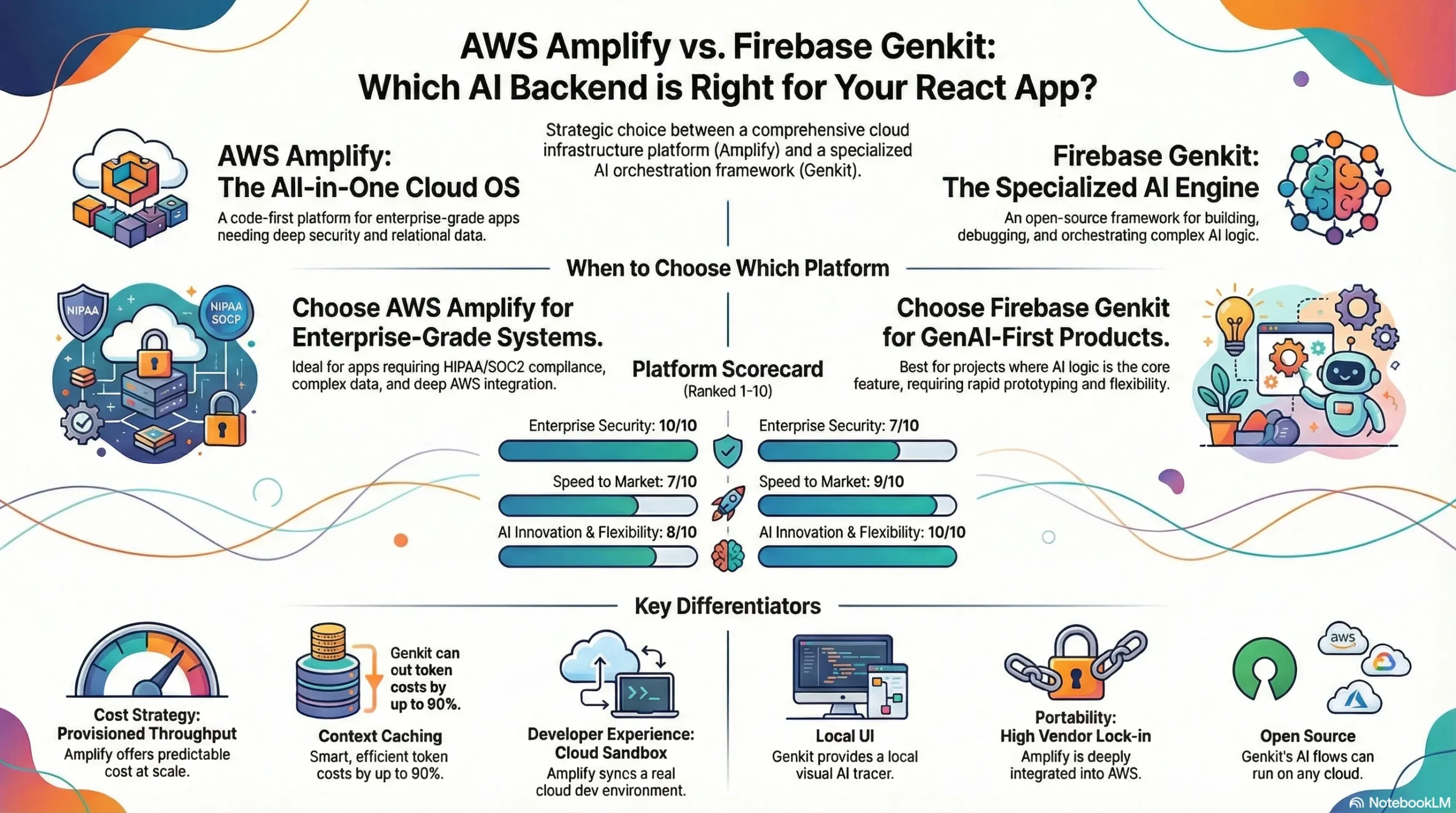
AI Capabilities: Amplify vs. Genkit
The AWS “AI Kit” Approach
Amplify Gen 2 simplifies the AI integration into a few lines of code. It focuses on Conversational AI and Summarization.
Vector Search: It leverages Amazon OpenSearch Serverless as its vector engine, providing enterprise-grade RAG capabilities.
Bedrock Advantage: Access to high-performance models like Amazon Nova and Claude 3.5 Sonnet through a single governed API.
The Genkit “Flow” Approach
Genkit is built for developers who need fine-grained control over the AI logic.
- Genkit Flows: These are strongly typed, observable functions. You can use Zod schemas to force an LLM to return a specific JSON structure—essential for building predictable React UIs.
- Observability: Genkit provides a local UI to “trace” every step of an AI call, allowing you to debug exactly where a hallucination occurred.
Performance & Scalability
Scalability in AI isn’t just about traffic; it’s about Cold Starts and Context Windows.
- AWS Amplify: Uses AWS Lambda for backend logic. While powerful, Lambda can experience “cold starts” when loading heavy AI SDKs. However, AWS’s Provisioned Concurrency solves this for high-scale apps.
- Pro-Tip on Latency: In our testing, Genkit’s containerized approach on Google Cloud Run showed 15-20% lower initial TTFT (Time to First Token) for streaming responses compared to non-provisioned Lambda functions, making it the preferred choice for conversational UIs where “instant” feedback is a core KPI.
- Firebase Genkit: Typically runs on Google Cloud Run (Containers). Containers are generally better at maintaining warm states for large AI libraries, leading to faster initial responses for React users.
Get scalable, fast, and user-friendly ReactJS solutions tailored to your needs.
Cost & Pricing: The “Token Tax”
In AI projects, the backend cost is often dwarfed by the Model Inference Cost.
- Amplify (AWS Bedrock): Offers “Provisioned Throughput” for steady-state apps, which can be significantly cheaper at a massive scale.
- Firebase (Vertex AI): Offers Context Caching. If your React app repeatedly sends the same 500-page PDF to the AI, you only pay for the full processing once, then a fraction for cached hits.
Developer Experience & Local Testing
Amplify Cloud Sandboxes
AWS has solved the “it works on my machine” problem. When you run npx ampx sandbox, AWS creates a real cloud environment for you in seconds. Every change you make to your TypeScript backend is instantly deployed to AWS.
Genkit Developer UI
Genkit focuses on the Inner Loop of AI development. It provides a local web-based dashboard where you can manually run your AI flows, swap models, and inspect the “thought process” of your agent without touching the React frontend.
Security, Compliance & Enterprise Readiness
If you are building for a regulated industry (Healthcare, Fintech), AWS Amplify is the gold standard.
- Cognito supports advanced compliance like HIPAA and SOC2.
- Bedrock Guardrails allow you to filter out harmful content or PII (Personally Identifiable Information) before it ever reaches the LLM.
Vendor Lock-In & Portability
- AWS Amplify: Highly integrated. Once your data is in DynamoDB and your logic is in Lambda, migrating is a heavy lift.
- Firebase Genkit: Surprisingly portable. Since Genkit is open-source, you can package your AI flows as a Docker container and run them on Azure, AWS App Runner, or even a private server.
Real-World Use Cases
- Startup MVP (Social AI App): Choose Firebase Genkit. The speed of setup and the flexibility of Gemini’s free tier are unbeatable for growth-hacking.
- Enterprise RAG (Internal Knowledge Base): Choose AWS Amplify. The ability to securely index S3 buckets into an OpenSearch Vector database with zero-trust security is a massive advantage.
Architecture Patterns: The RAG Pipeline
For a React AI project, the standard RAG (Retrieval-Augmented Generation) pipeline looks like this:
- Ingestion: React App -> S3 -> Lambda -> Vector DB.
- Retrieval: React App -> AppSync -> Vector Search -> Bedrock -> Stream back to React.
Migration: The “Data Gravity” Problem
If you are considering moving from Firebase to AWS (or vice-versa), remember Data Gravity. Moving 1TB of user data and vector embeddings is expensive. If you are starting a new project and plan to scale, it is cheaper to hire react.js developers now to build the correct foundation than to pay for a migration in 2027.
The Decision Matrix
| Metric | AWS Amplify | Firebase Genkit |
|---|---|---|
| Speed to Market | 7/10 | 9/10 |
| Enterprise Security | 10/10 | 7/10 |
| AI Innovation | 8/10 | 10/10 |
| Scaling Complexity | Medium | Low |
The AI Architect’s Logic: How to Choose
| If your priority is… | Then choose… | Because… |
|---|---|---|
| Enterprise Security & Compliance | AWS Amplify | It supports HIPAA/SOC2 compliance via Cognito and utilizes Bedrock Guardrails to filter PII before it reaches the LLM. |
| Multi-Model Flexibility | Firebase Genkit | It is designed as a model-agnostic framework, allowing you to swap between Gemini, Claude, and Ollama with minimal code changes. |
| Complex Relational Data | AWS Amplify | It offers a code-first, TypeScript-native integration with PostgreSQL (Amazon Aurora), whereas Genkit leans toward NoSQL (Firestore). |
| High-Volume Token Savings | Firebase Genkit | It leverages Google’s Vertex AI Context Caching, which can reduce token costs by up to 90% for long-form data analysis. |
| Rapid Agentic Prototyping | Firebase Genkit | Its Zod-based tool-calling system 10101010and local Developer UI make it significantly faster to debug multi-step AI “thought processes”. |
| Integrated Enterprise RAG | AWS Amplify | It allows you to securely index S3 buckets directly into an OpenSearch Vector database with zero-trust security. |
Final Recommendation
The choice between AWS Amplify vs Firebase Genkit depends on where your “Center of Gravity” lies.
If your React app is a component of a larger, complex business ecosystem, AWS Amplify Gen 2 is the most stable and scalable choice. However, if your app’s core value is the “Vibe” and “Intelligence” of the AI itself, Firebase Genkit provides the most advanced toolkit for the modern AI engineer.
To ensure your project remains resilient, many organizations seek the best react.js development services to audit their backend architecture early. In the age of AI, a poorly chosen backend is the fastest way to accrue “Code Rot at Machine Speed.”