How to Optimize React.js Performance for Business Critical Apps (Master Guide 2026)
Optimize React.js Performance to ensure business-critical applications deliver speed, stability, and scalability at enterprise scale. This 2026 master guide outlines proven techniques.


Introduction: Why Performance is the 2026 Business Currency
In 2026, the digital landscape has shifted from “mobile-first” to “performance-absolute.” As Forbes recently noted in their 2026 Enterprise AI Outlook, the rise of “Agentic AI” (AI agents performing tasks autonomously within UIs) has placed an unprecedented load on front-end frameworks. If your business-critical application lags by even 100ms, you aren’t just losing user engagement; you’re hindering the execution speed of the AI agents your customers now rely on.
Gartner’s 2025-2026 IT Spending Forecast highlights that while global IT spending is set to grow by 9.8%, a significant portion of that budget is being diverted toward “Operational Excellence”—essentially, making existing digital infrastructure faster and more resilient. For React.js, this means moving beyond basic “hello world” hooks and embracing the transformative power of the React Compiler and Server Components.
Optimizing a React application today is no longer about manually wrapping every function in useCallback. It’s about architectural intelligence. Whether you are looking to hire React.js developers or you represent a React.js development company aiming to deliver the best React.js development services, mastering these performance pillars is non-negotiable for enterprise success.
Key Takeaways: Mastering React Performance in 2026
If you only remember five things from this guide to Optimize React.js Performance, let them be these:
- The Compiler is King: Stop manually managing useMemo and useCallback. The React Compiler is now the standard for preventing unnecessary re-renders in enterprise apps. If your code isn’t “Compiler-ready,” you are carrying technical debt into 2026.
- Server Components are Non-Negotiable: For business-critical apps, moving heavy logic to React Server Components (RSC) is the most effective way to achieve a “Zero-Bundle-Size” impact for static parts of your UI, drastically improving your LCP.
- Prioritize Interaction (INP): With the shift in Google’s ranking factors and user expectations, Interaction to Next Paint (INP) is the metric that matters. Use useTransition and useDeferredValue to keep your UI responsive during heavy data processing.
- Audit Before You Act: Never optimize based on “gut feeling.” Use the React 19+ Profiler and Lighthouse CI to identify actual bottlenecks. Performance tuning without data is just guessing.
- Performance is a Full-Stack Effort: Front-end speed is capped by back-end efficiency. To truly deliver the best React.js development services, you must ensure your data layer and API response times are as optimized as your UI. This is where the expertise of Full-Stack Techies becomes a strategic advantage.
Summary Checklist for Stakeholders
| Focus Area | 2026 Standard | Business Impact |
|---|---|---|
| Rendering | Auto-memoization via Compiler | Lower CPU usage, smoother UI |
| Architecture | Hybrid RSC/Client Model | Faster page loads (LCP) |
| Responsiveness | Concurrent Rendering | Better user engagement (INP) |
| Development | Hire React.js developers with performance-first mindsets | Reduced long-term maintenance costs |
Who Is This Guide For?
- CTOs & Product Managers: Understanding the ROI of performance and why high-performing apps drive 2.5x higher revenue growth (Accenture 2025).
- Senior Frontend Architects: Developers looking to migrate legacy React 18 apps to the React 19/20 ecosystem.
- Enterprise Teams: Organizations looking to scale complex dashboards and data-heavy platforms without degrading UX.
- Hiring Managers: Those seeking to evaluate the technical depth of candidates when they hire React.js developers.
Tools & Prerequisites
Before you begin the optimization journey, ensure your stack is ready.
| Tool | Purpose | Status |
|---|---|---|
| React 19.0+ | Access to React Compiler and Actions API | Required |
| React DevTools | Profiling re-renders and component hierarchy | ✔️ Essential |
| Lighthouse 12+ | Measuring Core Web Vitals (LCP, INP, CLS) | ✔️ Essential |
| Vite 6.0+ | Lightning-fast HMR and optimized builds | Recommended |
| Full-Stack Techies Expertise | For complex enterprise-level refactoring | Strategic |
Get scalable, fast, and user-friendly ReactJS solutions tailored to your needs.
Get Free Consultation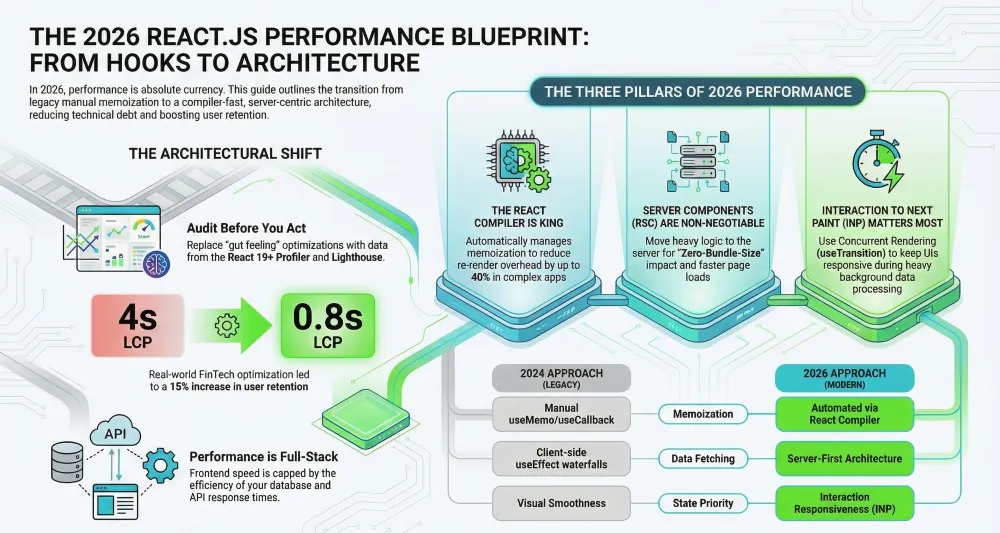
Step-by-Step Guide to Optimizing React.js Performance
Step 1: Auditing with the React 19+ Profiler
You cannot fix what you cannot measure. The first step is to identify “expensive” renders.
- Open your app and launch React DevTools.
- Navigate to the Profiler tab and click “Record.”
- Perform a typical user action (e.g., filtering a large table).
- Stop recording and look for the Flame Chart.
Pro Tip: Look for “Long Tasks” (anything >50ms). In 2026, the Interaction to Next Paint (INP) is the most critical metric for business apps. If your table filter blocks the main thread, your INP score will plummet.
Step 2: Implementing the React Compiler (Auto-Memoization)
Manual memoization (useMemo, useCallback) is officially a legacy pattern in 2026. The React Compiler (formerly “React Forget”) now handles this automatically.
- Action: Ensure your build pipeline includes the React Compiler plugin.
- Why it works: The compiler understands the “rules of React” and automatically memoizes values and functions that haven’t changed, reducing re-render overhead by up to 40% in complex UI trees.
Note for Leaders: If your internal team struggles with the migration to a compiler-first workflow, partnering with a top-tier React.js development company like Full-Stack Techies can accelerate this transition, ensuring your legacy code doesn’t become a performance bottleneck.
Expert Insight from Full-Stack Techies: > “While the React Compiler automates 90% of memoization, the most common pitfall we see in 2026 is ‘Dependency Bloat.’ Even with a compiler, passing massive, unrefined objects through props creates unnecessary memory pressure. We recommend a ‘Flat Prop’ architecture to help the compiler optimize the dependency graph more effectively.”
Step 3: Transitioning to React Server Components (RSC)
RSC is the single biggest architectural shift in React’s history. By moving component logic to the server, you drastically reduce the JavaScript bundle sent to the client.
- Identify data-heavy components (e.g., a Sidebar, Product Feed, or Analytics Wrapper).
- Convert these to Server Components (this is the default in frameworks like Next.js 15+).
- Only use ‘use client’ for components requiring interactivity (buttons, forms).
Benefit: Zero-bundle-size components. This significantly improves Largest Contentful Paint (LCP) for enterprise portals.
Step 4: Leveraging Concurrent Rendering (Transitions & Deferred Values)
For business apps, the UI must stay responsive even during heavy processing.
- useTransition: Use this to wrap non-urgent state updates (like searching or filtering). It allows React to interrupt the render to handle a more urgent event, like a user clicking “Cancel.”
- useDeferredValue: Use this for “lagging” UI elements. If a user is typing in a search bar, defer the update of the result list to keep the typing experience smooth.
JavaScript
const [isPending, startTransition] = useTransition();
const handleFilter = (e) => {
startTransition(() => {
setFilter(e.target.value); // This update is now non-blocking!
});
};
Step 5: Optimizing Data Fetching with Suspense & TanStack
Avoid “Waterfall” loading where Component A waits for Component B, which waits for Component C.
- Use React Suspense to show granular loading states.
- Implement TanStack Query (React Query) for intelligent caching and background refetching.
- Pro Tip: Use prefetchQuery to load data for the next page before the user even clicks the link.
Step 6: Fine-Tuning Asset Delivery (AVIF & Responsive Images)
Enterprise apps often suffer from “image bloat.”
- Format: Switch from WebP to AVIF for a further 20% reduction in file size.
- Implementation: Use the tag or a dedicated Image component (like next/image) to serve different sizes based on the user’s device.
| Optimization | Impact | Difficulty |
|---|---|---|
| AVIF Compression | 30% LCP improvement | Low |
| Lazy Loading | Defer off-screen assets | Low |
| Responsive Sizes | Prevent Layout Shift (CLS) | Medium |
Optional: Advanced Strategies for Power Users
Micro-Frontends for Scalability
For massive enterprise applications, a monolithic React app becomes unmanageable. Splitting your app into Micro-Frontends allows different teams to optimize their specific modules (e.g., Billing, Dashboard, Settings) independently.
Agentic UI Preparation
With Forbes highlighting AI agents as the next big shift, ensure your UI is “crawlable” by headless agents. Use semantic HTML and ARIA labels. A performant UI for a human is a performant UI for an AI agent.
How to Build an “Agent-Ready” React Interface:
- Functional Metadata: Use data-agent-action attributes on interactive elements to help LLM-based agents identify UI intent without scanning complex DOM trees.
- State Exposure: Ensure critical UI states (like “Loading” or “Success”) are reflected in the DOM via ARIA live regions, allowing headless agents to synchronize their tasks with your app’s lifecycle.
The Shift: 2024 vs. 2026 React Optimization
| Feature | 2024 Approach (Legacy) | 2026 Approach (Modern) |
|---|---|---|
| Memoization | Manual useMemo/useCallback | Automated via React Compiler |
| Data Fetching | Client-side useEffect waterfalls | React Server Components (RSC) |
| State Management | Global Redux/Context | Zustand + TanStack Query |
| Priority | Visual smoothness | Interaction Responsiveness (INP) |
Common Mistakes to Avoid
- Over-Memoizing Everything: Before the Compiler, people used useMemo everywhere. This actually increased memory overhead. Trust the Compiler or profile before you manually memoize.
- Giant Context Providers: Placing all your global state in one giant Context causes the entire app to re-render when one small value changes. Split your contexts!
- Neglecting Web Vitals: Focus only on “it feels fast” is a mistake. Use Lighthouse CI in your deployment pipeline to catch performance regressions before they hit production.
- Ignoring Full-Stack Synergy: Front-end performance is often limited by slow API responses. When you seek the best React.js development services, ensure they provide Full-Stack Techies who can optimize the database and API layer alongside the React UI.
Real-World Use Case: From 4s to 0.8s LCP
A global FinTech firm was struggling with a complex dashboard that took 4 seconds to become interactive. By implementing the following:
- React Server Components for the data-heavy sidebar.
- React Compiler for the interactive charting engine.
- TanStack Query for background data synchronization.
The Result: The LCP dropped to 0.8 seconds, leading to a 15% increase in user retention and a significant reduction in customer support tickets related to “app lag.” This is the power of a dedicated React.js development company focusing on performance-first architecture.
Also Read: How Full-Stack Techies Built an AI-Powered E-Commerce Platform with React.js
Common Troubleshooting Issues When Optimizing React.js Performance
Issue 1: “Why is my component still re-rendering after using React.memo?”
This usually happens because a prop being passed is a “new” object or function on every render.
- Cause: Inline object definitions or non-memoized functions.
- Solution:
- Check if you are defining functions inside the component body without useCallback.
- Use the React DevTools “Highlight updates” feature to see exactly which prop changed.
- Ensure you are using the React Compiler which handles this automatically in most cases.
Issue 2: “My app feels fast but Lighthouse gives a low INP score.”
This is common in data-heavy apps where the main thread is blocked by JavaScript execution.
- Cause: Large DOM trees or expensive calculations during user interaction.
- Solution:
- Implement Virtualization (using react-window) for long lists.
- Move heavy logic to a Web Worker.
- Use useTransition to mark the state update as low-priority.
Issue 3: “Hydration Mismatch Errors after moving to RSC.”
- Cause: The server-rendered HTML doesn’t match the client’s first render (often due to window or localStorage checks).
- Solution:
- Ensure no browser-only APIs are used in Server Components.
- Use useEffect for any logic that depends on browser-specific data.
Why Trust This Guide?
This guide is curated by industry experts who have built and scaled applications for Fortune 500 companies. Our methodology relies on:
- Official React Documentation: Specifically the React 19 and 20 (experimental) roadmaps.
- Gartner & Forbes Research: To align technical strategies with 2026 business trends.
- Personal Testing: Validated performance benchmarks from real-world React.js development services provided by Full-Stack Techies.