Azure DevOps vs Jira: Feature-by-Feature Comparison for DevOps and Engineering Teams (2026)
This 2026 guide compares Azure DevOps vs Jira feature-by-feature to help DevOps and engineering teams choose the right tool. Explore differences in project management, CI/CD, integrations, and scalability to make an informed decision.


Introduction: The Tool That Runs Your Engineering Engine
Every sprint, every release, every hotfix — the tools your engineering team relies on shape how fast you ship, how well you collaborate, and how confidently you scale. For thousands of organizations worldwide, the decision comes down to two names: Azure DevOps and Jira.
The Azure DevOps vs Jira debate is not new, but the stakes are higher in 2026 than ever before. The global DevOps market is expected to grow from USD 16.13 billion in 2025 to USD 19.57 billion in 2026 and is forecast to reach USD 51.43 billion by 2031 at a 21.33% CAGR. Organizations are racing to modernize their software delivery pipelines, and the platform they pick will either accelerate or constrain that ambition.
Whether you’re a startup engineering team evaluating your first project management tool, an enterprise migrating off legacy systems, or an engineering leader exploring DevOps as a service and managed DevOps options, this comparison is for you. We’ll break down every major feature category, map each tool to specific team profiles, and share what industry analysts are saying about where this market is heading.
At Full-Stack Techies, we help companies navigate exactly these decisions every day — as a trusted DevOps service provider delivering DevOps as a managed service, we’ve implemented and optimized both platforms across dozens of client environments. Our goal here is to give you the clearest, most practical comparison available.
Key Takeaways
Azure DevOps is a complete DevOps platform; Jira is a best-in-class work management hub. The fundamental difference is scope — Azure DevOps wants to own your entire delivery lifecycle while Jira excels as the coordination layer within a broader toolchain.
Your existing tech stack should drive the decision. Microsoft 365, Azure cloud, and GitHub users will extract significantly more value from Azure DevOps with far less configuration effort. Polyglot and multi-cloud environments are better served by Jira’s open integration model.
Jira wins on workflow flexibility and search; Azure DevOps wins on pipeline integration and traceability. Neither platform dominates across every category — the right choice depends entirely on where your team’s biggest friction points are today.
The base price is rarely the total cost. Jira’s plugin requirements for test management and CI/CD visibility, and Azure DevOps’s steep jump to the Test Plans tier, mean total cost of ownership can look very different from the headline per-user pricing.
Security and compliance-heavy teams have a natural home in Azure DevOps. Native Active Directory integration, inheritance-based permissions, and unified audit logging make it a stronger choice for regulated industries building DevSecOps as a service practices.
The DevOps platform market is growing rapidly — and so is demand for managed expertise. With the global DevOps market projected to reach $51.43 billion by 2031 and DevOps managed services growing at a 28.40% CAGR, organizations are increasingly turning to a DevOps service provider rather than building all internal capability from scratch.
Running both platforms simultaneously is common but requires deliberate integration. Hybrid Azure DevOps and Jira configurations can be powerful, but without proper synchronization, they create data silos, duplicated work items, and lost delivery visibility.
The platform alone does not deliver DevOps maturity — configuration and practice do. Most teams use only a fraction of their platform’s capability. Structured implementation, pipeline automation, security integration, and ongoing optimization — the kind delivered through DevOps as a managed service engagements — are what translate platform investment into real engineering velocity.
AI is becoming a genuine differentiator on both platforms. Microsoft Copilot within Azure DevOps and Atlassian Intelligence within Jira are both evolving rapidly. Teams selecting a platform today should factor in the AI roadmap, not just current feature parity.
When in doubt, get an expert assessment before committing. Platform migrations are expensive and disruptive. A structured evaluation from an experienced DevOps service provider like Full-Stack Techies — one with real implementation experience across both platforms — can save significant time, cost, and internal friction before you sign a multi-year contract.
The State of the Market: Why This Decision Matters More in 2026
Before diving into the features, it’s worth grounding this comparison in the broader industry context.
According to Gartner’s Research Roundup for DevOps 2026, while focus on DevOps practices has been strong, continued development of capabilities is still needed to realize maximum value, and heads of IT need to simplify DevOps tools and technologies, as well as address organizational skills and culture challenges. This is a critical signal: the era of running a fragmented toolchain of a dozen siloed products is coming to an end. Teams need platforms that unify, not complicate.
According to Gartner’s forecast, organizations that focus on improving Developer Experience (DevEx) are expected to achieve twice the developer retention rate by 2027 compared to those that do not make similar investments. The choice of tooling is now a talent strategy, not just an operational one.
Meanwhile, the demand for external expertise is surging. The global DevOps Managed Services market is expected to grow from USD 4.5 billion in 2024 to USD 54.8 billion by 2034, at a CAGR of 28.40%. Companies are increasingly turning to DevOps service providers, not just buying software licenses, because configuring and running these platforms optimally requires specialized expertise that most internal teams don’t have in-house.
Demand is spiking specifically for managed DevSecOps platforms that combine advisory and execution capabilities. This means your platform choice doesn’t just affect your developers — it affects your security posture, compliance profile, and vendor ecosystem.
With that context in mind, let’s get into the tools themselves.
What Are Azure DevOps and Jira?
Azure DevOps
Azure DevOps, a Microsoft product, offers a suite of development tools for supporting software project management. It consists of Azure Boards for project planning and tracking, Azure Repos for version control, Azure Pipelines for continuous integration and delivery, Azure Test Plans for test management, and Azure Artifacts for package management.
The key philosophy behind Azure DevOps is end-to-end ownership of the software development lifecycle. Azure DevOps is geared more towards a complete DevOps lifecycle, integrating project management with a suite of development tools. If your team wants one platform to handle planning, coding, building, testing, and deploying — Azure DevOps is designed with that in mind.
Jira
Developed by Atlassian, Jira started out as a way to track bugs and issues and is now one of the foremost project management tools on the market. Agile software teams use Jira to craft automated workflows and collaborate on a centralized platform with the Scrum or Kanban templates of their choice.
Jira, on the other hand, focuses primarily on project management, with a strong emphasis on issue tracking and Agile methodology. It’s a coordination and visibility layer that integrates deeply with other development tools — it doesn’t try to replace them.
The philosophical difference here is the most important factor in making your choice: Azure DevOps wants to be your entire toolchain; Jira wants to be the hub that connects your toolchain.
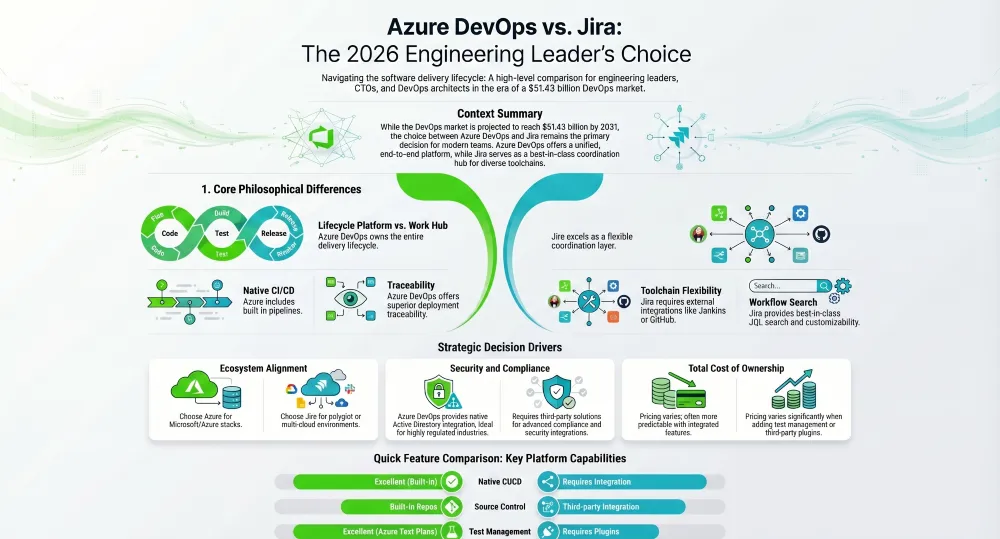
Feature-by-Feature Comparison
1. Project and Work Management
Both tools support agile methodologies, including Scrum and Kanban, backlog management, sprint planning, and roadmaps. But the depth and flexibility differ.
Jira is widely regarded as the gold standard for agile project management flexibility. With over 170+ DevOps add-ons and third-party integrations, teams can unlock the extensibility of an open, diverse toolchain while keeping the ease and coordination of an all-in-one tool. Jira’s custom workflows are a particular strength — every team has its own definition of ‘Done’ and how to get there, and Jira lets teams build custom workflows that better reflect real-life processes, while reducing friction and enabling faster delivery.
Azure Boards, the project management component of Azure DevOps, is solid and tightly integrated with the rest of the DevOps pipeline. The key advantage here is traceability: teams can trace all the steps in Azure DevOps between projects and the relationships between them, whereas with Jira, traceability is limited — you can’t look at earlier versions of a task, and you can’t immediately see which work items have been completed with each deployment.
Winner for project management flexibility: Jira. Winner for traceability and cross-tool linkage: Azure DevOps.
2. CI/CD and Pipeline Automation
This is where Azure DevOps pulls ahead decisively for teams that want their pipelines native to their work management system.
Azure DevOps offers a full set of tools for everything from planning and coding to testing and releasing software. It’s great for teams that want an all-in-one platform with built-in DevOps pipelines that enhance CI/CD automation. Azure Pipelines supports multi-stage deployments, environment gates, approval workflows, and integrates directly with Azure cloud services.
Jira does not natively provide CI/CD tooling. Teams typically connect it with Jenkins, GitHub Actions, Bitbucket Pipelines, or GitLab CI. Jira is not as integrated with CI/CD tools out of the box compared to Azure DevOps. This is not necessarily a disadvantage — many teams prefer to keep their pipeline tools separate from their project management layer — but it does mean more configuration work upfront and potential visibility gaps.
For teams pursuing DevOps as a service with a third-party provider, this distinction matters significantly. A DevOps managed service provider like Full-Stack Techies typically builds CI/CD pipelines atop Azure DevOps for Microsoft-ecosystem clients, while constructing Jira-centric configurations using separate pipeline tools for polyglot environments.
Winner for native CI/CD: Azure DevOps. Winner for CI/CD tool flexibility: Jira.
3. Source Code Management (SCM)
Azure DevOps includes Azure Repos, a full-featured Git repository service with pull request workflows, branch policies, and code review tools. It integrates natively with Azure Pipelines, making the developer’s inner loop tight and efficient.
Jira does not include native source code management. It integrates with GitHub, GitLab, Bitbucket, and other Git providers. The advantage is flexibility — teams can continue using whichever Git host they prefer. The disadvantage is that the integration requires configuration and can introduce latency in status syncing.
Users also have the option of integrating Azure Pipelines and Jira to provide more visibility into the entire development lifecycle. By combining the two, IT teams can move between systems to better understand and track software releases. Many mature engineering organizations end up doing exactly this — running Azure Pipelines for automation while using Jira for planning.
Winner for tightly integrated SCM: Azure DevOps. Winner for SCM flexibility: Jira.
4. Test Management
Jira requires separate plugins like Zephyr for comprehensive test management, whereas Azure DevOps includes Azure Test Plans, offering built-in, extensive test management features.
Azure Test Plans supports manual test case authoring, execution, exploratory testing, and test result analytics — all within the same platform where work items and code live. For regulated industries like fintech, healthcare, and government, where traceability from requirement to test result is a compliance mandate, this is a significant advantage.
Jira’s test management story depends heavily on the plugin you choose. Zephyr Scale and X-ray are the most popular, but both cost extra and require administration overhead. Teams with complex QA workflows often find Azure DevOps a cleaner experience when testing traceability matters.
Winner: Azure DevOps.
5. Customization and Workflow Flexibility
Jira clearly leads in terms of customization and scalability. When combined with other options, the ability to add services on the fly within projects makes Jira more flexible than the two.
Jira’s workflow engine is genuinely best-in-class. You can define custom statuses, transitions, validators, post-functions, and conditions. Custom issue types, screens, and fields allow teams to model almost any operational process. The Atlassian Marketplace provides thousands of integrations and extensions that go far beyond software development — teams in legal, marketing, HR, and finance use Jira to manage their own workflows.
Azure DevOps offers customization through process templates (Agile, Scrum, CMMI) and custom work item types, but its flexibility ceiling is lower than Jira’s. It’s designed for software development workflows specifically, which makes it simpler to get started but less adaptable to non-standard processes.
Winner: Jira.
6. Search and Query Capabilities
Jira’s Query Language (JQL) gives users advanced search functionality that lets them quickly locate problems anywhere in their code. Teams can also do text-based searches and remember previous searches in a later session. Search functionality is a lot more limited in Azure DevOps.
JQL is a genuine competitive differentiator. Power users can construct highly complex queries, save them as filters, share them across teams, and use them as the basis for dashboards and reports. For large engineering teams managing hundreds of projects and thousands of issues simultaneously, JQL saves significant time.
Azure DevOps uses WIQL (Work Item Query Language), which is functional but less powerful and less approachable than JQL. Saved queries and chart generation work well for standard needs, but you’ll hit limitations faster with complex reporting requirements.
Winner: Jira.
7. Reporting and Dashboards
Both platforms offer dashboards and reports. Azure DevOps provides built-in analytics views, velocity charts, burndown charts, and cumulative flow diagrams that are tightly linked to Pipelines and Repos data — giving engineering leaders a unified delivery metrics view.
Jira’s reporting is deep within its agile framework. Jira’s reporting tools for project management enable DevOps teams to monitor software processes with reporting and dashboards effectively. Advanced reporting in Jira — particularly cross-project and portfolio-level views — typically requires Jira Advanced Roadmaps (included in Premium and Enterprise tiers) or third-party plugins.
For organizations that want to correlate code deployment frequency with sprint velocity and test coverage in a single view, Azure DevOps delivers that out of the box. Jira requires more configuration to achieve the same.
Winner for built-in SDLC reporting: Azure DevOps. Winner for flexible project reporting: Jira.
8. Security and Access Control
Azure DevOps leverages its Microsoft roots to provide enterprise-grade protection through integration with Active Directory, allowing organizations to apply consistent inheritance-based permissions across the DevOps workflow for simplified authorization management. Jira, by contrast, necessitates custom access control administration for each individual component, be it Jira applications, third-party plugins, or linked tools like source control repositories.
For organizations running on Microsoft 365, Azure Active Directory, or operating under compliance frameworks like SOC 2, ISO 27001, or FedRAMP, Azure DevOps integrates naturally with the security posture they’ve already established. Single sign-on, conditional access policies, and audit logging flow through familiar Microsoft tools.
Jira’s security model is robust but requires more deliberate configuration, particularly as the number of connected tools and plugins grows. The introduction of Atlassian Guard (formerly Atlassian Access) has improved centralized administration, but it comes at an additional cost.
For teams building out DevSecOps as a service practices, this matters deeply. Security-by-design in pipelines is far easier to enforce uniformly when your toolchain is under one vendor’s security umbrella, as Azure DevOps provides.
Winner: Azure DevOps for Microsoft ecosystem orgs. Comparable with additional tooling for Jira.
9. AI and Automation Features
Both platforms are actively investing in AI capabilities as of 2026.
Microsoft has embedded Copilot deeply across the Azure DevOps surface, with AI-assisted pull request descriptions, work item suggestions, pipeline troubleshooting, and natural language query support. The integration with GitHub Copilot means developers get AI assistance from a code editor through the deployment pipeline within a unified ecosystem.
Atlassian has introduced Atlassian Intelligence across Jira, offering AI-powered issue summarization, sprint planning suggestions, and natural language JQL generation. These features are available in cloud plans and are improving rapidly.
Integration of security and DevOps is expected to deepen in 2026, with 27.27% of security engineers identifying better integration of development workflows as a primary focus. AI tooling that connects security scanning with project management and pipeline automation is the frontier both vendors are racing toward.
This category is rapidly evolving and currently roughly even, with Azure DevOps holding an advantage for teams deeply embedded in the Microsoft/GitHub ecosystem.
10. Pricing
Jira’s pricing tiers: Free for up to 10 users; Standard at $9.05/user/month; Premium at $18.30/user/month (advanced automation, unlimited storage, cross-team planning); and Enterprise at custom pricing.
Azure DevOps pricing: Basic starting at $6/user/month (with the first 5 users free), which includes Azure Artifacts, Repos, Boards, and Pipelines. Basic + Test Plans starting at $52/user/month, which adds advanced test planning, tracking, execution, and centralized reporting.
Even for larger groups of enterprise users, Azure DevOps can still be quite complex and relatively expensive — up to $52 per user per month, including the test planning component.
For small teams, Jira’s free tier is genuinely generous. For large enterprises with complex testing needs, Azure DevOps costs can scale significantly. Teams that need CI/CD capabilities outside Microsoft’s ecosystem will also need to factor in additional pipeline tooling costs when using Jira.
Total cost of ownership modeling — accounting for plugins, integrations, support tiers, and administrator time — often reveals that the cheaper headline price doesn’t always equal the cheaper total investment. This is an area where working with a DevOps service provider to model costs before committing pays real dividends.
Head-to-Head Summary Table
| Feature | Azure DevOps | Jira |
|---|---|---|
| Project & Work Management | Strong | Excellent |
| Native CI/CD | Excellent | Requires Integration |
| Source Code Management | Built-in (Azure Repos) | Third-party Integration |
| Test Management | Excellent (Azure Test Plans) | Requires Plugin (Zephyr/Xray) |
| Custom Workflows | Good | Excellent |
| Search & Query Language | WIQL (functional) | JQL (best-in-class) |
| Reporting & Dashboards | Excellent (SDLC-focused) | Good (agile-focused) |
| Security & Access Control | Excellent (AAD integration) | Good (Atlassian Guard) |
| AI Features | Strong (Copilot) | Growing (Atlassian Intelligence) |
| Ecosystem / Integrations | Strong (Microsoft ecosystem) | Excellent (open ecosystem) |
| Pricing (base) | $6/user/month | $9.05/user/month |
| Pricing (with testing) | $52/user/month | $18.30/user/month + plugin |
Get scalable, fast, and user-friendly DevOps solutions tailored to your needs.
Get Free ConsultationWhich Teams Should Choose Azure DevOps?
Azure DevOps is the better fit if your team or organization meets the following criteria.
You are already invested in the Microsoft ecosystem. If your organization uses Microsoft 365, Azure cloud, Visual Studio, or GitHub Enterprise, Azure DevOps creates a coherent, integrated environment that reduces context switching and simplifies administration. Microsoft’s Azure DevOps is utilized by 85% of Fortune 500 companies.
You need end-to-end DevOps lifecycle coverage in a single platform. Azure DevOps excels in CI/CD capabilities, offering robust tools for automating the software deployment process, with everything from planning to deployment under one roof. Teams that want to minimize the number of vendor relationships they manage will find Azure DevOps compelling.
You work in regulated industries where audit trails and requirement-to-test traceability are mandatory. Financial services, healthcare, and government contractors frequently choose Azure DevOps for this reason.
You are exploring DevOps as a managed service from a provider. Azure DevOps’s standardized interface, Microsoft support SLAs, and Active Directory integration make it the platform of choice for many managed service engagements. At Full-Stack Techies, when clients want a DevOps as a managed service arrangement built on Microsoft infrastructure, Azure DevOps is typically our recommended foundation.
Which Teams Should Choose Jira?
Jira is the better fit if your team or organization meets the following criteria.
You run a polyglot engineering environment. If your developers use GitHub, GitLab, Bitbucket, and various cloud providers interchangeably, Jira’s open integration model accommodates that without forcing standardization on Microsoft’s stack.
You prioritize agile project management depth over CI/CD integration. Jira shines in agile project management with its robust customization options. Product managers, scrum masters, and teams practicing advanced agile ceremonies will feel at home in Jira in ways they may not in Azure DevOps.
You are already using other Atlassian products. Atlassian offers a wide range of complementary products, including Confluence and Bitbucket, all of which are tightly integrated with Jira. If your team documents in Confluence and reviews code in Bitbucket, Jira completes a powerful and coherent Atlassian suite.
You need a tool that works across non-engineering teams. Marketing, HR, legal, and operations teams frequently adopt Jira alongside engineering, which enables a single work management platform across the entire organization rather than one tool per department.
The Hybrid Approach: When Teams Use Both
Many teams use Azure DevOps and Jira side-by-side — Jira for planning and visibility, Azure DevOps for execution. This is actually a common configuration in enterprise environments, particularly during tool migrations or in organizations where different business units have different infrastructure standards.
The challenge, as any DevOps service provider will tell you, is integration management. Combining the two leverages Jira’s extensive customizability and Azure DevOps’ robust tools, but silos emerge without proper integration capabilities, leading to duplicated issues between systems, out-of-sync statuses from Jira to Azure Boards, and lost visibility in the entire software development lifecycle.
If you are running a hybrid configuration, investing in a proper integration layer — whether through tools like Getint, Unito, or custom webhooks — and ideally working with an experienced DevOps service provider to architect it properly, is essential to capturing value from both platforms simultaneously.
Also Read: How to Implement Azure DevOps as a Service in Your Organization (Complete 2026 Guide)
Alternatives to Consider
If neither Azure DevOps nor Jira sounds perfect for you, the market in 2025 has other great options.
- GitLab: GitLab is the closest true competitor to Azure DevOps. It is a single application for the entire DevOps lifecycle. It is very popular in the open-source community and has incredible built-in CI/CD and security features.
- GitHub Enterprise: Owned by Microsoft (just like Azure DevOps), GitHub is adding more project management features every year. With GitHub Issues and GitHub Actions, many teams are running their entire operation directly on GitHub.
- Monday Dev or Asana: If your team finds Jira too complicated and Azure DevOps too rigid, modern tools like Monday.com have created specific “Dev” versions. They are highly visual, incredibly easy to learn, and great for lighter software projects.
The Rise of DevOps as a Service and What It Means for Your Platform Choice
One of the most significant trends shaping this decision in 2026 is the rapid growth of DevOps as a service and DevOps as a managed service as delivery models.
Intensifying demand for shorter software delivery cycles, rising enterprise-wide automation, and the mainstreaming of AI-assisted workflows are accelerating DevOps adoption rates. Toolchains are evolving toward integrated DevSecOps platforms as security moves “left” in the development lifecycle. Hybrid-cloud strategies, skills shortages, and the pivot from monoliths to microservices are creating service-led growth opportunities.
This is exactly the environment where a DevOps service provider like Full-Stack Techies creates maximum value. Many organizations want the benefits of mature DevOps practice — faster deployments, higher reliability, automated security scanning, real-time observability — but don’t have the internal bandwidth to build and maintain that capability themselves.
Whether you choose Azure DevOps or Jira, the platform alone is not the solution. The practices, pipelines, automation frameworks, security integrations, and monitoring configurations layered on top of the platform determine whether your engineering team actually ships faster and more reliably. That’s what DevSecOps as a service engagements are designed to deliver.
At Full-Stack Techies, our DevOps as a managed service practice covers both platforms comprehensively. We architect the platform, configure the pipelines, integrate the security tooling, establish the monitoring baseline, and continue to optimize the environment as your team scales. Whether you’re starting from scratch or trying to extract more value from a platform you already own, we can meet you where you are.
Industry Signals: What the Analysts Are Saying
The analyst community is watching this space closely, and a few themes emerge consistently.
According to Gartner Peer Insights, the DevOps platforms market reflects the consolidation of technologies across development, security, infrastructure, and operations to streamline software delivery. The end-to-end view these platforms provide encourages a systems-thinking mindset and accelerates feedback loops. Both Azure DevOps and Jira are competing for a share of this consolidation wave, with Azure DevOps positioned more as a complete platform and Jira positioned more as the connective tissue within a broader toolchain.
Platform engineering will be one of the key DevOps trends in 2026 and beyond, as organizations increasingly build Internal Developer Platforms (IDPs) to streamline delivery pipelines. This is relevant to the Azure DevOps vs Jira decision because IDPs built on Azure DevOps tend to benefit from its native pipeline and infrastructure tooling, while IDP teams that prioritize developer experience customization often build Jira-centric interfaces with custom portals on top.
According to Gartner, over 85% of organizations will be adopting a cloud computing strategy, and 95% of new digital workloads will take place on cloud platforms — a 30% increase from 2021. For teams choosing a DevOps platform today, cloud-native architecture and multi-cloud readiness are table stakes, not differentiators. Both Azure DevOps and Jira are cloud-native SaaS offerings, but Azure DevOps has a natural advantage for teams standardized on Azure.
Common Mistakes to Avoid When Making This Decision
Choosing the platform with the better UI without modeling total cost of ownership. Both platforms have hidden costs — plugins, integrations, add-ons, and admin overhead — that don’t appear in the base per-user pricing. Build a realistic 3-year TCO model before committing.
Optimizing for the developers without considering adjacent teams. Project managers, QA engineers, security teams, and business stakeholders all interact with these platforms. The tool that makes developers happiest may create friction for the people they depend on.
Underestimating migration complexity. Moving from one platform to the other is painful. Issue history, attachment data, custom field mappings, workflow configurations, and integration webhooks rarely migrate cleanly. If you are evaluating a migration, invest in a proof-of-concept pilot before committing.
Deploying the platform without a DevOps service provider or experienced internal team to configure it properly. The out-of-the-box experience of both Azure DevOps and Jira is not the same as an optimized, production-grade configuration. Teams that self-install and never configure CI/CD pipelines, quality gates, security scanning integrations, or reporting dashboards are paying for capabilities they never use.
This last point is where partnering with a specialist DevOps service provider becomes a genuine business decision, not just a convenience. Full-Stack Techies regularly works with teams that have been on Jira or Azure DevOps for years but are only using 20% of the platform’s capability. Structured onboarding and configuration sprints unlock that value without requiring teams to develop deep internal platform expertise.
Final Verdict: Azure DevOps vs Jira
There is no universal winner in the Azure DevOps vs Jira comparison. Jira leads in terms of customizability and search functionality, while Azure DevOps takes the top spot in traceability and ease of use. When asking which is better, there’s no absolute answer — it comes down to how your software team works and what they’re comfortable with.
If your organization is building on Microsoft Azure, has compliance-heavy testing requirements, or wants a single platform to run the entire delivery lifecycle, Azure DevOps is the stronger choice.
If your organization runs a diverse technology stack, has strong agile practice needs, uses other Atlassian products, or requires cross-organizational work management flexibility, Jira is the stronger choice.
If your organization wants to minimize platform administration overhead entirely and focus engineering resources on product delivery, the most practical path may be engaging a DevOps as a managed service provider to run either platform on your behalf while your team focuses on what they’re best at.
Why Trust This Comparison?
This comparison is built on real-world experience, not just documentation reviews.
The Full-Stack Techies team has hands-on implementation experience across both Azure DevOps and Jira — configuring pipelines, migrating projects, designing workflows, and optimizing delivery environments for engineering teams across industries including fintech, healthcare, SaaS, and enterprise IT.
Our assessments are grounded in three layers of evidence: direct client engagement data from DevOps as a managed service and DevOps as a service engagements we have delivered, current platform documentation and release notes from Microsoft and Atlassian, and published research from recognized industry authorities including Gartner, McKinsey, and Forbes.
We have no preferred vendor. Full-Stack Techies works with both platforms regularly and recommends based on fit, not commercial relationships. Where Azure DevOps is the stronger choice, we say so. Where Jira wins, we say that too.
Our goal is simple: give engineering leaders and DevOps teams the clearest, most honest signal possible so they can make a confident decision — and then help them execute it well.